
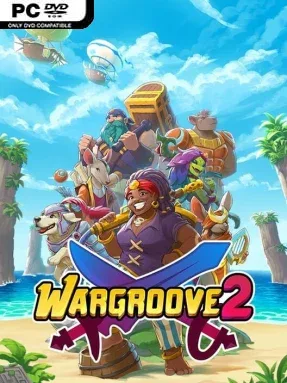
Game Overview
Aurania’s uneasy peace collapses when a foreign power digs up ancient weapons better left buried, sending rival kingdoms back onto the battlefield. Wargroove 2 is a bright, character-driven turn-based strategy game that carries the accessible spirit of Advance Wars into a fantasy world of knights, witches, dragons, pirates, and talking dogs. Its campaign balances cheerful pixel-art charm with conspiracies, vengeance, and war’s human cost, following several intersecting perspectives across three story arcs. Battles remain easy to read at a glance, but poor positioning or wasted funds can turn a confident advance into a brutal defeat.
Players recruit units from captured structures, manage limited gold, seize villages, and maneuver armies across forests, roads, rivers, and choke points. Every unit has a useful counter or specialty, from inexpensive infantry who capture territory to siege weapons, naval forces, airborne attackers, and powerful dragons, making scouting and target priority essential. Commanders sit at the center of each army, and their signature Groove powers charge through combat; the new tiered system lets players trigger a dependable effect early or wait for a far more dramatic version when the situation demands it. Alongside the narrative missions, Conquest provides a roguelite challenge run built around branching battles, persistent upgrades, and increasingly dangerous encounters, while local and online multiplayer support competitive matches and cooperative play.
The real strength lies in how much tactical variety the clean presentation conceals. New factions and commanders create distinct approaches without burying newcomers under complicated subsystems, and map objectives go beyond simply destroying an enemy headquarters. A remarkably flexible editor lets players build maps, cinematic scenes, and complete custom campaigns, then share them with others, giving the game a long tail for strategy fans who enjoy community-made content. Wargroove 2 suits anyone craving an Advance Wars-style campaign on PC, while veteran turn-based players get enough commander combinations, Conquest runs, and multiplayer mind games to keep refining their tactics.
Installation
- Click the green button below to be redirected to UploadHaven.
- Wait 15 seconds, then hit “Free Download.” (Free downloads may be slower — upgrade to UploadHaven Pro for faster speeds.)
- Once downloaded, right-click the .zip file and choose “Extract to Wargroove 2.” (You’ll need 7-Zip for this.)
- Open the extracted folder and run the game as administrator.
- Enjoy! 🎮 If you see missing DLL errors, check the <strong>_Redist</strong> folder inside and install what’s needed.
System Requirements
- OS: Windows 7
- Processor: Core i3 or equivalent
- Memory: 2 GB RAM
- Graphics: DirectX 11 and/or OpenGL 3.3 compatible video card
- DirectX: Version 11
- Storage: 1 GB available space
Setup Guide & Troubleshooting
How do I fix missing DLL errors for Wargroove 2 (v1.2.8)?
After extracting Wargroove 2 (v1.2.8), navigate to the _Redist or _CommonRedist folder inside the game directory and install DirectX, Vcredist, and any other dependencies included.
What should I do if the downloaded file is corrupted?
The full archive is 1.74 GB — make sure your download completed fully before extracting. Use 7-Zip to extract the files. If you still see a "file corrupted" error, re-download and try again.
Why should I run the game as administrator?
Right-click the game executable and select "Run as Administrator" to avoid save file issues and permission errors. This is especially important on the first launch.
How do I update my GPU drivers for this game?
Wargroove 2 (v1.2.8) requires a DirectX 11 and/or OpenGL 3.3 compatible video card or equivalent. Update your NVIDIA or AMD drivers to the latest version for the best performance.
The game won't launch — what should I try?
This game requires Version 11. Try running in compatibility mode, install the latest DirectX runtime, or install the All-in-One VC Redist Package.
My antivirus is blocking the game — is it safe?
Antivirus false positives are common with pre-installed games. Temporarily pause your antivirus during extraction to prevent it from quarantining game files. You can re-enable it after the extraction completes.