
Game Overview
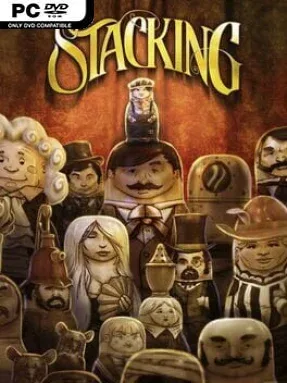
A whimsical early-20th-century world of animated matryoshka dolls turns problem-solving into a charming game of possession and scale. Stacking follows Charlie Blackmore, a tiny doll trying to free his family from the grasp of a ruthless industrial baron, moving through train stations, luxury liners, factories, and even an airship. Its silent-film presentation, complete with expressive pantomime, old-timey title cards, and jaunty music, gives the adventure a warm comic-book energy rather than a grim fairy-tale mood. Double Fine’s humor is everywhere, balancing a sincere rescue story with absurd situations involving disguises, social sabotage, and tiny wooden people behaving very badly.
Charlie cannot fight enemies or wield conventional tools; instead, he jumps inside larger dolls and borrows their particular talents. One character may charm a guard, another may break objects, distract crowds, open locked routes, or frighten someone into moving, and the trick is identifying which ability fits each obstacle. Every major puzzle supports several solutions, encouraging players to experiment with the dolls scattered around each area instead of simply hunting for one prescribed answer. Optional prank-style challenges and collectible nesting sets add reasons to revisit completed locations, while Charlie’s hideout records the assortment of dolls and sets he acquires.
What makes Stacking memorable is how naturally its nesting-doll concept drives both its puzzles and its personality: switching bodies is not a gimmick bolted onto an adventure game, but the foundation of every interaction. The environments feel like compact theatrical dioramas packed with secrets, and their multiple-answer design makes the relatively relaxed campaign more replayable than its straightforward story suggests. The included Lost Hobo King expansion adds a substantial side adventure with new characters, abilities, and trials built around restoring a displaced ruler. Fans of Costume Quest, Psychonauts, or inventive point-and-click adventures should feel immediately at home, while newcomers benefit from its forgiving pace and clear, playful logic.
Installation
- Click the green button below to be redirected to UploadHaven.
- Wait 15 seconds, then hit “Free Download.” (Free downloads may be slower — upgrade to UploadHaven Pro for faster speeds.)
- Once downloaded, right-click the .zip file and choose “Extract to Stacking.” (You’ll need 7-Zip for this.)
- Open the extracted folder and run the game as administrator.
- Enjoy! 🎮 If you see missing DLL errors, check the <strong>_Redist</strong> folder inside and install what’s needed.
System Requirements
- OS: Windows XP SP3
- Processor: 1.8 GHz dual core CPU
- Memory: 1 GB RAM
- Graphics: 256 MB GeForce 8800, Radeon 3850, or Intel HD 2000 Graphics
- DirectX®:9.0c
- Hard Drive: 1.5 GB free HD Space
- Sound:DirectX Compatible Sound Card
Setup Guide & Troubleshooting
How do I fix missing DLL errors for Stacking?
After extracting Stacking, navigate to the _Redist or _CommonRedist folder inside the game directory and install DirectX, Vcredist, and any other dependencies included.
What should I do if the downloaded file is corrupted?
The full archive is 1.41 GB — make sure your download completed fully before extracting. Use 7-Zip to extract the files. If you still see a "file corrupted" error, re-download and try again.
Why should I run the game as administrator?
Right-click the game executable and select "Run as Administrator" to avoid save file issues and permission errors. This is especially important on the first launch.
How do I update my GPU drivers for this game?
Stacking requires a 256 MB GeForce 8800, Radeon 3850, or Intel HD 2000 Graphics or equivalent. Update your NVIDIA or AMD drivers to the latest version for the best performance.
The game won't launch — what should I try?
Try running in compatibility mode, install the latest DirectX runtime, or install the All-in-One VC Redist Package.
My antivirus is blocking the game — is it safe?
Antivirus false positives are common with pre-installed games. Temporarily pause your antivirus during extraction to prevent it from quarantining game files. You can re-enable it after the extraction completes.