
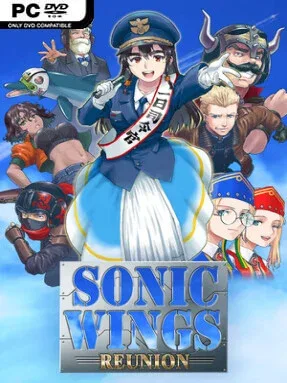
Game Overview
A globe-spanning superweapon crisis powers this brisk, arcade-minded vertical shooter, where the shadowy Fata Morgana turns advanced military technology against the world’s cities. Players join Project Blue, an international rescue unit of ace pilots, and take to the skies in a campaign that favors explosions, close calls, and screen-filling enemy formations over slow-burn storytelling. SONIC WINGS REUNION continues the long-dormant Sonic Wings/Aero Fighters line with modern presentation while holding tightly to its late-’90s coin-op spirit. The mood is colorful and energetic rather than grim, even as battles rage above recognizable urban environments under constant bombardment.
Each run begins by choosing from eight pilots, then blasting through eight stages packed with airborne attackers, ground targets, bosses, and the familiar bullet-dodging pressure of a shoot-’em-up. Aircraft selection matters because characters bring their own dialogue, narrative angle, and likely playstyle flavor, while pairing pilots in local co-op unlocks extra conversational exchanges and changing story developments. Difficulty settings, a practice option, and invincibility mode make the game more approachable than an old arcade cabinet, letting newcomers learn patterns without immediately being sent back to the start. Score-chasers still have leaderboards and achievements to pursue, while cloud saves help preserve progress across sessions.
The strongest hook is its combination of character-driven branching scenes and uncomplicated, immediate shmup action: it wants players to replay missions with new partners, not merely survive them once. Hidden characters add another layer of incentive, and the three soundtrack choices—including original music from series composer Soshi Hosoi, an arranged alternative, and the unusual Mao Mao mode—give repeat runs a different audiovisual flavor. Modern city backdrops and updated effects distinguish it from its pixel-era predecessors without changing the fundamental appeal of weaving through fire and dismantling giant war machines. Fans of Aero Fighters, Raiden, and accessible arcade shooters should feel at home, while its training tools and local co-op make it a sensible entry point for players who want to try the genre without committing to punishing arcade rules.
Installation
- Click the green button below to be redirected to UploadHaven.
- Wait 15 seconds, then hit “Free Download.” (Free downloads may be slower — upgrade to UploadHaven Pro for faster speeds.)
- Once downloaded, right-click the .zip file and choose “Extract to SONIC WINGS REUNION.” (You’ll need 7-Zip for this.)
- Open the extracted folder and run the game as administrator.
- Enjoy! 🎮 If you see missing DLL errors, check the <strong>_Redist</strong> folder inside and install what’s needed.
System Requirements
- Requires a 64-bit processor and operating system
- OS: Windows 10/11
- Processor: Intel Core-i3 4160 or faster processor
- Memory: 8 GB RAM
- Graphics: OpenGL 3.1 compliant video card
- DirectX: Version 11
- Network: Broadband Internet connection
- Storage: 6 GB available space
- Sound Card: Direct Sound
- Additional Notes: Controller recommended.
Setup Guide & Troubleshooting
How do I fix missing DLL errors for SONIC WINGS REUNION (v1.40)?
After extracting SONIC WINGS REUNION (v1.40), navigate to the _Redist or _CommonRedist folder inside the game directory and install DirectX, Vcredist, and any other dependencies included.
What should I do if the downloaded file is corrupted?
The full archive is 681.52 MB — make sure your download completed fully before extracting. Use 7-Zip to extract the files. If you still see a "file corrupted" error, re-download and try again.
Why should I run the game as administrator?
Right-click the game executable and select "Run as Administrator" to avoid save file issues and permission errors. This is especially important on the first launch.
How do I update my GPU drivers for this game?
SONIC WINGS REUNION (v1.40) requires a OpenGL 3.1 compliant video card or equivalent. Update your NVIDIA or AMD drivers to the latest version for the best performance.
The game won't launch — what should I try?
This game requires Version 11. Try running in compatibility mode, install the latest DirectX runtime, or install the All-in-One VC Redist Package.
My antivirus is blocking the game — is it safe?
Antivirus false positives are common with pre-installed games. Temporarily pause your antivirus during extraction to prevent it from quarantining game files. You can re-enable it after the extraction completes.