
Game Overview
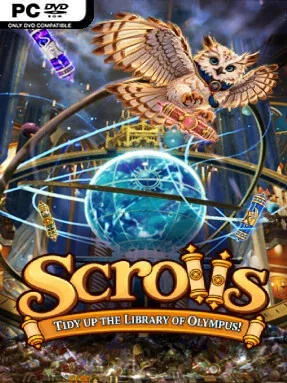
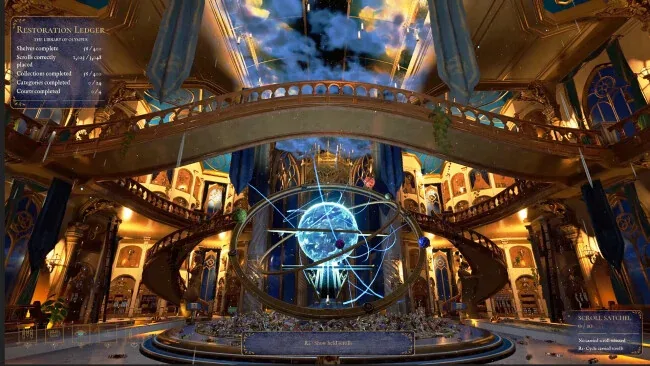
A mountain of misplaced knowledge turns a seemingly humble tidying job into a surprisingly absorbing cooperative puzzle. SCROLLS: Tidy up the Library of Olympus! casts players as divine librarians restoring an enormous archive where myths, maps, histories, and astronomical records lie in chaotic heaps. Its tone is calm, playful, and deeply satisfying, built around the pleasure of turning visual clutter into perfectly ordered shelves. Beneath the serene premise sits a genuine organizational challenge, as thousands of individually marked scrolls must find their correct homes.
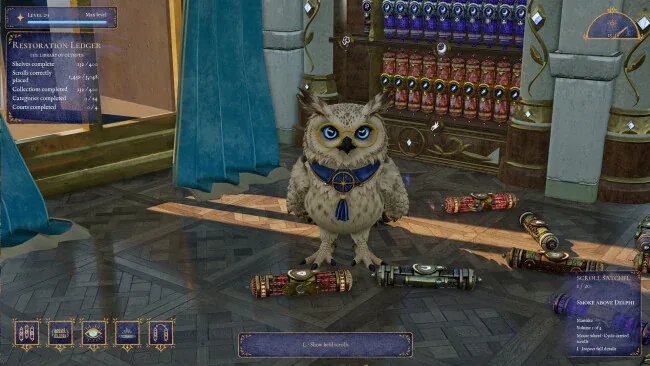
Every scroll carries clues through its title, color, insignia, and Roman numeral, requiring careful inspection before it can join the right collection and take its proper numerical position. Players roam the library in first person, picking up armfuls of documents, making temporary sorting piles, placing volumes into shelves, and rearranging mistakes as patterns become clearer. Progress unlocks supernatural conveniences, including abilities that identify related scrolls, reveal destination shelves, gather a set’s missing pieces, or automatically file matching volumes. The full task spans 3,048 scrolls, 400 collections, and 24 subjects, while online co-op supports up to eight people with shared progression, making the workload either efficiently collaborative or wonderfully chaotic.
What separates it from ordinary cleaning sims is the blend of tactile object handling and deductive cataloguing: each completed shelf feels earned because players learn the library’s visual language rather than merely following markers. The handcrafted materials give different fields their own identity, so recognizing an epic poem or geographic record gradually becomes second nature. Co-op adds an appealing social layer reminiscent of the teamwork and accidental disorder of PlateUp! or Unpacking’s methodical satisfaction expanded into a shared 3D space. Patient solo players, cozy-game fans, and groups wanting a low-pressure project all find plenty to enjoy, though anyone who hates meticulous sorting may find the scale intimidating.
Screenshots
Installation
- Select the <strong>Download</strong> button at the top of this page to open UploadHaven.
- On UploadHaven, wait for any countdown, then select <strong>Free Download</strong>. Optional: UploadHaven Pro for faster downloads.
- When complete, extract the archive to a <strong>SCROLLS: Tidy up the Library of Olympus!</strong> folder using 7-Zip.
- Open the extracted folder and start the game normally.
- For errors, check <strong>Setup Guide & Troubleshooting</strong> below. Keep your security software enabled.
System Requirements
- Requires a 64-bit processor and operating system
- OS: 10, 11
- Processor: Ryzen 5 2600
- Memory: 8 GB RAM
- Graphics: GTX 2060 Desktop
- Storage: 6 GB available space
- Additional Notes: 1080p – Low/Medium Settings. Steam Deck – Low Settings 800p
Setup Guide & Troubleshooting
Is SCROLLS: Tidy up the Library of Olympus! (Latest Full Build) free to download on Steam Unlocked?
Yes, SCROLLS: Tidy up the Library of Olympus! (Latest Full Build) is available as a full-version direct download on Steam Unlocked with verified mirror links and complete release files.
How do I install SCROLLS: Tidy up the Library of Olympus! without errors?
Download the complete archive from the mirror links, extract using 7-Zip or WinRAR into a path without special characters, install any required runtime redistributables, and launch the main executable.
Does this release of SCROLLS: Tidy up the Library of Olympus! include the latest updates?
This listing provides build Latest Full Build of SCROLLS: Tidy up the Library of Olympus!, tested for offline play and compatibility with modern operating systems and emulators.
What should I do if SCROLLS: Tidy up the Library of Olympus! crashes on startup?
Verify that your GPU drivers and Visual C++ / DirectX runtimes are updated, run the executable as administrator, and ensure your antivirus did not block any extracted game files.