
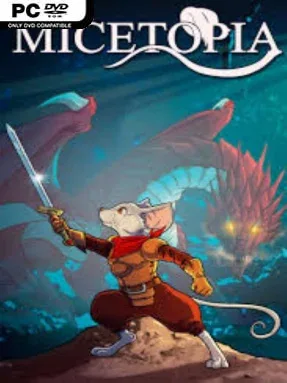
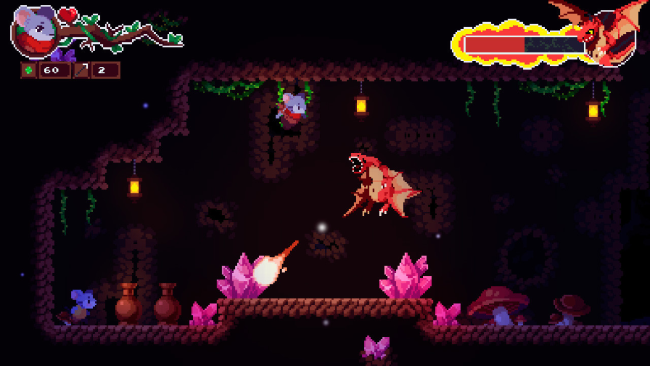
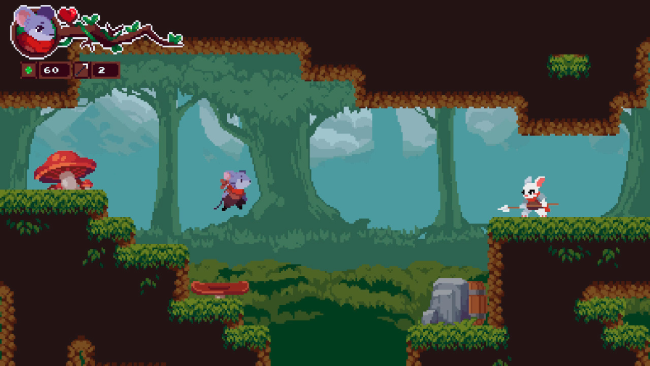
Micetopia Cover Art

Micetopia

INDIE 127.21 MB

Game Overview

A lone mouse hero sets out to reclaim a fantasy kingdom after sinister creatures carry off nearly every resident of its peaceful village. Micetopia is a compact pixel-art action platformer with the structure of a Metroidvania, balancing cheerful storybook visuals against caves, ruins, and hostile territory packed with danger. Its tone stays approachable rather than grim, using colorful sprites and chiptune music to make the rescue mission feel like a classic 16-bit adventure.

Players run, jump, strike enemies, and search interconnected areas for paths that were previously unreachable. Progress revolves around saving captured villagers and gaining the tools or abilities needed to push farther through the map, so backtracking has a clear purpose instead of feeling like busywork. Platforming demands careful timing around hazards and gaps, while combat is straightforward and immediate, focusing on positioning, attack range, and learning enemy behavior. Checkpoints and a manageable scale make it welcoming for players who want the exploration loop of the genre without committing to a massive, punishing campaign.

Micetopia stands out through its unusually cute mouse-centered setting and its commitment to old-school pixel presentation without burying the player in complicated systems. The world encourages curiosity, with side routes, secrets, and rescued characters giving each newly opened region a satisfying sense of progress. It feels closest to lighter, more linear takes on games such as Shovel Knight or early Castlevania-style exploration, rather than the sprawling challenge of Hollow Knight. Fans of retro platformers and newcomers looking for an accessible Metroidvania with a warm visual identity should find plenty to enjoy here.

Installation

  1. Click the green button below to be redirected to UploadHaven.
  2. Wait 15 seconds, then hit “Free Download.” (Free downloads may be slower — upgrade to UploadHaven Pro for faster speeds.)
  3. Once downloaded, right-click the .zip file and choose “Extract to Micetopia.” (You’ll need 7-Zip for this.)
  4. Open the extracted folder and run the game as administrator.
  5. Enjoy! 🎮 If you see missing DLL errors, check the <strong>_Redist</strong> folder inside and install what’s needed.

System Requirements

  • Requires a 64-bit processor and operating system
  • OS: Windows 7
  • Processor: core2duo
  • Memory: 1024 MB RAM
  • Graphics: ANY
  • Sound Card: ANY
  • Additional Notes: Gamepad recommended

Setup Guide & Troubleshooting

How do I fix missing DLL errors for Micetopia?

After extracting Micetopia, navigate to the _Redist or _CommonRedist folder inside the game directory and install DirectX, Vcredist, and any other dependencies included.

What should I do if the downloaded file is corrupted?

The full archive is 127.21 MB — make sure your download completed fully before extracting. Use 7-Zip to extract the files. If you still see a "file corrupted" error, re-download and try again.

Why should I run the game as administrator?

Right-click the game executable and select "Run as Administrator" to avoid save file issues and permission errors. This is especially important on the first launch.

How do I update my GPU drivers for this game?

Micetopia requires a ANY or equivalent. Update your NVIDIA or AMD drivers to the latest version for the best performance.

The game won't launch — what should I try?

Try running in compatibility mode, install the latest DirectX runtime, or install the All-in-One VC Redist Package.

My antivirus is blocking the game — is it safe?

Antivirus false positives are common with pre-installed games. Temporarily pause your antivirus during extraction to prevent it from quarantining game files. You can re-enable it after the extraction completes.

Need more help? Browse our FAQ & Troubleshooting Guide for solutions to common issues.
Looking for something else? Explore all games on Steam Unlocked