
Game Overview
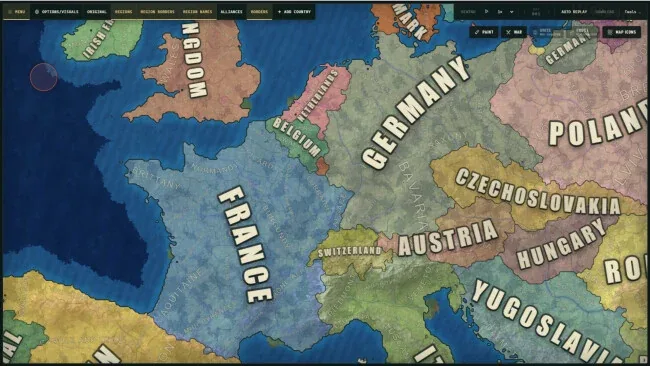
History becomes a blank digital canvas rather than a battlefield to conquer in Mapping Creator, a sandbox map-making tool built for alternate-history fans and armchair generals. Instead of juggling diplomacy trees, economies, and AI routines, players shape nations and conflicts directly, deciding exactly where borders run and how wars unfold. The mood is creative and methodical, closer to an animated military-map editor than a conventional grand strategy campaign. It suits anyone who has sketched imaginary empires, redesigned real conflicts, or wanted to turn a “what if?” scenario into a polished visual story.
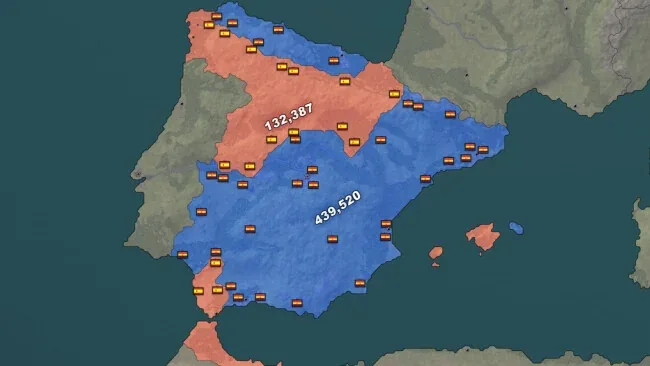
The central loop revolves around painting the political map with precise control. Players alter national colours, names, flags, and territorial shapes, using brush-based tools to refine borders down to individual pixels rather than accepting a prebuilt province layout. Military units can be placed, rotated, and dragged across the map to illustrate offensives, defensive lines, and clashes between countries; the creator determines the scale, direction, and result of every engagement. As the scenario develops, the software records the action automatically, allowing users to assemble their evolving map into a timelapse video without relying on separate capture programs.
Its strongest appeal lies in removing the usual barriers between an idea and its presentation. Where games such as Hearts of Iron IV ask players to master production, research, logistics, and AI behavior, Mapping Creator hands them directorial control over the outcome from the outset. That makes it less suitable for players seeking tactical challenge or emergent strategy, but potentially far more satisfying for creators who care about clean borders, custom flags, and carefully staged campaigns. Alternate-history enthusiasts, map animators, educators, and newcomers intimidated by dense strategy systems all get an approachable way to construct wars and nations exactly as they picture them.
Screenshots
Installation
- Select the <strong>Download</strong> button at the top of this page to open UploadHaven.
- On UploadHaven, wait for any countdown, then select <strong>Free Download</strong>. Optional: UploadHaven Pro for faster downloads.
- When complete, extract the archive to a <strong>Mapping Creator</strong> folder using 7-Zip.
- Open the extracted folder and start the game normally.
- For errors, check <strong>Setup Guide & Troubleshooting</strong> below. Keep your security software enabled.
System Requirements
- Requires a 64-bit processor and operating system
- OS: Windows 10 64-bit
- Processor: Intel Core i3-6100 / AMD Ryzen 3 1200 (4 threads)
- Memory: 8192 MB RAM
- Graphics: DirectX 11 GPU with WebGL 2 support, 2 GB VRAM (e.g. Intel UHD 620, GTX 750 Ti)
- DirectX: Version 11
- Storage: 1024 MB available space
Setup Guide & Troubleshooting
Is Mapping Creator (Latest Full Build) free to download on Steam Unlocked?
Yes, Mapping Creator (Latest Full Build) is available as a full-version direct download on Steam Unlocked with verified mirror links and complete release files.
How do I install Mapping Creator without errors?
Download the complete archive from the mirror links, extract using 7-Zip or WinRAR into a path without special characters, install any required runtime redistributables, and launch the main executable.
Does this release of Mapping Creator include the latest updates?
This listing provides build Latest Full Build of Mapping Creator, tested for offline play and compatibility with modern operating systems and emulators.
What should I do if Mapping Creator crashes on startup?
Verify that your GPU drivers and Visual C++ / DirectX runtimes are updated, run the executable as administrator, and ensure your antivirus did not block any extracted game files.