
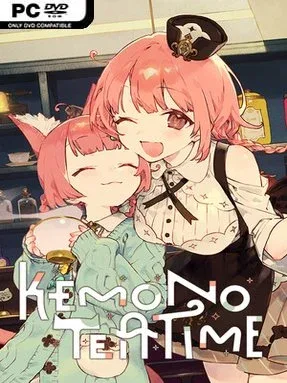
Game Overview
A tiny café in the city of Melodius becomes a gentle refuge for animal-eared patrons facing the limited time left in their lives. Kemono Teatime is a cozy narrative simulation with an unexpectedly melancholic core: its pastel charm, warm desserts, and soft café ambience sit beside stories about connection, acceptance, and farewells. Rather than pushing urgency or high scores, it asks players to slow down, listen closely, and make each visitor’s remaining moments feel meaningful. The result is sweet, soothing, and quietly heartbreaking.
Most of your time goes into preparing personalized cups of tea for customers as they share their worries, memories, and preferences. A selection of black teas, herbs, and hidden components lets you experiment with blends, matching flavors to a guest’s mood and building a more intimate understanding of who they are. The tea-making process emphasizes tactile, calming sound design, with binaural ASMR effects that make pouring, stirring, and brewing feel like the point rather than a distraction between story scenes. Conversations and successful orders gradually reveal more about the café’s staff and regulars, while each new visitor brings a different musical atmosphere to the shop.
What makes Kemono Teatime memorable is the contrast between its cute kemonomimi cast and its willingness to confront mortality without becoming oppressive. Its art direction and audio are designed for players who enjoy low-pressure comfort games, but the writing gives it more emotional weight than a straightforward café simulator. Fans of Coffee Talk, VA-11 Hall-A, or visual novels centered on listening to strangers will recognize the appeal, though the tea customization and ASMR presentation give it a distinct rhythm. It suits newcomers looking for a calm, story-led experience, as well as veterans of cozy narrative games who want something tender with a sharper emotional aftertaste.
Installation
- Click the green button below to be redirected to UploadHaven.
- Wait 15 seconds, then hit “Free Download.” (Free downloads may be slower — upgrade to UploadHaven Pro for faster speeds.)
- Once downloaded, right-click the .zip file and choose “Extract to Kemono Teatime.” (You’ll need 7-Zip for this.)
- Open the extracted folder and run the game as administrator.
- Enjoy! 🎮 If you see missing DLL errors, check the <strong>_Redist</strong> folder inside and install what’s needed.
System Requirements
- OS: Windows10
- Processor: Quad-core Intel or AMD processor, 2.5 GHz or faster
- Memory: 4 GB RAM
- DirectX: Version 11
- Storage: 2 GB available space
Setup Guide & Troubleshooting
How do I fix missing DLL errors for Kemono Teatime (v1.0.2 & ALL DLC’s)?
After extracting Kemono Teatime (v1.0.2 & ALL DLC’s), navigate to the _Redist or _CommonRedist folder inside the game directory and install DirectX, Vcredist, and any other dependencies included.
What should I do if the downloaded file is corrupted?
The full archive is 1.80 GB — make sure your download completed fully before extracting. Use 7-Zip to extract the files. If you still see a "file corrupted" error, re-download and try again.
Why should I run the game as administrator?
Right-click the game executable and select "Run as Administrator" to avoid save file issues and permission errors. This is especially important on the first launch.
How do I update my GPU drivers for this game?
Update your NVIDIA or AMD drivers to the latest version for the best performance and compatibility.
The game won't launch — what should I try?
This game requires Version 11. Try running in compatibility mode, install the latest DirectX runtime, or install the All-in-One VC Redist Package.
My antivirus is blocking the game — is it safe?
Antivirus false positives are common with pre-installed games. Temporarily pause your antivirus during extraction to prevent it from quarantining game files. You can re-enable it after the extraction completes.