
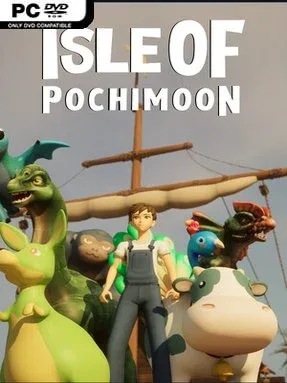
Game Overview
A lonely island becomes a steadily more dangerous home in this indie bullet-heaven survival game. Isle of Pochimoon mixes the constant pressure of arena-style monster combat with the quieter routines of gathering, fishing, farming, crafting, and keeping a small convenience store stocked. Rather than sending players through a purely combat-focused roguelite loop, it asks them to build a functioning settlement between desperate survival sessions. The mood is colorful and approachable on the surface, but the escalating enemy threat means there is always another reason to improve your supplies and companions.
Combat centers on lasting as long as possible while hostile waves grow stronger, with your chosen Pochimoon providing crucial assistance and shaping viable builds. Materials collected around the island feed directly into construction and crafting: woodcutters supply timber, mines produce metal, soil plots support crops, and workshops turn resources into useful goods. Selling products through the store gives the everyday chores a practical purpose instead of making them feel like isolated side activities. Fishing and creature taming add further ways to prepare, while the Fusion Lab lets players combine two different Pochimoon into a new companion with its own potential role in battle.
Pochimoon fusion is the feature that gives the game its strongest identity, encouraging experimentation beyond simply finding the rarest pet or strongest weapon. Each run can become a different balancing act between combat survival, resource production, shop management, and the search for better fusion combinations. Its mix of automated bullet-heaven action and cozy life-sim systems should appeal to players who enjoy the build variety of Vampire Survivors but want more persistent island chores and creature collecting around it. Newcomers can focus on straightforward gathering and basic companions, while veterans have plenty of room to chase increasingly efficient builds as the island’s dangers intensify.
Installation
- Click the green button below to be redirected to UploadHaven.
- Wait 15 seconds, then hit “Free Download.” (Free downloads may be slower — upgrade to UploadHaven Pro for faster speeds.)
- Once downloaded, right-click the .zip file and choose “Extract to Isle of Pochimoon.” (You’ll need 7-Zip for this.)
- Open the extracted folder and run the game as administrator.
- Enjoy! 🎮 If you see missing DLL errors, check the <strong>_Redist</strong> folder inside and install what’s needed.
System Requirements
- Requires a 64-bit processor and operating system
- OS: Windows 10 or later
- Processor: Intel Core i5 2.6GHz or similar
- Memory: 4 GB RAM
- Graphics: GeForce GTX 1060
- DirectX: Version 12
- Storage: 10 GB available space
- Additional Notes: 64-bit operating system is required
Setup Guide & Troubleshooting
How do I fix missing DLL errors for Isle of Pochimoon?
After extracting Isle of Pochimoon, navigate to the _Redist or _CommonRedist folder inside the game directory and install DirectX, Vcredist, and any other dependencies included.
What should I do if the downloaded file is corrupted?
The full archive is 1.52 GB — make sure your download completed fully before extracting. Use 7-Zip to extract the files. If you still see a "file corrupted" error, re-download and try again.
Why should I run the game as administrator?
Right-click the game executable and select "Run as Administrator" to avoid save file issues and permission errors. This is especially important on the first launch.
How do I update my GPU drivers for this game?
Isle of Pochimoon requires a GeForce GTX 1060 or equivalent. Update your NVIDIA or AMD drivers to the latest version for the best performance.
The game won't launch — what should I try?
This game requires Version 12. Try running in compatibility mode, install the latest DirectX runtime, or install the All-in-One VC Redist Package.
My antivirus is blocking the game — is it safe?
Antivirus false positives are common with pre-installed games. Temporarily pause your antivirus during extraction to prevent it from quarantining game files. You can re-enable it after the extraction completes.