
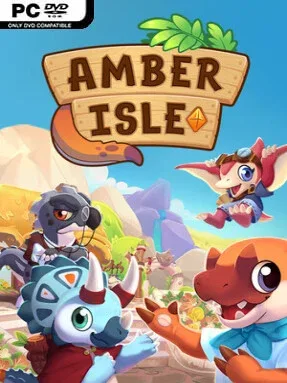
Game Overview
A struggling island town becomes a bright, cozy retail project in this prehistoric shop-management sim. You play a newly arrived merchant among the Paleofolk, an endearing population that includes dinosaurs, mammoths, marine creatures, and tiny invertebrates, all with wildly different practical needs. The tone stays light and playful, but the town’s decline gives your work a satisfying purpose: every successful sale helps turn a near-forgotten community back into a lively destination. Amber Isle balances the simple pleasure of running a cute store with a social-sim focus on getting to know the residents who keep coming through its doors.
Daily play revolves around sourcing materials, making useful stock, arranging displays, and matching customers with products that suit their bodies and personalities. A towering long-necked visitor needs oversized supplies, while aquatic customers call for items that can survive the water, so the shop’s catalog feels more imaginative than standard “sell potions and furniture” management. Pricing and negotiation matter, letting you haggle for better returns as you climb the rankings, then reinvest earnings into larger floor space, decorations, and a more efficient layout. Outside the counter, friendships open quests, recipes, and upgrades, while town restoration unlocks fresh facilities and draws additional Paleofolk back to the island.
Its strongest feature is the way shop success visibly changes the settlement around you: residents establish their own cafes, stalls, gardens, and communal spots rather than merely standing around as quest dispensers. The colorful, toy-like presentation and huge range of creature designs give the world more character than many cozy life sims, and the player-created Paleofolk avatar adds another welcome layer of expression through body types, colors, crests, and outfits. Anyone who enjoys the gentle loops of Animal Crossing, the customer-driven management of Recettear, or the relationship building of Stardew Valley finds plenty to like here, especially if they prefer low-pressure creativity over demanding economic simulation. Veteran management players may find the systems approachable rather than punishing, but the charm, customization, and steady sense of rebuilding make it an easy recommendation for cozy-game newcomers.
Installation
- Click the green button below to be redirected to UploadHaven.
- Wait 15 seconds, then hit “Free Download.” (Free downloads may be slower — upgrade to UploadHaven Pro for faster speeds.)
- Once downloaded, right-click the .zip file and choose “Extract to Amber Isle.” (You’ll need 7-Zip for this.)
- Open the extracted folder and run the game as administrator.
- Enjoy! 🎮 If you see missing DLL errors, check the <strong>_Redist</strong> folder inside and install what’s needed.
System Requirements
- Requires a 64-bit processor and operating system
- OS: Windows 10 64 bit
- Processor: Intel Core i5-6600K or AMD Ryzen 3 1200
- Memory: 8 GB RAM
- Graphics: NVIDIA GeForce GTX 550 Ti, 2GB or AMD Radeon HD 7750, 2GB
- DirectX: Version 10
- Storage: 2 GB available space
- Additional Notes: Low 1080p @ 30 FPS
Setup Guide & Troubleshooting
How do I fix missing DLL errors for Amber Isle?
After extracting Amber Isle, navigate to the _Redist or _CommonRedist folder inside the game directory and install DirectX, Vcredist, and any other dependencies included.
What should I do if the downloaded file is corrupted?
The full archive is 3.82 GB — make sure your download completed fully before extracting. Use 7-Zip to extract the files. If you still see a "file corrupted" error, re-download and try again.
Why should I run the game as administrator?
Right-click the game executable and select "Run as Administrator" to avoid save file issues and permission errors. This is especially important on the first launch.
How do I update my GPU drivers for this game?
Amber Isle requires a NVIDIA GeForce GTX 550 Ti, 2GB or AMD Radeon HD 7750, 2GB or equivalent. Update your NVIDIA or AMD drivers to the latest version for the best performance.
The game won't launch — what should I try?
This game requires Version 10. Try running in compatibility mode, install the latest DirectX runtime, or install the All-in-One VC Redist Package.
My antivirus is blocking the game — is it safe?
Antivirus false positives are common with pre-installed games. Temporarily pause your antivirus during extraction to prevent it from quarantining game files. You can re-enable it after the extraction completes.