
Game Overview
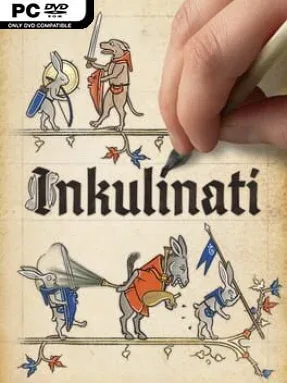
Medieval marginalia becomes a gleefully vicious battlefield where rabbits swing swords, cats preach enemies to death, and snails swallow soldiers whole. Inkulinati is a turn-based tactics game built around the strange humor and hand-drawn beauty of illuminated manuscripts, bringing centuries-old doodles to life with surprising personality. Its parchment arenas look playful, but every duel demands careful positioning, resource control, and a willingness to exploit absurd tools. The mood lands somewhere between a historical art exhibit, a tactical board game, and a Monty Python sketch with real strategic teeth.
Players command an Inkulinati master who draws Beasts onto the page using a limited supply of Living Ink. Each creature has a distinct role, from durable front-line bruisers to ranged attackers and bizarre support units, so success depends on forming an effective army while responding to the enemy’s choices. Turns involve moving units, attacking, using special abilities, claiming more ink, and taking advantage of terrain hazards or barriers; the master can also interfere directly by shoving troops, placing obstacles, or causing spectacularly messy explosions. A roguelike Journey mode changes the path, enemies, perks, and available creatures between runs, while duels against AI or other players reward a deeper understanding of matchups and battlefield rules.
What makes Inkulinati memorable is that its comedy never replaces its tactics. The expressive manuscript animation, deliberately ridiculous creature designs, and historical visual references give every encounter a flavor few strategy games can match, yet the systems encourage serious experimentation with army composition and action economy. Randomized journeys and the large pool of unlockable Beasts help keep repeat runs from becoming routine, especially as new perks can reshape a familiar strategy. Fans of Into the Breach, Worms, or tactical roguelikes who want a more eccentric, slower-paced alternative find plenty to enjoy, while newcomers can learn its accessible basics before confronting its more demanding tactical puzzles.
Installation
- Click the green button below to be redirected to UploadHaven.
- Wait 15 seconds, then hit “Free Download.” (Free downloads may be slower — upgrade to UploadHaven Pro for faster speeds.)
- Once downloaded, right-click the .zip file and choose “Extract to Inkulinati.” (You’ll need 7-Zip for this.)
- Open the extracted folder and run the game as administrator.
- Enjoy! 🎮 If you see missing DLL errors, check the <strong>_Redist</strong> folder inside and install what’s needed.
System Requirements
- OS: Microsoft® Windows® 10
- Processor: Intel Core i5 6400 or AMD equivalents
- Memory: 6 GB RAM
- Graphics: GeForce GTX 750 Ti or AMD RX 560
- DirectX: Version 11
- Storage: 5 GB available space
Setup Guide & Troubleshooting
How do I fix missing DLL errors for Inkulinati (v1.48.3.0 & ALL DLC)?
After extracting Inkulinati (v1.48.3.0 & ALL DLC), navigate to the _Redist or _CommonRedist folder inside the game directory and install DirectX, Vcredist, and any other dependencies included.
What should I do if the downloaded file is corrupted?
The full archive is 1.44 GB — make sure your download completed fully before extracting. Use 7-Zip to extract the files. If you still see a "file corrupted" error, re-download and try again.
Why should I run the game as administrator?
Right-click the game executable and select "Run as Administrator" to avoid save file issues and permission errors. This is especially important on the first launch.
How do I update my GPU drivers for this game?
Inkulinati (v1.48.3.0 & ALL DLC) requires a GeForce GTX 750 Ti or AMD RX 560 or equivalent. Update your NVIDIA or AMD drivers to the latest version for the best performance.
The game won't launch — what should I try?
This game requires Version 11. Try running in compatibility mode, install the latest DirectX runtime, or install the All-in-One VC Redist Package.
My antivirus is blocking the game — is it safe?
Antivirus false positives are common with pre-installed games. Temporarily pause your antivirus during extraction to prevent it from quarantining game files. You can re-enable it after the extraction completes.