
Game Overview
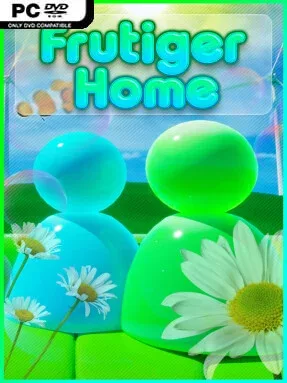
Bright glass surfaces, aquatic blues, glossy plastics, and optimistic early-2000s futurism define the appeal of Frutiger Home. Rather than asking you to manage budgets or survive disasters, it turns interior design into a low-pressure social sandbox built around the Frutiger Aero aesthetic. The mood is cheerful, nostalgic, and deliberately uncomplicated: a place for creating rooms that look like they belong in a long-lost operating system commercial or a sunlit tech showroom.
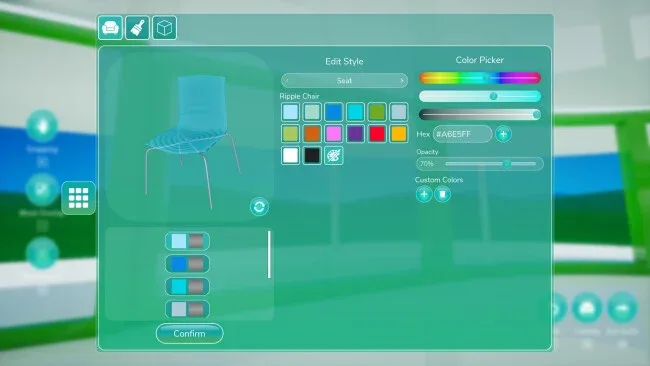
Players begin by selecting a house layout, then fill its rooms with a broad catalog of themed furniture, decorations, and visual accents. The central loop is simple but satisfying: arrange objects, refine color and placement choices, experiment with different room identities, and keep revising until the home feels personal. Cooperative play lets friends work on the same space, whether that means coordinating a cohesive design or gleefully turning each room into its own strange showcase. Once decorating is done, the house becomes a hangout where players can relax together and take part in casual activities instead of treating their finished build as a static gallery.
Its strongest feature is commitment to a niche visual language that most decorating games only touch on in passing. Frutiger Home understands that the appeal comes from the details—clean curves, vivid natural imagery, transparent materials, and a version of the future that feels playful rather than sterile. There is no heavy simulation layer getting between you and the decorating, making it more accessible than management-focused builders such as The Sims, while its shared creative space gives it some of the laid-back charm of multiplayer sandbox games. Anyone who enjoys room design, internet-aesthetic nostalgia, or quiet co-op sessions with friends finds an easygoing canvas here, while serious customization fans may value it most as a focused visual playground.
Screenshots

Installation
- Select the <strong>Download</strong> button at the top of this page to open UploadHaven.
- On UploadHaven, wait for any countdown, then select <strong>Free Download</strong>. Optional: UploadHaven Pro for faster downloads.
- When complete, extract the archive to a <strong>Frutiger Home</strong> folder using 7-Zip.
- Open the extracted folder and start the game normally.
- For errors, check <strong>Setup Guide & Troubleshooting</strong> below. Keep your security software enabled.
System Requirements
- Requires a 64-bit processor and operating system
- OS: Windows 10
- Processor: Intel i5-7600K / AMD Ryzen 5 3600
- Memory: 8 GB RAM
- Graphics: NVIDIA GTX 1060 / Radeon RX 6600
- DirectX: Version 11
- Network: Broadband Internet connection
- Storage: 15 GB available space
Setup Guide & Troubleshooting
Is Frutiger Home (v1.0.7) safe to download?
Yes, files are tested and verified before publication.
What are the system requirements?
Compatible with Windows with required storage space.
Can I run this on Windows 11?
Yes, tested on 64-bit Windows 10 and Windows 11.