
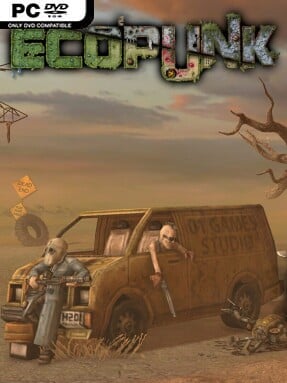
Game Overview
A ruined Earth becomes the stage for a demanding colony-survival strategy game where restoring nature matters as much as staying alive. Mutants and malfunctioning machines stalk a harsh wasteland shaped by hunger, disease, and extreme temperatures, while a small group of Ecopunks tries to establish something better among the wreckage. The tone is bleak but not hopeless: every salvaged resource, planted seed, and defended shelter pushes back against a world that has gone badly wrong. Rather than simply enduring the apocalypse, your settlement works toward healing the planet that civilization destroys.
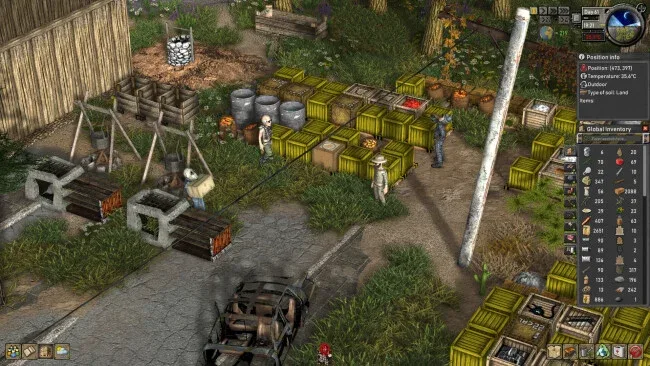
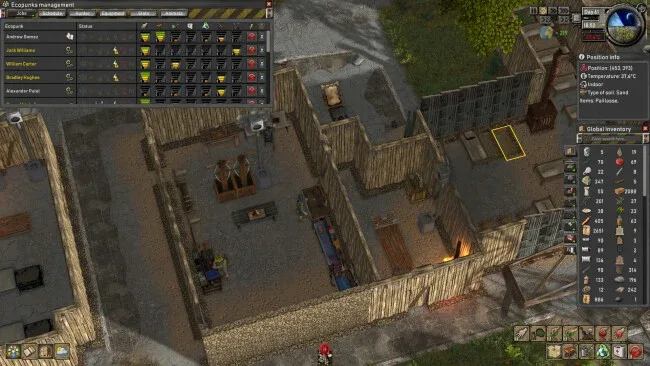
Keeping colonists alive drives the daily routine. You gather supplies through foraging, hunting, farming, and raids, then turn those materials into food, medicine, clothing, weapons, and more through eight specialized professions. Construction is free-form and tile-based, allowing players to lay out homes, walls, defenses, workshops, and comfort items according to their own plans, but a pretty base means little without insulation, heating, or cooling to protect people from lethal weather. Combat adds a sharp survival edge, with crafted firearms, armor, enemy camps to loot, and attacks from hostile creatures and machines forcing you to balance expansion against security. Research gradually opens better technology and equipment, giving a struggling camp the tools to become a resilient community.
The Mother Tree provides the game’s strongest identity, turning ecological recovery into a practical power system rather than background flavor. Ancient seeds revive damaged land, defeated enemies can be offered for blessings, and a healthier ecosystem directly improves your group’s prospects. That blend of settlement management, environmental restoration, and desperate wasteland defense gives Ecopunk a different emphasis from colony builders focused solely on production chains or military conquest. Players who enjoy the survival pressure of RimWorld-style stories but want more hands-on building and a greener long-term objective should find plenty to dig into, while genre veterans can appreciate the constant tension between comfort, climate, combat, and growth.
Screenshots
Installation
- Click the green button below to be redirected to UploadHaven.
- Wait 15 seconds, then hit “Free Download.” (Free downloads may be slower — upgrade to UploadHaven Pro for faster speeds.)
- Once downloaded, right-click the .zip file and choose “Extract to Ecopunk.” (You’ll need 7-Zip for this.)
- Open the extracted folder and run the game as administrator.
- Enjoy! 🎮 If you see missing DLL errors, check the <strong>_Redist</strong> folder inside and install what’s needed.
System Requirements
- Requires a 64-bit processor and operating system
- OS: Windows 10
- Processor: 2.9 GHz
- Memory: 8 GB RAM
- Graphics: AMD Radeon RX580 / Nvidia GeForce GTX 1650S
- DirectX: Version 11
- Storage: 2 GB available space
Setup Guide & Troubleshooting
How do I fix missing DLL errors for Ecopunk (v0.2.3)?
After extracting Ecopunk (v0.2.3), navigate to the _Redist or _CommonRedist folder inside the game directory and install DirectX, Vcredist, and any other dependencies included.
What should I do if the downloaded file is corrupted?
The full archive is 607.08 MB — make sure your download completed fully before extracting. Use 7-Zip to extract the files. If you still see a "file corrupted" error, re-download and try again.
Why should I run the game as administrator?
Right-click the game executable and select "Run as Administrator" to avoid save file issues and permission errors. This is especially important on the first launch.
How do I update my GPU drivers for this game?
Ecopunk (v0.2.3) requires a AMD Radeon RX580 / Nvidia GeForce GTX 1650S or equivalent. Update your NVIDIA or AMD drivers to the latest version for the best performance.
The game won't launch — what should I try?
This game requires Version 11. Try running in compatibility mode, install the latest DirectX runtime, or install the All-in-One VC Redist Package.
My antivirus is blocking the game — is it safe?
Antivirus false positives are common with pre-installed games. Temporarily pause your antivirus during extraction to prevent it from quarantining game files. You can re-enable it after the extraction completes.