
Game Overview
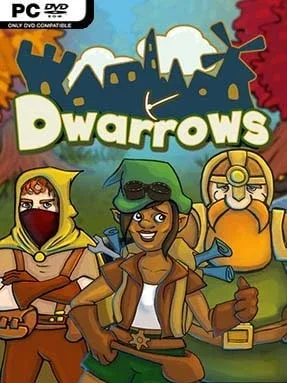
A quiet wilderness waiting to become a home gives Dwarrows its appeal. This peaceful action-adventure blends light town management with a fairy-tale exploration journey, placing you in the Dusken Woodlands with little more than three capable travelers and an abandoned settlement. Rather than pushing constant combat or survival pressure, it creates a gentle rhythm of gathering, rebuilding, and wandering toward the next mystery. The mood stays warm and whimsical, though ancient ruins, strange artifacts, and isolated corners of the map add enough intrigue to keep the journey moving.
You control a Builder, Warrior, and Mage, swapping between their specialized abilities to handle the world’s obstacles. One gathers and constructs, another clears dangerous paths and deals with hostile creatures, while magical skills reveal routes and interact with puzzles; coordinating the trio is the central adventure mechanic. Wood, stone, and other materials feed into a steadily expanding town, where constructed homes and facilities make room for wandering characters you convince to settle down. Exploration opens additional regions filled with collectibles, environmental puzzles, quests, and treasures, while friendly animals can be befriended to provide practical help in the field. Combat exists, but it remains simple and forgiving, making progress more about curiosity and smart use of each character than demanding reflexes.
Dwarrows stands apart by tying its building system directly to its handcrafted adventure world instead of turning settlement growth into an endless optimization exercise. Its rounded, colorful art style and animal companions give it an easygoing charm reminiscent of a lighter mix of The Legend of Zelda and My Time at Portia, without the social-sim density of either. The campaign rewards players who like checking every path, completing collections, and seeing a lonely village gradually become lively. It suits newcomers to town-builders especially well, while veteran players should approach it for its relaxing atmosphere and exploration rather than deep economic strategy.
Installation
- Click the green button below to be redirected to UploadHaven.
- Wait 15 seconds, then hit “Free Download.” (Free downloads may be slower — upgrade to UploadHaven Pro for faster speeds.)
- Once downloaded, right-click the .zip file and choose “Extract to Dwarrows.” (You’ll need 7-Zip for this.)
- Open the extracted folder and run the game as administrator.
- Enjoy! 🎮 If you see missing DLL errors, check the <strong>_Redist</strong> folder inside and install what’s needed.
System Requirements
- Requires a 64-bit processor and operating system
- OS: Windows 10 (Requires 64-bit)
- Processor: Intel CPU Core i5-760 / AMD FX-9590
- Memory: 4 GB RAM
- Graphics: Nvidia GeForce GTX 760 or AMD Radeon R9 270
- DirectX: Version 11
- Storage: 3 GB available space
Setup Guide & Troubleshooting
How do I fix missing DLL errors for Dwarrows (v1.5)?
After extracting Dwarrows (v1.5), navigate to the _Redist or _CommonRedist folder inside the game directory and install DirectX, Vcredist, and any other dependencies included.
What should I do if the downloaded file is corrupted?
The full archive is 782.40 MB — make sure your download completed fully before extracting. Use 7-Zip to extract the files. If you still see a "file corrupted" error, re-download and try again.
Why should I run the game as administrator?
Right-click the game executable and select "Run as Administrator" to avoid save file issues and permission errors. This is especially important on the first launch.
How do I update my GPU drivers for this game?
Dwarrows (v1.5) requires a Nvidia GeForce GTX 760 or AMD Radeon R9 270 or equivalent. Update your NVIDIA or AMD drivers to the latest version for the best performance.
The game won't launch — what should I try?
This game requires Version 11. Try running in compatibility mode, install the latest DirectX runtime, or install the All-in-One VC Redist Package.
My antivirus is blocking the game — is it safe?
Antivirus false positives are common with pre-installed games. Temporarily pause your antivirus during extraction to prevent it from quarantining game files. You can re-enable it after the extraction completes.