
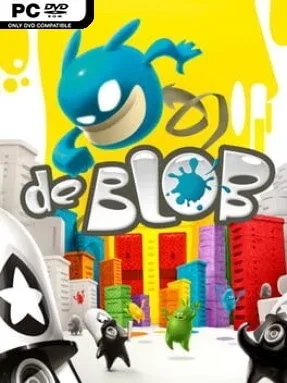
Game Overview
Chroma City begins as a lifeless concrete sprawl, drained of color by the authoritarian I.N.K.T. Corporation, and its rescue comes in the form of a bouncing ball of living paint. de Blob turns a simple platforming premise into an exuberant rebellion: roll through the city, absorb paint, and splash entire districts back into life. The mood stays playful and cartoonish even when tanks, turrets, and hostile Inkies try to stop the uprising. Every newly painted building, restored Raydian, and burst of music makes the campaign feel like a small victory against a deliberately dull regime.
Controlling Blob revolves around momentum, jumping, wall-bouncing, and spreading color across expansive urban stages. Paint pools grant primary colors that can be mixed into new shades, while coating structures earns points, unlocks routes, and revives the city’s soundtrack layer by layer. Missions ask players to free civilians, defeat enemies, reach checkpoints, and meet painting or collection goals before time runs out, with tougher areas introducing hazardous floors, electrical traps, fast-moving vehicles, and larger armored targets. Blob can grow by collecting paint, allowing him to smash stronger foes and access objectives that a smaller form cannot handle; the PC edition also adds modern display settings, remappable controls, and solid keyboard, mouse, and gamepad support.
What makes de Blob memorable is the way its artistic theme directly shapes play rather than merely decorating it. Color changes the architecture, citizens, ambient sound, and overall personality of each neighborhood, so revisiting an area to paint it more thoroughly remains satisfying even after the main objective is complete. Its open-ended stage structure gives players room to choose routes and prioritize either efficient mission completion or cheerful, destructive sightseeing. Fans of Super Mario Sunshine’s paint-based environmental interaction, classic 3D collectathons, and lighthearted platformers find plenty to enjoy, while its approachable controls make it an easy recommendation for newcomers as well as veterans looking for a bright, unusual palate cleanser.
Installation
- Click the green button below to be redirected to UploadHaven.
- Wait 15 seconds, then hit “Free Download.” (Free downloads may be slower — upgrade to UploadHaven Pro for faster speeds.)
- Once downloaded, right-click the .zip file and choose “Extract to de Blob.” (You’ll need 7-Zip for this.)
- Open the extracted folder and run the game as administrator.
- Enjoy! 🎮 If you see missing DLL errors, check the <strong>_Redist</strong> folder inside and install what’s needed.
System Requirements
- OS: Windows 7 (32 or 64bit), Windows 8, Windows 10
- Processor: Dual Core CPU 2.50 GHz
- Memory: 4 GB RAM
- Graphics: GeForce 310 with 1 GB VRAM
- DirectX: Version 11
- Storage: 10 GB available space
- Sound Card: DirectX compatible
Setup Guide & Troubleshooting
How do I fix missing DLL errors for de Blob?
After extracting de Blob, navigate to the _Redist or _CommonRedist folder inside the game directory and install DirectX, Vcredist, and any other dependencies included.
What should I do if the downloaded file is corrupted?
The full archive is 4.02 GB — make sure your download completed fully before extracting. Use 7-Zip to extract the files. If you still see a "file corrupted" error, re-download and try again.
Why should I run the game as administrator?
Right-click the game executable and select "Run as Administrator" to avoid save file issues and permission errors. This is especially important on the first launch.
How do I update my GPU drivers for this game?
de Blob requires a GeForce 310 with 1 GB VRAM or equivalent. Update your NVIDIA or AMD drivers to the latest version for the best performance.
The game won't launch — what should I try?
This game requires Version 11. Try running in compatibility mode, install the latest DirectX runtime, or install the All-in-One VC Redist Package.
My antivirus is blocking the game — is it safe?
Antivirus false positives are common with pre-installed games. Temporarily pause your antivirus during extraction to prevent it from quarantining game files. You can re-enable it after the extraction completes.