
Cottonville Cover Art

Cottonville

INDIE 212.98 MB

Game Overview

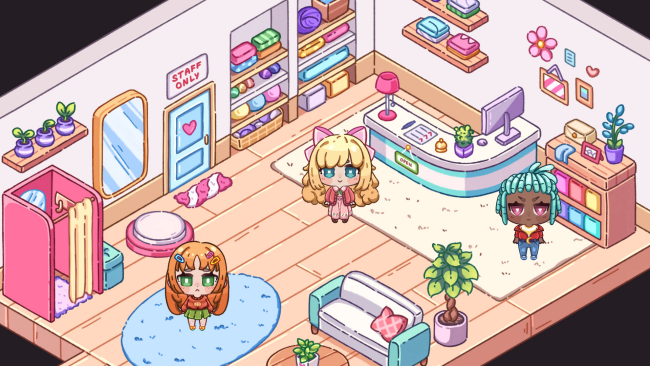
A quiet country town trades big-city stress for cotton fields, dye flowers, and the soft clatter of a sewing machine. Cottonville is a cozy indie life sim built around inheriting a family atelier and turning it into a thriving fashion business, one customer order at a time. Its premise is refreshingly grounded: leave Friglight behind, settle into a slower routine, and transform home-grown materials into outfits with personality. The mood stays warm and colorful, making it an easygoing escape for players who prefer creativity and routine over high-pressure challenges.

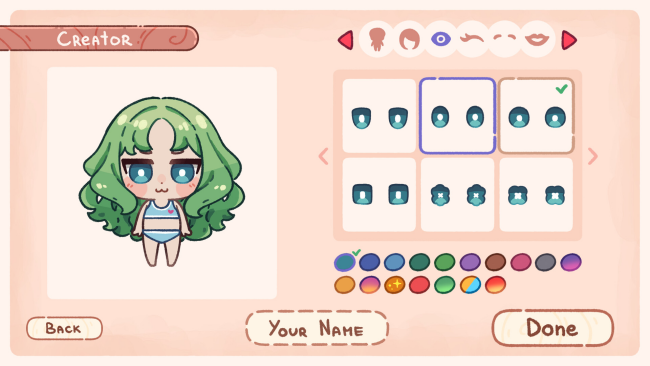
Days revolve around planting and harvesting cotton, linen, and bamboo, collecting flowers for natural dyes, then processing those resources into fabric for the workshop. Customers arrive with particular tastes and requests, and success depends on choosing appropriate patterns, colors, and combinations before sewing a finished garment. More than 60 designs, with color variants that push the collection beyond 120 options, gradually open up as the atelier grows, giving progression a tangible creative payoff. Character creation also matters: hairstyles, hair colors, facial features, skin tones, and a growing wardrobe let players make their resident feel like part of the town’s evolving fashion scene.

What separates Cottonville from a standard farming sim is its full connection between agriculture and clothing design; crops are not merely sold for cash, but become the foundation of every outfit. The limited palette of seven fabric colors and request-driven tailoring add just enough problem-solving to make each commission feel more purposeful than simple dress-up. It does not aim for the dense systems or social complexity of Stardew Valley, instead favoring a focused loop closer to a relaxed crafting game with a boutique-management twist. Players who enjoy Fashion Dreamer-style styling, gentle farming, collectible patterns, and personal customization should find plenty to enjoy, while genre veterans may appreciate its more specialized fashion focus.

Installation

  1. Click the green button below to be redirected to UploadHaven.
  2. Wait 15 seconds, then hit “Free Download.” (Free downloads may be slower — upgrade to UploadHaven Pro for faster speeds.)
  3. Once downloaded, right-click the .zip file and choose “Extract to Cottonville.” (You’ll need 7-Zip for this.)
  4. Open the extracted folder and run the game as administrator.
  5. Enjoy! 🎮 If you see missing DLL errors, check the <strong>_Redist</strong> folder inside and install what’s needed.

System Requirements

  • OS: Windows 10
  • Processor: Intel 2 cores / 4 threads @ 2.5Ghz
  • Memory: 4 GB RAM
  • Graphics: Require a dedicated graphic card.
  • DirectX: Version 11
  • Storage: 3 GB available space

Setup Guide & Troubleshooting

How do I fix missing DLL errors for Cottonville?

After extracting Cottonville, navigate to the _Redist or _CommonRedist folder inside the game directory and install DirectX, Vcredist, and any other dependencies included.

What should I do if the downloaded file is corrupted?

The full archive is 212.98 MB — make sure your download completed fully before extracting. Use 7-Zip to extract the files. If you still see a "file corrupted" error, re-download and try again.

Why should I run the game as administrator?

Right-click the game executable and select "Run as Administrator" to avoid save file issues and permission errors. This is especially important on the first launch.

How do I update my GPU drivers for this game?

Cottonville requires a Require a dedicated graphic card. or equivalent. Update your NVIDIA or AMD drivers to the latest version for the best performance.

The game won't launch — what should I try?

This game requires Version 11. Try running in compatibility mode, install the latest DirectX runtime, or install the All-in-One VC Redist Package.

My antivirus is blocking the game — is it safe?

Antivirus false positives are common with pre-installed games. Temporarily pause your antivirus during extraction to prevent it from quarantining game files. You can re-enable it after the extraction completes.

Need more help? Browse our FAQ & Troubleshooting Guide for solutions to common issues.
Looking for something else? Explore all games on Steam Unlocked