
Game Overview
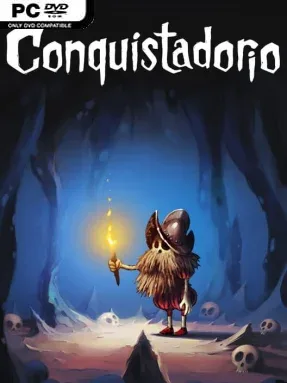
A weary conquistador trades glory for solitude, only to find that even retirement brings absurd trouble when his beloved coffin vanishes from his cave. Conquistadorio is a hand-drawn puzzle adventure built around that wonderfully strange mission: recovering the one place its skeleton-like hero wants to rest. Its world feels playful rather than grim, using expressive animation, oddball characters, and silent visual comedy to turn a simple search into a surreal chain of problems. The tone lands somewhere between a whimsical cartoon and an old-fashioned point-and-click adventure, with no spoken exposition slowing down the action.
Players move through illustrated scenes, inspect unusual contraptions, collect useful objects, and work out how each piece of the environment connects to the next obstacle. Puzzles are the main event, ranging from inventory-based challenges to mechanical logic problems that ask you to read the scene carefully and experiment with its moving parts. Progress comes from observation instead of combat or character stats, so patience and curiosity matter far more than reflexes. Non-verbal storytelling lets animations, sound cues, and environmental changes communicate the plot, while the soundtrack and ambient audio give each location a pleasantly offbeat atmosphere.
Its strongest feature is the presentation: every screen has the feel of a detailed animated illustration, and the protagonist’s reactions make failures and discoveries entertaining in their own right. Conquistadorio avoids the text-heavy approach of many classic adventures, making it approachable even for players who prefer visual problem-solving over lengthy dialogue trees. The puzzles can be demanding enough to stall impatient players, but the game’s compact, charming structure keeps the focus on solving one satisfying obstacle at a time. Fans of Machinarium, Samorost, or other dialogue-light adventure puzzlers should feel immediately at home, while newcomers get a welcoming introduction to the genre’s slower, more observant rhythm.
Installation
- Click the green button below to be redirected to UploadHaven.
- Wait 15 seconds, then hit “Free Download.” (Free downloads may be slower — upgrade to UploadHaven Pro for faster speeds.)
- Once downloaded, right-click the .zip file and choose “Extract to Conquistadorio.” (You’ll need 7-Zip for this.)
- Open the extracted folder and run the game as administrator.
- Enjoy! 🎮 If you see missing DLL errors, check the <strong>_Redist</strong> folder inside and install what’s needed.
System Requirements
- OS: Windows 7+
- Processor: 1.8 GHz
- Memory: 4 GB RAM
- Graphics: 2 GB
- Storage: 1 GB available space
- Sound Card: Direct X
Setup Guide & Troubleshooting
How do I fix missing DLL errors for Conquistadorio (v2023.10.02)?
After extracting Conquistadorio (v2023.10.02), navigate to the _Redist or _CommonRedist folder inside the game directory and install DirectX, Vcredist, and any other dependencies included.
What should I do if the downloaded file is corrupted?
The full archive is 471.87 MB — make sure your download completed fully before extracting. Use 7-Zip to extract the files. If you still see a "file corrupted" error, re-download and try again.
Why should I run the game as administrator?
Right-click the game executable and select "Run as Administrator" to avoid save file issues and permission errors. This is especially important on the first launch.
How do I update my GPU drivers for this game?
Conquistadorio (v2023.10.02) requires a 2 GB or equivalent. Update your NVIDIA or AMD drivers to the latest version for the best performance.
The game won't launch — what should I try?
Try running in compatibility mode, install the latest DirectX runtime, or install the All-in-One VC Redist Package.
My antivirus is blocking the game — is it safe?
Antivirus false positives are common with pre-installed games. Temporarily pause your antivirus during extraction to prevent it from quarantining game files. You can re-enable it after the extraction completes.