
Coloring Game: Pixel Cover Art

Coloring Game: Pixel

INDIE 137.85 MB

Game Overview

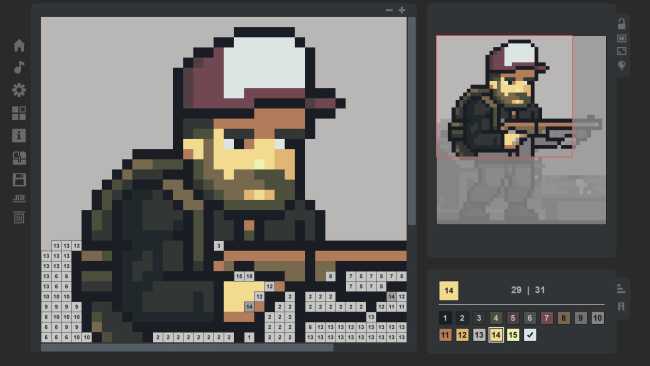
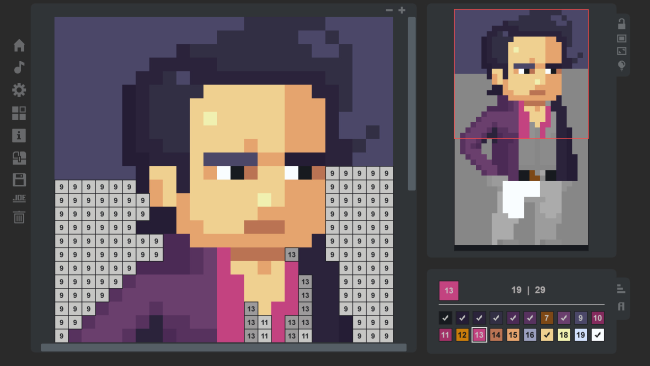
Small, crisp pixel-art canvases make Coloring Game: Pixel a deliberately low-pressure alternative to sprawling digital coloring books. Rather than asking for hours of work on one enormous illustration, it presents 40 compact pictures that are easy to finish in a sitting while still offering enough detail to feel satisfying. The mood is calm and methodical, built around the simple pleasure of watching a blank grid gradually become a complete image. Its total artwork contains more than 300,000 pixels, so the collection remains substantial despite the smaller individual designs.

Players select colours and fill the appropriate sections of each image, steadily clearing the board one pixel at a time. The central loop is straightforward: choose a picture, work through its colour areas, and decide whether to take a careful manual approach or aim for faster completion. Pen Mode emphasizes individual placement and gives the package an estimated seven to eight hours of hands-on coloring, making it the better option for players who enjoy the process as much as the finished picture. New animations add a little visual reward to completed work, while additional challenges give experienced coloring-game regulars reasons to return after the basic gallery is done.

What stands out is the focus on short-form projects: every illustration feels attainable without becoming disposable. That structure makes it easy to play between larger games, during a podcast, or whenever a demanding action title is not the mood. The pixel format also lends each finished piece a clean retro-game look, closer to assembling sprite art than working in a conventional paint program. Fans of relaxing color-by-number apps, nonograms, and other quiet completion-focused puzzles find an easy fit here, while newcomers get an accessible introduction with no mechanical barrier beyond patience and attention.

Installation

  1. Click the green button below to be redirected to UploadHaven.
  2. Wait 15 seconds, then hit “Free Download.” (Free downloads may be slower — upgrade to UploadHaven Pro for faster speeds.)
  3. Once downloaded, right-click the .zip file and choose “Extract to Coloring Game: Pixel.” (You’ll need 7-Zip for this.)
  4. Open the extracted folder and run the game as administrator.
  5. Enjoy! 🎮 If you see missing DLL errors, check the <strong>_Redist</strong> folder inside and install what’s needed.

System Requirements

  • OS: Windows 7
  • Processor: 1000 MHz
  • Memory: 1024 MB RAM
  • Graphics: Hardware support WebGL – OpenGL 2.1 (GPU Memory – 512MB)
  • Storage: 186 MB available space

Setup Guide & Troubleshooting

How do I fix missing DLL errors for Coloring Game: Pixel?

After extracting Coloring Game: Pixel, navigate to the _Redist or _CommonRedist folder inside the game directory and install DirectX, Vcredist, and any other dependencies included.

What should I do if the downloaded file is corrupted?

The full archive is 137.85 MB — make sure your download completed fully before extracting. Use 7-Zip to extract the files. If you still see a "file corrupted" error, re-download and try again.

Why should I run the game as administrator?

Right-click the game executable and select "Run as Administrator" to avoid save file issues and permission errors. This is especially important on the first launch.

How do I update my GPU drivers for this game?

Coloring Game: Pixel requires a Hardware support WebGL – OpenGL 2.1 (GPU Memory – 512MB) or equivalent. Update your NVIDIA or AMD drivers to the latest version for the best performance.

The game won't launch — what should I try?

Try running in compatibility mode, install the latest DirectX runtime, or install the All-in-One VC Redist Package.

My antivirus is blocking the game — is it safe?

Antivirus false positives are common with pre-installed games. Temporarily pause your antivirus during extraction to prevent it from quarantining game files. You can re-enable it after the extraction completes.

Need more help? Browse our FAQ & Troubleshooting Guide for solutions to common issues.
Looking for something else? Explore all games on Steam Unlocked