

Game Overview
New York becomes a living spreadsheet in Big Ambitions, a business-and-life simulation that starts with a cramped apartment, limited cash, and a long climb toward serious wealth. Its appeal comes from the freedom to define success for yourself: run one reliable neighborhood shop, build a retail empire, invest in property, or turn a modest tech operation into a corporate machine. The mood is less about dramatic boardroom theatrics than methodical problem-solving, with every profitable day feeling earned and every bad decision leaving a mark on your finances.
Early hours revolve around working a job, saving money, finding premises, and opening a first business such as a coffee shop, florist, clothing store, liquor outlet, supermarket, or professional office. Players handle the unglamorous essentials personally, including leases, loans, store layouts, furnishings, stock orders, pricing, staffing, deliveries, and bills, before gradually delegating those pressures to employees and specialist managers. Growth introduces warehouses, imports, logistics networks, headquarters, real estate, and investment funds, turning a small operation into a web of interdependent companies. Personal needs matter throughout: sleep, health, happiness, transport, and housing all compete with expansion plans, while time keeps moving whether your latest venture succeeds or collapses.
What distinguishes Big Ambitions from simpler tycoon games is how closely its businesses connect to an everyday character simulation. You do not merely place buildings on a map; you commute through the city, furnish offices, arrange shelves, equip workers, and feel the practical cost of each new layer of responsibility. Its open-ended structure offers the approachable satisfaction of Two Point-style management alongside the personal routine and city-scale ambition of The Sims, though it places far more emphasis on cash flow and supply chains. Patient planners, aspiring entrepreneurs, and sandbox fans who enjoy optimizing systems will get the most from it, while players seeking fast, hands-off strategy may find its detailed setup demanding.
Screenshots
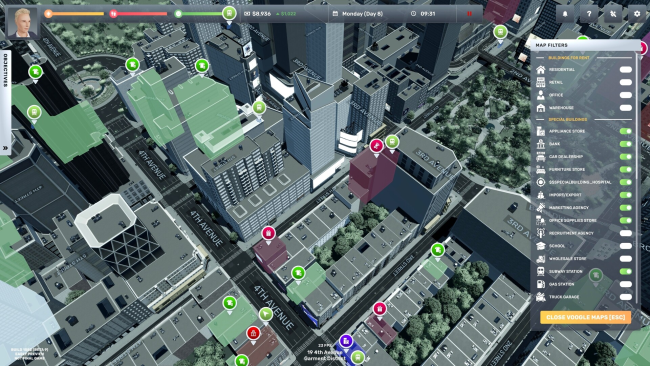

Installation
- Select the <strong>Download</strong> button at the top of this page to open UploadHaven.
- On UploadHaven, wait for any countdown, then select <strong>Free Download</strong>. Optional: UploadHaven Pro for faster downloads.
- When complete, extract the archive to a <strong>Big Ambitions</strong> folder using 7-Zip.
- Open the extracted folder and start the game normally.
- For errors, check <strong>Setup Guide & Troubleshooting</strong> below. Keep your security software enabled.
System Requirements
- Requires a 64-bit processor and operating system
- OS: Windows 10
- Processor: Intel i5 or similar
- Memory: 8 GB RAM
- Graphics: NVIDIA Geforce GTX 960 or similiar (Minimum 2GB vram)
- Storage: 4 GB available space
Setup Guide & Troubleshooting
How do I fix missing DLL errors for Big Ambitions (v0.11.3544)?
After extracting Big Ambitions (v0.11.3544), navigate to the _Redist or _CommonRedist folder inside the game directory and install DirectX, Vcredist, and any other dependencies included.
What should I do if the downloaded file is corrupted?
The full archive is 2.79 GB — make sure your download completed fully before extracting. Use 7-Zip to extract the files. If you still see a "file corrupted" error, re-download and try again.
Why should I run the game as administrator?
Right-click the game executable and select "Run as Administrator" to avoid save file issues and permission errors. This is especially important on the first launch.
How do I update my GPU drivers for this game?
Big Ambitions (v0.11.3544) requires a NVIDIA Geforce GTX 960 or similiar (Minimum 2GB vram) or equivalent. Update your NVIDIA or AMD drivers to the latest version for the best performance.
The game won't launch — what should I try?
Try running in compatibility mode, install the latest DirectX runtime, or install the All-in-One VC Redist Package.
My antivirus is blocking the game — is it safe?
Antivirus false positives are common with pre-installed games. Temporarily pause your antivirus during extraction to prevent it from quarantining game files. You can re-enable it after the extraction completes.