
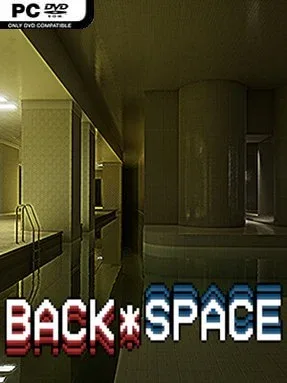
Game Overview
Flickering office lights, deserted shopping corridors, and rooms that feel vaguely familiar form the unsettling heart of BACK*SPACE. Rather than turning liminal-space imagery into a monster chase or survival challenge, it treats these uncanny places as somewhere to quietly inhabit. The mood sits between nostalgic and disorienting, using analog-inspired visuals and sparse sound to make every empty hallway feel like a memory that does not quite belong to you. It is a slow, solitary simulation built for players who enjoy atmosphere more than objectives.
Players begin from a central hub and travel through 16 distinct areas, each offering its own variation on abandoned interiors, maze-like passages, and strangely peaceful dead ends. Navigation is deliberately confusing, but there is no punishment for taking the wrong turn: no enemies, timers, combat, or fail states interrupt the wandering. A flashlight helps cut through darker spaces, while environmental details such as humming fixtures and unstable fluorescent lights guide the eye and sustain the tension. Every level hides a lost object, and collecting them gradually opens access to a final elevator; because item locations change between runs, revisiting areas remains worthwhile. Keyboard-and-mouse and Xbox controller support, adjustable sensitivity, optional VHS effects, and motion-sickness-conscious settings make the experience flexible.
BACK*SPACE stands apart by understanding that liminal horror does not require jump scares to be effective. Its Unreal Engine 5 lighting gives mundane architecture a convincing, often dreamlike presence, though the visual features can demand more from aging graphics cards. The pleasure comes from noticing subtle spatial tricks, finding overlooked routes, and deciding whether a place feels comforting, threatening, or simply empty. Expect roughly 8–12 hours for thorough exploration, with additional replay value for completionists and fans of environmental detail. Players who like The Backrooms-inspired fiction, walking simulators, and the reflective side of games such as Pools should find its restrained approach especially rewarding; action-focused players likely will not.
Installation
- Click the green button below to be redirected to UploadHaven.
- Wait 15 seconds, then hit “Free Download.” (Free downloads may be slower — upgrade to UploadHaven Pro for faster speeds.)
- Once downloaded, right-click the .zip file and choose “Extract to BACK*SPACE.” (You’ll need 7-Zip for this.)
- Open the extracted folder and run the game as administrator.
- Enjoy! 🎮 If you see missing DLL errors, check the <strong>_Redist</strong> folder inside and install what’s needed.
System Requirements
- Requires a 64-bit processor and operating system
- OS: 10 or newer
- Processor: Intel i5 or AMD Ryzen 5 series
- Memory: 8 GB RAM
- Graphics: NVidia RTX 2000 series or higher; Radeon RX5000 series
- DirectX: Version 11
- Storage: 10 GB available space
- Additional Notes: GPU with Ray Tracing support required for Unreal Engine 5 Lumen
Setup Guide & Troubleshooting
How do I fix missing DLL errors for BACK*SPACE?
After extracting BACK*SPACE, navigate to the _Redist or _CommonRedist folder inside the game directory and install DirectX, Vcredist, and any other dependencies included.
What should I do if the downloaded file is corrupted?
The full archive is 9.00 GB — make sure your download completed fully before extracting. Use 7-Zip to extract the files. If you still see a "file corrupted" error, re-download and try again.
Why should I run the game as administrator?
Right-click the game executable and select "Run as Administrator" to avoid save file issues and permission errors. This is especially important on the first launch.
How do I update my GPU drivers for this game?
BACK*SPACE requires a NVidia RTX 2000 series or higher; Radeon RX5000 series or equivalent. Update your NVIDIA or AMD drivers to the latest version for the best performance.
The game won't launch — what should I try?
This game requires Version 11. Try running in compatibility mode, install the latest DirectX runtime, or install the All-in-One VC Redist Package.
My antivirus is blocking the game — is it safe?
Antivirus false positives are common with pre-installed games. Temporarily pause your antivirus during extraction to prevent it from quarantining game files. You can re-enable it after the extraction completes.