
Game Overview
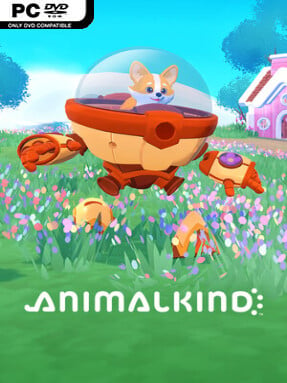
A tiny animal piloting a hulking relic of a machine gives this cozy village builder its best idea: you are cute, but your construction equipment absolutely is not. Animalkind casts players as a corgi, tabby cat, or raccoon settling into a bright open-world wilderness where a modest home can gradually become a busy community. Its mood stays warm and low-pressure, though the abandoned technology and scattered hints of an older civilization add a gentle layer of mystery beneath the colorful presentation.
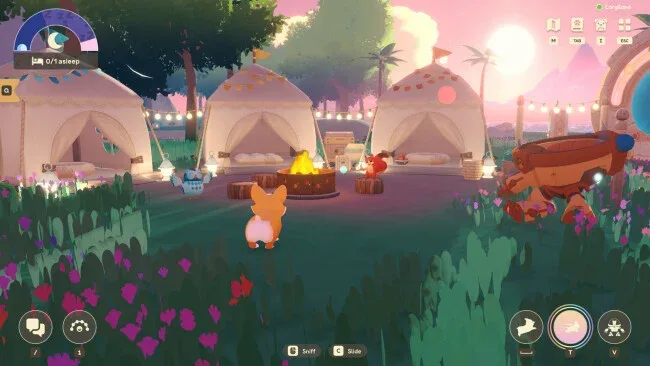
Most of your time goes into gathering materials, crafting useful items, reshaping land, and placing homes, paths, furniture, and decorations to make the island work the way you want. The ancient mech is the practical centerpiece, using its size and upgradeable frame to harvest resources, reach new areas, and handle heavier building jobs than your animal avatar could manage alone. Excursions beyond the home settlement lead to changing wilderness zones with different biomes, supplies, surprises, and animal residents who can be convinced to move in. Farming, cooking, and town planning support a relaxed progression loop rather than demanding combat or strict survival management, while online co-op allows a host and three friends to share a world.
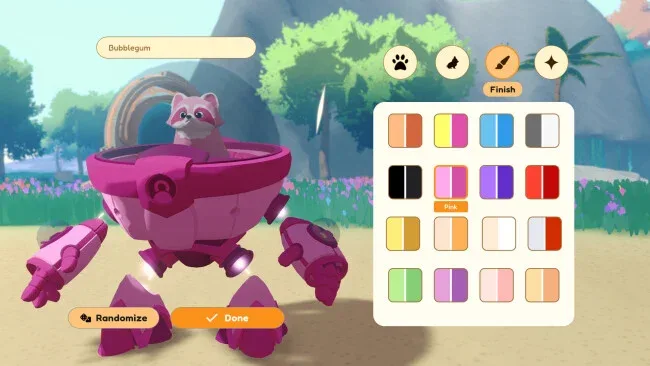
Animalkind stands out by making the mech more than a novelty mount: it is effectively your expandable toolset, traversal vehicle, and construction partner. Character coats, animations, mech paint, stickers, and a large range of decorative options encourage players to make both their villager and settlement feel personal. Anyone who enjoys the routine of Animal Crossing, the freeform construction of My Time at Portia, or cooperative crafting sandboxes should find an inviting fit here, especially if they prefer creativity and communal exploration over high-stakes challenge.
Screenshots
Installation
- Click the green button below to be redirected to UploadHaven.
- Wait 15 seconds, then hit “Free Download.” (Free downloads may be slower — upgrade to UploadHaven Pro for faster speeds.)
- Once downloaded, right-click the .zip file and choose “Extract to Animalkind.” (You’ll need 7-Zip for this.)
- Open the extracted folder and run the game as administrator.
- Enjoy! 🎮 If you see missing DLL errors, check the <strong>_Redist</strong> folder inside and install what’s needed.
System Requirements
- Requires a 64-bit processor and operating system
- OS: Windows 10
- Processor: Intel Core i5 equivalent or higher
- Memory: 6 GB RAM
- Graphics: NVIDIA GeForce GTX 460 or AMD Radeon HD 5770 /w 1GB VRAM
- Network: Broadband Internet connection
- Storage: 10 GB available space
Setup Guide & Troubleshooting
How do I fix missing DLL errors for Animalkind (v0.7.0)?
After extracting Animalkind (v0.7.0), navigate to the _Redist or _CommonRedist folder inside the game directory and install DirectX, Vcredist, and any other dependencies included.
What should I do if the downloaded file is corrupted?
The full archive is 675.95 MB — make sure your download completed fully before extracting. Use 7-Zip to extract the files. If you still see a "file corrupted" error, re-download and try again.
Why should I run the game as administrator?
Right-click the game executable and select "Run as Administrator" to avoid save file issues and permission errors. This is especially important on the first launch.
How do I update my GPU drivers for this game?
Animalkind (v0.7.0) requires a NVIDIA GeForce GTX 460 or AMD Radeon HD 5770 /w 1GB VRAM or equivalent. Update your NVIDIA or AMD drivers to the latest version for the best performance.
The game won't launch — what should I try?
Try running in compatibility mode, install the latest DirectX runtime, or install the All-in-One VC Redist Package.
My antivirus is blocking the game — is it safe?
Antivirus false positives are common with pre-installed games. Temporarily pause your antivirus during extraction to prevent it from quarantining game files. You can re-enable it after the extraction completes.