
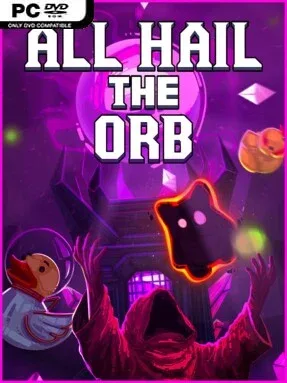
Game Overview
A glowing relic, a growing band of devoted followers, and an unreasonable number of ducks form the heart of All Hail the Orb, a compact pixel-art incremental game built for relaxed sessions. You begin by feeding power into a mysterious orb through simple manual clicking, then gradually turn that humble ritual into a bizarre little operation. The setting borrows the trappings of a dungeon-crawling cult fantasy, but its mood stays cheerful, silly, and deliberately low-pressure rather than ominous. It is less about surviving danger than enjoying the steady transformation of a tiny shrine into a bustling machine of devotion.
Power generation drives everything forward. Early progress asks for hands-on clicking, while recruited cultists eventually handle repetitive work and keep resources flowing on their own. New rooms, systems, and upgrades open as the cult expands, with an ancient dungeon acting as the path through the game’s unlocks and surprises. Exploration does not involve combat, punishing puzzles, or the threat of losing progress, so players can experiment with their setup and let automation do its work at a comfortable pace. The result is a familiar idle-game loop where each new feature reduces busywork while revealing another small goal to chase.
What separates All Hail the Orb from more numbers-heavy clickers is its sense of playful discovery. Its chunky pixel visuals, offbeat cult premise, and recurring duck jokes give the progression a personality that many minimalist idle games lack. The experience appears designed as a short, satisfying climb rather than an endless spreadsheet of optimization, making it easy to finish without treating it like a second job. Fans of idle games such as Cookie Clicker or small-scale automation titles will recognize the appeal, while newcomers benefit from the forgiving structure and absence of fail states. Anyone wanting a gentle, amusing progression game with a clear sense of momentum should find plenty to enjoy in its weird little ritual.
Installation
- Click the green button below to be redirected to UploadHaven.
- Wait 15 seconds, then hit “Free Download.” (Free downloads may be slower — upgrade to UploadHaven Pro for faster speeds.)
- Once downloaded, right-click the .zip file and choose “Extract to All Hail the Orb.” (You’ll need 7-Zip for this.)
- Open the extracted folder and run the game as administrator.
- Enjoy! 🎮 If you see missing DLL errors, check the <strong>_Redist</strong> folder inside and install what’s needed.
System Requirements
- OS: 10
- Processor: 2.7 GHz Dual Core or Better
- Memory: 4 GB RAM
- Graphics: 512MB, OpenGL 3+ compatible
- Storage: 5 GB available space
Setup Guide & Troubleshooting
How do I fix missing DLL errors for All Hail the Orb (v2026.05.04)?
After extracting All Hail the Orb (v2026.05.04), navigate to the _Redist or _CommonRedist folder inside the game directory and install DirectX, Vcredist, and any other dependencies included.
What should I do if the downloaded file is corrupted?
The full archive is 172.20 MB — make sure your download completed fully before extracting. Use 7-Zip to extract the files. If you still see a "file corrupted" error, re-download and try again.
Why should I run the game as administrator?
Right-click the game executable and select "Run as Administrator" to avoid save file issues and permission errors. This is especially important on the first launch.
How do I update my GPU drivers for this game?
All Hail the Orb (v2026.05.04) requires a 512MB, OpenGL 3+ compatible or equivalent. Update your NVIDIA or AMD drivers to the latest version for the best performance.
The game won't launch — what should I try?
Try running in compatibility mode, install the latest DirectX runtime, or install the All-in-One VC Redist Package.
My antivirus is blocking the game — is it safe?
Antivirus false positives are common with pre-installed games. Temporarily pause your antivirus during extraction to prevent it from quarantining game files. You can re-enable it after the extraction completes.