
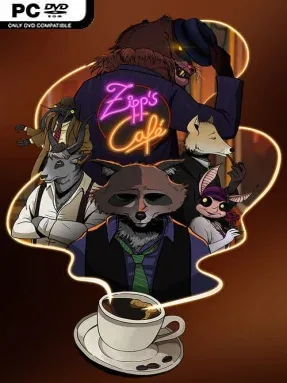
Game Overview
Rain-soaked streets, animal regulars, and the hiss of a coffee machine give this compact management tale its warm-but-wounded personality. Zipp’s Café places you behind the counter of a small eatery on the rough edge of an insect-and-animal metropolis, where every order arrives with a little more emotional baggage than expected. Its noir-flavored story asks whether people can outgrow their mistakes, repair damaged relationships, or simply find a quiet place to belong. The mood balances cozy routine with melancholy, betrayal, romance, and the pressure of making a living one cup at a time.
Most of your time revolves around serving customers through several distinct minigames: brewing unusual coffee and tea orders, preparing strange meals, and handling the less glamorous cleanup afterward. Each activity has its own pace and mechanics, preventing the café work from becoming a single repetitive task. Conversations with five memorable visitors gradually reveal how their lives overlap, pulling the owner into problems that extend far beyond the counter. The experience is deliberately bite-sized rather than an endless business simulator, with story progression and character encounters carrying more weight than deep economic optimization.
What stands out is the contrast between its gentle café presentation and a plot that embraces regret, compromise, and personal consequences. The setting’s mix of insects, animals, and urban noir gives the world a peculiar storybook quality, while the option to switch into monochrome noir visuals adds a fitting stylistic twist. Players looking for the exhaustive systems of Coffee Talk, Diner Bros, or a Tycoon-style restaurant builder may find it slight, but its focused format works well for an evening of narrative-driven comfort food. Zipp’s Café suits players who enjoy quirky indie characters, small-scale service challenges, and bittersweet stories more than those chasing high-score management depth.
Installation
- Click the green button below to be redirected to UploadHaven.
- Wait 15 seconds, then hit “Free Download.” (Free downloads may be slower — upgrade to UploadHaven Pro for faster speeds.)
- Once downloaded, right-click the .zip file and choose “Extract to Zipp's Café.” (You’ll need 7-Zip for this.)
- Open the extracted folder and run the game as administrator.
- Enjoy! 🎮 If you see missing DLL errors, check the <strong>_Redist</strong> folder inside and install what’s needed.
System Requirements
- Requires a 64-bit processor and operating system
- OS: Windows 10 64-bit
- Processor: Dual Core CPU – 2.6ghz
- Memory: 4 GB RAM
- Graphics: 1GB VRAM: Intel HD 3000 GPU / AMD HD 5450 / Nvidia 9400 GT
- Storage: 1300 MB available space
Setup Guide & Troubleshooting
How do I fix missing DLL errors for Zipp’s Café?
After extracting Zipp’s Café, navigate to the _Redist or _CommonRedist folder inside the game directory and install DirectX, Vcredist, and any other dependencies included.
What should I do if the downloaded file is corrupted?
The full archive is 636.15 MB — make sure your download completed fully before extracting. Use 7-Zip to extract the files. If you still see a "file corrupted" error, re-download and try again.
Why should I run the game as administrator?
Right-click the game executable and select "Run as Administrator" to avoid save file issues and permission errors. This is especially important on the first launch.
How do I update my GPU drivers for this game?
Zipp’s Café requires a 1GB VRAM: Intel HD 3000 GPU / AMD HD 5450 / Nvidia 9400 GT or equivalent. Update your NVIDIA or AMD drivers to the latest version for the best performance.
The game won't launch — what should I try?
Try running in compatibility mode, install the latest DirectX runtime, or install the All-in-One VC Redist Package.
My antivirus is blocking the game — is it safe?
Antivirus false positives are common with pre-installed games. Temporarily pause your antivirus during extraction to prevent it from quarantining game files. You can re-enable it after the extraction completes.