

Game Overview
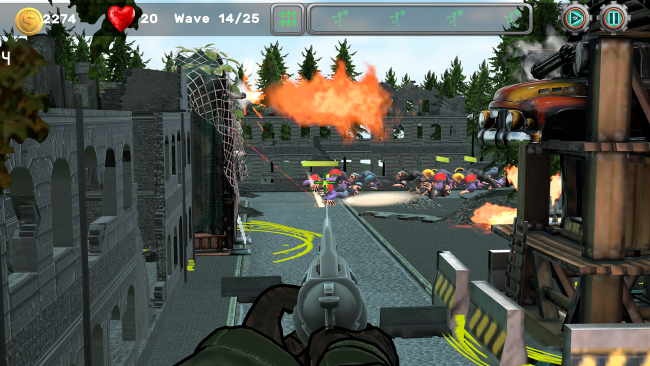
Alien hordes turn every map into a pressure cooker where planning alone is never quite enough. Z-APE: Tower Defense blends the long-view decision-making of a tower defense game with a hands-on first-person shooter, asking players to protect a base from escalating assaults by directing defenses and joining the firefight themselves. Its tone is lean, arcade-like, and action focused: one moment you are judging approach routes and conserving resources, and the next you are personally unloading on enemies that break through the line.
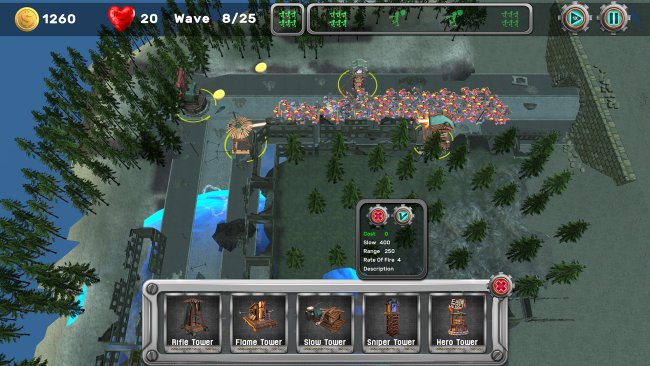
Each match revolves around building a workable defensive network before the attacking waves overwhelm it. Five tower types let you cover lanes, reinforce choke points, and adapt to the layout, while resource management determines how quickly a strong idea becomes a finished fortification. Rather than passively watching towers do the work, you can enter the fight with one of three combat classes and several weapon options, giving you a direct way to rescue a weak flank or push back a crowded route. Ten handcrafted stages provide distinct spaces for experimenting with placements, and three difficulty settings plus an endless mode offer room to sharpen strategies after the standard levels are cleared.
The best idea here is the freedom to swap between commander and soldier without committing to only one role. Fans of Sanctum will recognize the appeal of combining construction with FPS combat, though Z-APE keeps its focus on a compact selection of towers, guns, and maps rather than an enormous progression system. Level knowledge matters, since favorable firing positions and narrow paths can make a modest defense far more effective than expensive, careless building. It suits players who enjoy tower defense but dislike being reduced to a spectator, as well as shooter fans willing to slow down, plan ahead, and treat every wave as a tactical problem rather than a pure aim test.
Installation
- Click the green button below to be redirected to UploadHaven.
- Wait 15 seconds, then hit “Free Download.” (Free downloads may be slower — upgrade to UploadHaven Pro for faster speeds.)
- Once downloaded, right-click the .zip file and choose “Extract to Z-APE: Tower Defense.” (You’ll need 7-Zip for this.)
- Open the extracted folder and run the game as administrator.
- Enjoy! 🎮 If you see missing DLL errors, check the <strong>_Redist</strong> folder inside and install what’s needed.
System Requirements
- OS *: Windows 7
- Processor: Intel i3 4100 E, AMD Ryzen 3 2000
- Memory: 4096 MB RAM
- Graphics: Geforce GTX 750, Radeon RX 550
- DirectX: Version 11
- Storage: 2048 MB available space
Setup Guide & Troubleshooting
How do I fix missing DLL errors for Z-APE: Tower Defense?
After extracting Z-APE: Tower Defense, navigate to the _Redist or _CommonRedist folder inside the game directory and install DirectX, Vcredist, and any other dependencies included.
What should I do if the downloaded file is corrupted?
The full archive is 0.94 GB — make sure your download completed fully before extracting. Use 7-Zip to extract the files. If you still see a "file corrupted" error, re-download and try again.
Why should I run the game as administrator?
Right-click the game executable and select "Run as Administrator" to avoid save file issues and permission errors. This is especially important on the first launch.
How do I update my GPU drivers for this game?
Z-APE: Tower Defense requires a Geforce GTX 750, Radeon RX 550 or equivalent. Update your NVIDIA or AMD drivers to the latest version for the best performance.
The game won't launch — what should I try?
This game requires Version 11. Try running in compatibility mode, install the latest DirectX runtime, or install the All-in-One VC Redist Package.
My antivirus is blocking the game — is it safe?
Antivirus false positives are common with pre-installed games. Temporarily pause your antivirus during extraction to prevent it from quarantining game files. You can re-enable it after the extraction completes.