
Game Overview
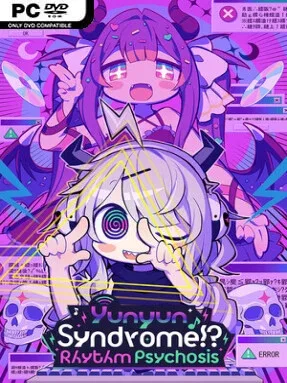
Qtie’s bedroom becomes the launch point for an internet-age fever dream where denpa music, anonymous posting, and obsessive fandom threaten to turn into something far more dangerous. Yunyun Syndrome!? Rhythm Psychosis is a surreal rhythm-adventure built around a shut-in heroine whose fixation on bizarrely cheerful otaku songs pushes her toward online chaos. Its tone swings between candy-colored anime comedy, deliberately uncomfortable dark humor, and a surprisingly sincere look at loneliness and escapism. The result feels less like a conventional idol rhythm game and more like a manic visual novel whose soundtrack is actively melting its protagonist’s brain.
Rhythm stages ask players to keep pace with more than 30 denpa tracks, a style defined by hyperactive hooks, oddball lyrics, relentless energy, and melodies that can be both irritating and impossible to forget. Successful performances advance Qtie’s spiral through message boards, fantasies, and increasingly catastrophic consequences, while narrative scenes reveal fragments of why she has withdrawn from the outside world. The song list mixes original material with cult-favorite tracks from denpa and Touhou-adjacent circles, so the music is not simply background flavor: it is the engine of the entire experience. Multiple endings give the story some replay value, encouraging another run to see whether Qtie’s devotion to the elusive Yunyun can lead somewhere other than total collapse.
What stands out is the commitment to its niche. Nanahira’s performance as Qtie and Haruko Momoi’s presence as Yunyun give the game genuine denpa pedigree, while the visual presentation embraces loud colors, cute character art, intrusive web imagery, and intentionally overwhelming energy. Beneath the absurdity lies a narrative interested in parasocial attachment, online identity, and the ways a private obsession can become self-destructive. Fans of Japanese rhythm games, visual novels, internet-culture satire, and off-kilter titles such as NEEDY STREAMER OVERLOAD should find plenty to enjoy, while players seeking a straightforward or emotionally comfortable music game may find its psychotic pop spectacle too intense.
Installation
- Click the green button below to be redirected to UploadHaven.
- Wait 15 seconds, then hit “Free Download.” (Free downloads may be slower — upgrade to UploadHaven Pro for faster speeds.)
- Once downloaded, right-click the .zip file and choose “Extract to Yunyun Syndrome!? Rhythm Psychosis.” (You’ll need 7-Zip for this.)
- Open the extracted folder and run the game as administrator.
- Enjoy! 🎮 If you see missing DLL errors, check the <strong>_Redist</strong> folder inside and install what’s needed.
System Requirements
- OS: Windows 10, 11 (64bit)
- Processor: Core™ i5-9400
- Memory: 8 GB RAM
- Graphics: GeForce® GTX 1050 Ti 4GB
- Storage: 3 GB available space
Setup Guide & Troubleshooting
How do I fix missing DLL errors for Yunyun Syndrome!? Rhythm Psychosis (v1.1.0 & ALL DLC)?
After extracting Yunyun Syndrome!? Rhythm Psychosis (v1.1.0 & ALL DLC), navigate to the _Redist or _CommonRedist folder inside the game directory and install DirectX, Vcredist, and any other dependencies included.
What should I do if the downloaded file is corrupted?
The full archive is 2.63 GB — make sure your download completed fully before extracting. Use 7-Zip to extract the files. If you still see a "file corrupted" error, re-download and try again.
Why should I run the game as administrator?
Right-click the game executable and select "Run as Administrator" to avoid save file issues and permission errors. This is especially important on the first launch.
How do I update my GPU drivers for this game?
Yunyun Syndrome!? Rhythm Psychosis (v1.1.0 & ALL DLC) requires a GeForce® GTX 1050 Ti 4GB or equivalent. Update your NVIDIA or AMD drivers to the latest version for the best performance.
The game won't launch — what should I try?
Try running in compatibility mode, install the latest DirectX runtime, or install the All-in-One VC Redist Package.
My antivirus is blocking the game — is it safe?
Antivirus false positives are common with pre-installed games. Temporarily pause your antivirus during extraction to prevent it from quarantining game files. You can re-enable it after the extraction completes.