

Game Overview
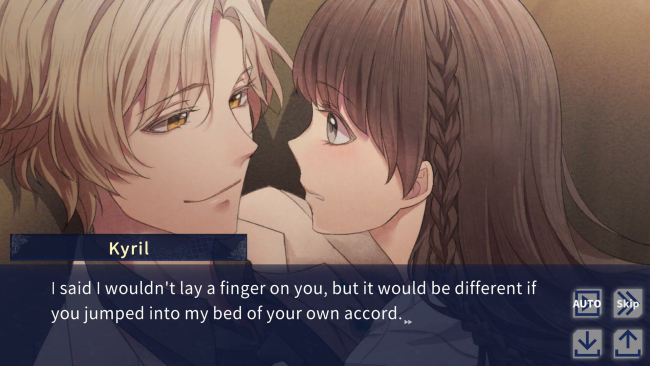
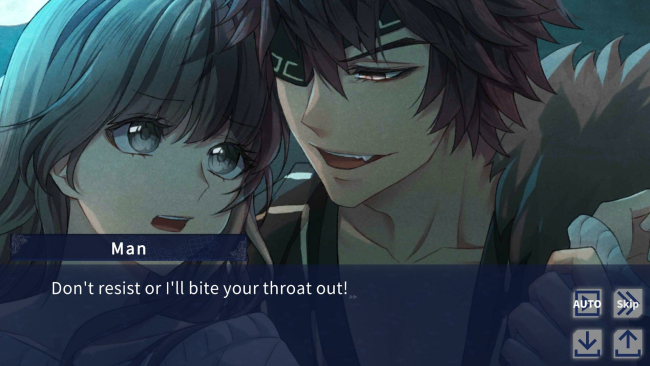
A missed train stop turns an exhausted Tokyo office worker’s fresh start into a supernatural nightmare steeped in Ainu-inspired mythology. Kurumi Oki arrives in Hokkaido hoping for a quieter life, only to awaken at the impossible Kamuy Mosir station, surrounded by strangers in ceremonial dress and creatures that insist she has already died. Her escape leads beyond the land of the dead and into the domain of gods, where danger, romance, and spiritual trials share the same uneasy space. Yukar from the Abyss plays like a compact fantasy visual novel with a darkly romantic edge rather than a combat-heavy adventure.
Reading scenes, making dialogue choices, and following the consequences of those decisions form the heart of the experience. Choices shape Kurumi’s relationships and determine which route and conclusion she reaches, giving the story two major paths with three endings apiece. Each route lasts roughly two hours, making it easy to revisit pivotal scenes and pursue a different fate without the enormous commitment demanded by longer visual novels. Players can also rename the protagonist, while collectible CG illustrations reward route completion and key romantic moments.
The setting stands out most through its use of Ainu language and cultural concepts, supported by an in-game dictionary that lets players check unfamiliar words without leaving the story behind. Rather than treating its mythology as mere background decoration, the narrative frames the gods’ world as beautiful, threatening, and emotionally complicated, especially when forbidden affection enters the picture. The presentation favors expressive anime character art and dramatic story beats over elaborate systems, so expectations should be set accordingly. Fans of choice-driven romance visual novels such as Amnesia or Hakuoki, particularly those who enjoy supernatural folklore and multiple endings, find the most to like here; newcomers also get an approachable, short-form introduction to the genre.
Installation
- Click the green button below to be redirected to UploadHaven.
- Wait 15 seconds, then hit “Free Download.” (Free downloads may be slower — upgrade to UploadHaven Pro for faster speeds.)
- Once downloaded, right-click the .zip file and choose “Extract to Yukar from the Abyss.” (You’ll need 7-Zip for this.)
- Open the extracted folder and run the game as administrator.
- Enjoy! 🎮 If you see missing DLL errors, check the <strong>_Redist</strong> folder inside and install what’s needed.
System Requirements
- OS: Windows 10/11
- Processor: 3GHz Quad Core
- Memory: 4 GB RAM
- Graphics: 64bit Graphics
- Storage: 1 GB available space
Setup Guide & Troubleshooting
How do I fix missing DLL errors for Yukar from the Abyss?
After extracting Yukar from the Abyss, navigate to the _Redist or _CommonRedist folder inside the game directory and install DirectX, Vcredist, and any other dependencies included.
What should I do if the downloaded file is corrupted?
The full archive is 813.81 MB — make sure your download completed fully before extracting. Use 7-Zip to extract the files. If you still see a "file corrupted" error, re-download and try again.
Why should I run the game as administrator?
Right-click the game executable and select "Run as Administrator" to avoid save file issues and permission errors. This is especially important on the first launch.
How do I update my GPU drivers for this game?
Yukar from the Abyss requires a 64bit Graphics or equivalent. Update your NVIDIA or AMD drivers to the latest version for the best performance.
The game won't launch — what should I try?
Try running in compatibility mode, install the latest DirectX runtime, or install the All-in-One VC Redist Package.
My antivirus is blocking the game — is it safe?
Antivirus false positives are common with pre-installed games. Temporarily pause your antivirus during extraction to prevent it from quarantining game files. You can re-enable it after the extraction completes.