
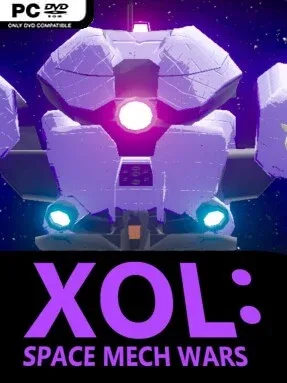
Game Overview
Zero-gravity mech combat gives this compact space shooter its immediate appeal: battles play out around warships, debris fields, and objectives rather than across a flat arena. You pilot a humanoid combat machine through a sci-fi conflict as an inexperienced recruit assigned to a hard-edged strike unit. The tone is brisk and military-minded, with a straightforward wartime story that links a dozen focused missions instead of burying the action under extended dialogue. Its central fantasy is simple and satisfying—flying like a fighter pilot while carrying the weapons and silhouette of a giant robot.
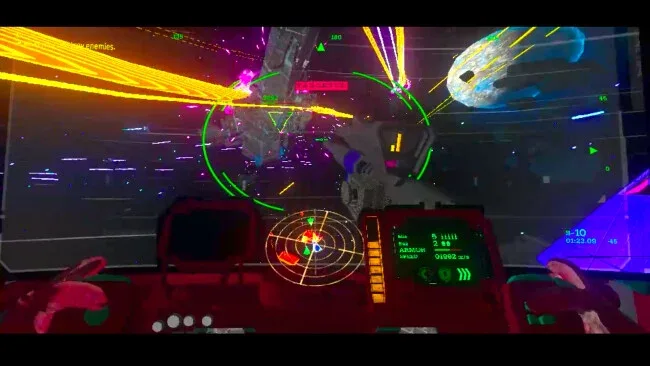
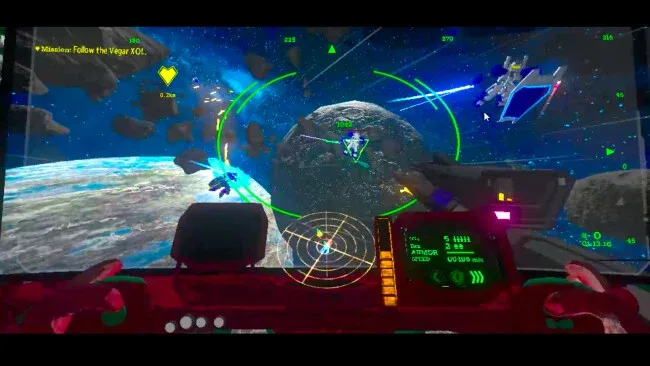
Combat revolves around free 3D movement, momentum management, and keeping hostile units near the center of the screen for automatic target locking and fire. Rather than demanding the pinpoint aiming of a traditional space sim, the controls put more attention on pursuit, evasion, positioning, and reading threats arriving from every angle. Missiles provide reliable ranged pressure, grenades punish groups or confined approaches, beam blades handle close encounters, and shields offer a defensive answer when incoming fire becomes overwhelming. Missions regularly ask you to follow squad orders, protect friendly vessels, hold important locations, or respond to changing battlefield conditions, so survival depends on supporting the wider operation as well as destroying targets.
What stands out is the accessible fusion of arcade flight movement and mech action: it has the all-direction mobility associated with space shooters, but its weapon switching gives encounters a more hands-on brawler feel. The auto-aim system lowers the barrier for newcomers, while inertia still rewards players who learn how to cut off fast targets and avoid drifting into bad angles. There is no deep customization system, so progression comes from improving piloting skill rather than endlessly tuning loadouts. XOL: Space Mech Wars suits players who want a short, direct mech campaign with the energy of an arcade space battle, especially fans of lighter Gundam-style action over simulation-heavy mech games.
Screenshots
Installation
- Click the green button below to be redirected to UploadHaven.
- Wait 15 seconds, then hit “Free Download.” (Free downloads may be slower — upgrade to UploadHaven Pro for faster speeds.)
- Once downloaded, right-click the .zip file and choose “Extract to XOL: Space Mech Wars.” (You’ll need 7-Zip for this.)
- Open the extracted folder and run the game as administrator.
- Enjoy! 🎮 If you see missing DLL errors, check the <strong>_Redist</strong> folder inside and install what’s needed.
System Requirements
- OS *: Windows 7 (SP1+), Windows 10 and Windows 11
- Processor: Core i5 6500T
- Memory: 4 GB RAM
- Graphics: GeForce GTX 950
- Storage: 4 GB available space
- Additional Notes: 720p
Setup Guide & Troubleshooting
How do I fix missing DLL errors for XOL: Space Mech Wars (v1.07)?
After extracting XOL: Space Mech Wars (v1.07), navigate to the _Redist or _CommonRedist folder inside the game directory and install DirectX, Vcredist, and any other dependencies included.
What should I do if the downloaded file is corrupted?
The full archive is 3.65 GB — make sure your download completed fully before extracting. Use 7-Zip to extract the files. If you still see a "file corrupted" error, re-download and try again.
Why should I run the game as administrator?
Right-click the game executable and select "Run as Administrator" to avoid save file issues and permission errors. This is especially important on the first launch.
How do I update my GPU drivers for this game?
XOL: Space Mech Wars (v1.07) requires a GeForce GTX 950 or equivalent. Update your NVIDIA or AMD drivers to the latest version for the best performance.
The game won't launch — what should I try?
Try running in compatibility mode, install the latest DirectX runtime, or install the All-in-One VC Redist Package.
My antivirus is blocking the game — is it safe?
Antivirus false positives are common with pre-installed games. Temporarily pause your antivirus during extraction to prevent it from quarantining game files. You can re-enable it after the extraction completes.