

Game Overview
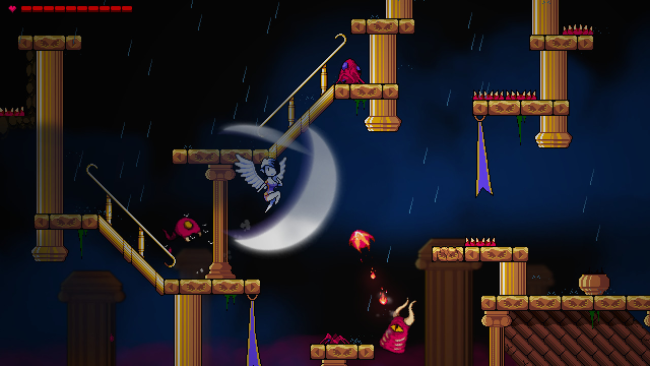
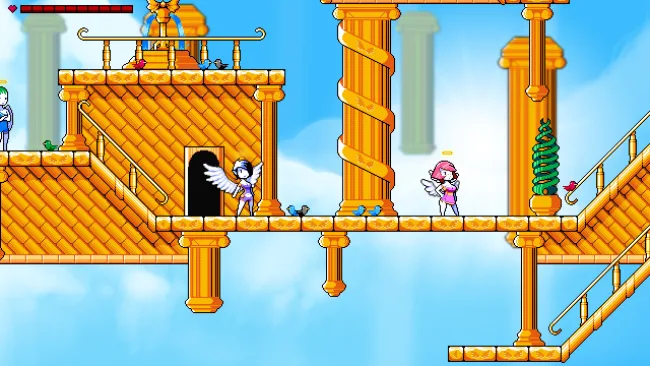
A fallen Demon Lord turns a bright fantasy realm into a lethal gauntlet of lava pits, hostile creatures, and punishing platforming rooms. Wings of Vi casts players as the angel Vi, who hunts Jeh’Oul across dangerous regions after his escape threatens the world. Its tone sits somewhere between SNES-era adventure charm and full-on controller-gripping frustration: deaths come frequently, but the challenge is built around readable hazards and learned execution rather than cheap surprises. Expect a demanding 2D action platformer made for players who enjoy improving through repetition.
Vi runs, jumps, wall-climbs, attacks, and gradually gains tools that expand both combat options and movement routes. Stages mix enemy encounters with careful timing challenges, precision landings, hidden paths, and checkpoint-driven attempts, leading into large boss battles that test pattern recognition as much as reflexes. The campaign offers several difficulty settings, letting newcomers soften the punishment while veterans can enable modifiers that make every mistake matter more. Collectibles, secret challenges, and achievements unlock cosmetic options and additional attacks, while online leaderboards record completion times and death counts across difficulty categories, modifiers, and a dedicated boss-rush mode.
What separates Wings of Vi from many deliberately brutal platformers is its effort to make failure feel earned. Rooms demand accuracy, yet their hazards are visually clear, and the controls support the kind of consistent practice that speedrunners need when shaving seconds off a route. Its detailed pixel art gives each area a distinct identity, from ominous demonic strongholds to mechanical threats, while the enemy and boss roster keeps the journey from becoming a pure jumping exercise. Fans of Cave Story, classic Mega Man, Castlevania, Super Meat Boy, or I Wanna Be the Boshy find familiar DNA here, but the adjustable difficulty makes it approachable for determined platforming newcomers too.
Screenshots
Installation
- Select the <strong>Download</strong> button at the top of this page to open UploadHaven.
- On UploadHaven, wait for any countdown, then select <strong>Free Download</strong>. Optional: UploadHaven Pro for faster downloads.
- When complete, extract the archive to a <strong>Wings Of Vi</strong> folder using 7-Zip.
- Open the extracted folder and start the game normally.
- For errors, check <strong>Setup Guide & Troubleshooting</strong> below. Keep your security software enabled.
System Requirements
- OS: Windows XP or later
- Processor: Pentium 4 or higher
- Memory: 256 MB RAM
- Graphics: 256 MB or higher
- DirectX: Version 9.0
- Storage: 80 MB available space
- Sound Card: Any
Setup Guide & Troubleshooting
How do I fix missing DLL errors for Wings Of Vi (v1.14)?
After extracting Wings Of Vi (v1.14), navigate to the _Redist or _CommonRedist folder inside the game directory and install DirectX, Vcredist, and any other dependencies included.
What should I do if the downloaded file is corrupted?
The full archive is 134.07 MB — make sure your download completed fully before extracting. Use 7-Zip to extract the files. If you still see a "file corrupted" error, re-download and try again.
Why should I run the game as administrator?
Right-click the game executable and select "Run as Administrator" to avoid save file issues and permission errors. This is especially important on the first launch.
How do I update my GPU drivers for this game?
Wings Of Vi (v1.14) requires a 256 MB or higher or equivalent. Update your NVIDIA or AMD drivers to the latest version for the best performance.
The game won't launch — what should I try?
This game requires Version 9.0. Try running in compatibility mode, install the latest DirectX runtime, or install the All-in-One VC Redist Package.
My antivirus is blocking the game — is it safe?
Antivirus false positives are common with pre-installed games. Temporarily pause your antivirus during extraction to prevent it from quarantining game files. You can re-enable it after the extraction completes.