

Game Overview
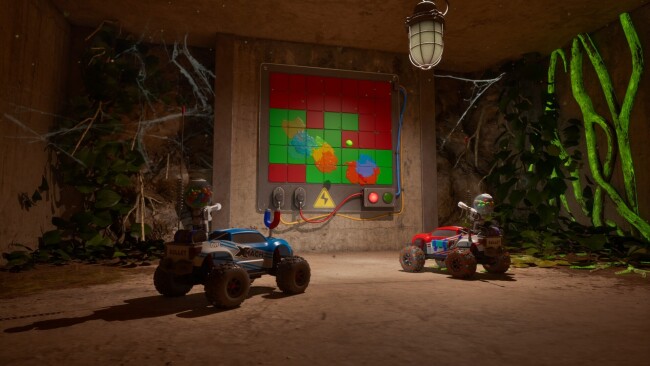
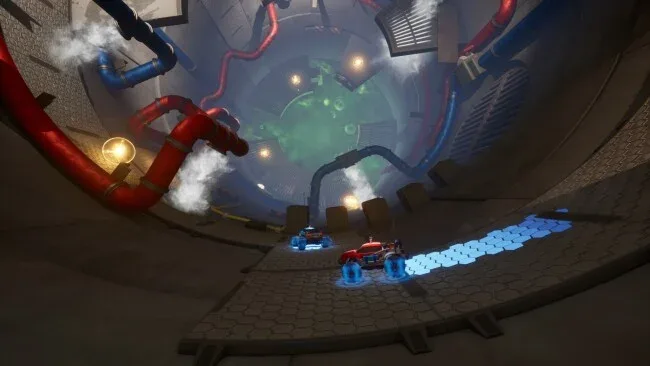
Two tiny RC cars turn an ordinary house into a towering cooperative obstacle course, where shelves become highways and desk clutter becomes dangerous terrain. WheelMates follows two friends responding to a professor’s distress call, only to find his sprawling home laboratory abandoned and full of unanswered questions. Its tone stays playful and curious rather than frightening, but the mystery gives every newly opened room a reason to investigate. The appeal comes from sharing a compact adventure built around communication, experimentation, and the pleasure of seeing familiar household spaces from toy-sized perspectives.
Players steer their customized cars through maze-like rooms, searching for routes across oversized furniture, around improvised hazards, and behind hidden passages. Progress depends on two-player coordination: one vehicle may need to hold a mechanism, create a path, or time a move correctly while the other takes advantage of the opening. New equipment steadily expands what the pair can do, including swinging ropes for crossing gaps, magnetic wheels for unusual surfaces, and magnetic grabs for interacting with objects from a distance. Rather than simply handing out upgrades, the game uses each gadget to reshape exploration, encouraging teams to revisit earlier spaces and approach obstacles with new options.
The miniature scale is its strongest feature, lending the laboratory a toybox sense of wonder while making everyday objects feel like elaborate platforming challenges. WheelMates also avoids treating co-op as an optional extra, since its puzzles are designed around both players having distinct responsibilities and staying in sync. Fans of It Takes Two, Unravel Two, or the cooperative puzzle sections of LEGO games should recognize the emphasis on teamwork, though the RC-car movement gives it its own playful identity. It suits friends looking for a relaxed but engaged shared campaign, especially players who enjoy poking into side areas, unlocking secrets, and gradually mapping an interconnected house.
Screenshots
Installation
- Click the green button below to be redirected to UploadHaven.
- Wait 15 seconds, then hit “Free Download.” (Free downloads may be slower — upgrade to UploadHaven Pro for faster speeds.)
- Once downloaded, right-click the .zip file and choose “Extract to WheelMates.” (You’ll need 7-Zip for this.)
- Open the extracted folder and run the game as administrator.
- Enjoy! 🎮 If you see missing DLL errors, check the <strong>_Redist</strong> folder inside and install what’s needed.
System Requirements
- Requires a 64-bit processor and operating system
- OS: 64 bit Windows 10/11
- Processor: Intel Core i5-8400 / AMD Ryzen 5 2600
- Memory: 8 GB RAM
- Graphics: NVIDIA GTX 1060 / AMD RX 580
- DirectX: Version 12
- Network: Broadband Internet connection
- Storage: 15 GB available space
Setup Guide & Troubleshooting
How do I fix missing DLL errors for WheelMates (v2026.09.07 & ALL DLC)?
After extracting WheelMates (v2026.09.07 & ALL DLC), navigate to the _Redist or _CommonRedist folder inside the game directory and install DirectX, Vcredist, and any other dependencies included.
What should I do if the downloaded file is corrupted?
The full archive is 6.55 GB — make sure your download completed fully before extracting. Use 7-Zip to extract the files. If you still see a "file corrupted" error, re-download and try again.
Why should I run the game as administrator?
Right-click the game executable and select "Run as Administrator" to avoid save file issues and permission errors. This is especially important on the first launch.
How do I update my GPU drivers for this game?
WheelMates (v2026.09.07 & ALL DLC) requires a NVIDIA GTX 1060 / AMD RX 580 or equivalent. Update your NVIDIA or AMD drivers to the latest version for the best performance.
The game won't launch — what should I try?
This game requires Version 12. Try running in compatibility mode, install the latest DirectX runtime, or install the All-in-One VC Redist Package.
My antivirus is blocking the game — is it safe?
Antivirus false positives are common with pre-installed games. Temporarily pause your antivirus during extraction to prevent it from quarantining game files. You can re-enable it after the extraction completes.