
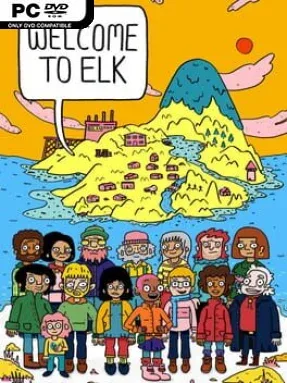
Game Overview
A remote island without internet becomes the setting for a surprisingly lively narrative adventure about grief, community, and the strange comedy people find in bad times. Welcome to Elk follows Frigg, a young carpenter who leaves a hectic city routine for an apprenticeship in an isolated settlement that initially seems painfully quiet. Instead, she encounters a place overflowing with eccentric locals, hard-luck histories, bizarre customs, and secrets that turn everyday island life into something unforgettable. Its tone shifts easily from absurd humor to genuine sadness, treating both as inseparable parts of the same human experience.
Frigg spends much of the adventure talking with residents, moving between hand-drawn locations, and helping solve the personal problems that emerge from their stories. Interactions are punctuated by compact minigames designed around individual scenes rather than a single repeating system, so one moment may be playful and ridiculous while the next carries real emotional weight. The pacing favors conversation and observation over demanding puzzles or action, making it more like an interactive collection of recollections than a traditional challenge-heavy adventure. Progress comes from meeting people, following their tangled relationships, and watching Frigg gradually understand why Elk is anything but boring.
What makes the experience stand apart is its unusual relationship with reality: its fictionalized episodes draw from stories shared by real people, and the game openly acknowledges the storytellers behind them. The colorful, almost storybook visual style keeps the island approachable, but it never completely softens subjects such as loss, isolation, addiction, and death. That balance gives the game a personality closer to Kentucky Route Zero or Night in the Woods than a conventional point-and-click comedy, though it is shorter and more direct than either. Players looking for combat, deep puzzles, or branching role-playing systems may find it slight, but anyone who values distinctive writing, offbeat characters, and heartfelt interactive storytelling should give Elk a visit.
Installation
- Click the green button below to be redirected to UploadHaven.
- Wait 15 seconds, then hit “Free Download.” (Free downloads may be slower — upgrade to UploadHaven Pro for faster speeds.)
- Once downloaded, right-click the .zip file and choose “Extract to Welcome to Elk.” (You’ll need 7-Zip for this.)
- Open the extracted folder and run the game as administrator.
- Enjoy! 🎮 If you see missing DLL errors, check the <strong>_Redist</strong> folder inside and install what’s needed.
System Requirements
- Requires a 64-bit processor and operating system
- OS: Windows 7
- Processor: Intel i5 Quad-Core
- Memory: 4 GB RAM
- Graphics: Intel HD 4000
- Storage: 2 GB available space
Setup Guide & Troubleshooting
How do I fix missing DLL errors for Welcome to Elk (v1.22.2)?
After extracting Welcome to Elk (v1.22.2), navigate to the _Redist or _CommonRedist folder inside the game directory and install DirectX, Vcredist, and any other dependencies included.
What should I do if the downloaded file is corrupted?
The full archive is 0.94 GB — make sure your download completed fully before extracting. Use 7-Zip to extract the files. If you still see a "file corrupted" error, re-download and try again.
Why should I run the game as administrator?
Right-click the game executable and select "Run as Administrator" to avoid save file issues and permission errors. This is especially important on the first launch.
How do I update my GPU drivers for this game?
Welcome to Elk (v1.22.2) requires a Intel HD 4000 or equivalent. Update your NVIDIA or AMD drivers to the latest version for the best performance.
The game won't launch — what should I try?
Try running in compatibility mode, install the latest DirectX runtime, or install the All-in-One VC Redist Package.
My antivirus is blocking the game — is it safe?
Antivirus false positives are common with pre-installed games. Temporarily pause your antivirus during extraction to prevent it from quarantining game files. You can re-enable it after the extraction completes.