
Game Overview
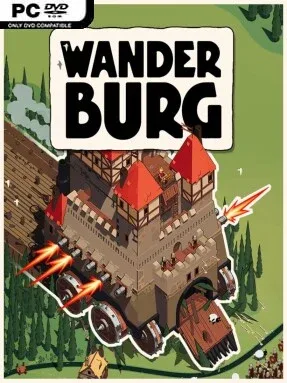
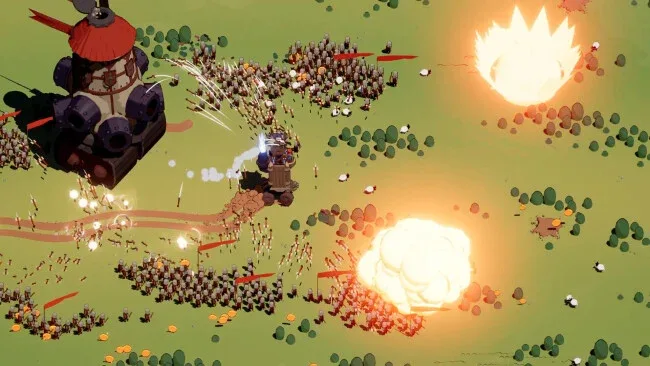
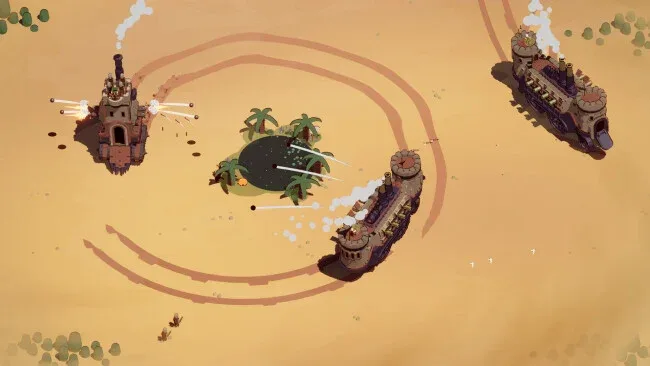
A castle on wheels turns the usual medieval power fantasy into a frantic survival race where size is everything. Wanderburg is a minimalist action roguelike built around mobile fortresses that rumble across open countryside, swallowing weaker targets before larger predators can do the same to them. Its tone is gleefully absurd rather than historically grounded: wizard towers sit beside steam-powered weapons, bicycle cavalry charge into chaos, and landbound citadels trade artillery volleys like battleships. Each run begins with a vulnerable little keep and rapidly becomes a fight to construct an unstoppable fortress.
Movement and consumption drive the loop, as players steer their castle toward villages, livestock, and undersized enemy strongholds to gain the mass and resources needed to survive. Victories against tougher castles push a run forward while the surrounding threat escalates, making positioning and build choices as important as raw aggression. New sections attach directly to the fortress, allowing cannons, magical artillery, explosives, siege equipment, and supporting structures to create different combat roles. Defeat does not end progression entirely, since unlockable modules, artifacts, captains, and vehicles steadily broaden the pool of potential builds for later attempts; mouse, keyboard, and controller support also make the brisk action easy to pick up.
Its strongest idea is the physical sense of expansion: upgrades are not abstract menu numbers, but visible pieces of a ramshackle war machine growing across the map. That modular approach encourages the kind of broken combinations roguelike fans enjoy, whether a player favors overwhelming gunfire, strange magic, explosive pressure, or a mixed arsenal. The clean presentation keeps attention on movement, target priority, and the escalating spectacle of fortresses devouring one another, rather than burying the action in complicated simulation systems. Wanderburg suits players who like the build experimentation of Vampire Survivors or Brotato but want more direct steering and a distinctive medieval-machine aesthetic, while genre veterans should appreciate its emphasis on discovering powerful synergies.
Screenshots
Installation
- Click the green button below to be redirected to UploadHaven.
- Wait 15 seconds, then hit “Free Download.” (Free downloads may be slower — upgrade to UploadHaven Pro for faster speeds.)
- Once downloaded, right-click the .zip file and choose “Extract to Wanderburg.” (You’ll need 7-Zip for this.)
- Open the extracted folder and run the game as administrator.
- Enjoy! 🎮 If you see missing DLL errors, check the <strong>_Redist</strong> folder inside and install what’s needed.
System Requirements
- Requires a 64-bit processor and operating system
- OS: Windows 10 or higher
- Processor: Intel Core i5 10th Generation
- Memory: 4 GB RAM
- Graphics: Nvidia Geforce GTX 1660 ti
- DirectX: Version 11
- Storage: 2 GB available space
Setup Guide & Troubleshooting
How do I fix missing DLL errors for Wanderburg (v0.9.5)?
After extracting Wanderburg (v0.9.5), navigate to the _Redist or _CommonRedist folder inside the game directory and install DirectX, Vcredist, and any other dependencies included.
What should I do if the downloaded file is corrupted?
The full archive is 581.93 MB — make sure your download completed fully before extracting. Use 7-Zip to extract the files. If you still see a "file corrupted" error, re-download and try again.
Why should I run the game as administrator?
Right-click the game executable and select "Run as Administrator" to avoid save file issues and permission errors. This is especially important on the first launch.
How do I update my GPU drivers for this game?
Wanderburg (v0.9.5) requires a Nvidia Geforce GTX 1660 ti or equivalent. Update your NVIDIA or AMD drivers to the latest version for the best performance.
The game won't launch — what should I try?
This game requires Version 11. Try running in compatibility mode, install the latest DirectX runtime, or install the All-in-One VC Redist Package.
My antivirus is blocking the game — is it safe?
Antivirus false positives are common with pre-installed games. Temporarily pause your antivirus during extraction to prevent it from quarantining game files. You can re-enable it after the extraction completes.