
Game Overview
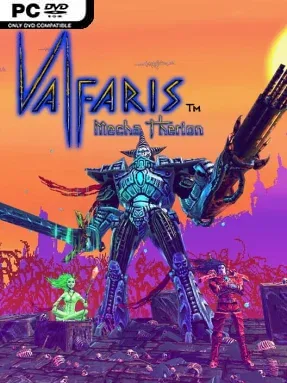
A blood-soaked heavy-metal shooter sends Therion back into the void, this time strapped inside a towering war machine built for one purpose: reducing alien horrors to molten scrap. Valfaris: Mecha Therion trades the original game’s run-and-gun platforming for a blistering 2.5D side-scrolling shoot ’em up, while keeping its grotesque biomechanical imagery, savage attitude, and cosmic revenge story intact. Therion continues his pursuit of the tyrannical Lord Vroll across hostile worlds crawling with mutated enemies, colossal bosses, and enough visual debris to make every battlefield feel dangerous. The tone is gloriously excessive rather than solemn, with screaming weapons, skulls, metal plating, and a soundtrack-ready sense of destruction.
Combat revolves around piloting Mecha Therion through horizontally scrolling stages, weaving through projectile storms while pouring fire into enemies from several weapon categories. Destroyer weapons provide primary ranged damage, Melee tools let the mech carve through threats at close range, and Auxiliary gear adds tactical options that can change how a loadout handles crowded encounters or tougher targets. Enemies drop Blood Metal, a resource used to improve weapons and add-ons, so survival and aggressive play directly feed into stronger builds. The game encourages experimentation instead of locking players into a single optimal arsenal; choosing complementary guns, blades, and support equipment matters as enemy formations and bosses demand sharp reactions.
Its strongest hook is the way a familiar retro shooter format is fused with Valfaris’s extravagant dark-fantasy sci-fi aesthetic. The action feels closer to a heavy-metal take on classics such as R-Type or Thunder Force than a conventional platform shooter, with a focus on positioning, weapon synergy, and learning enemy patterns rather than exploration. Crisp pixel art gives every creature and explosion a nasty physical weight, while the 2.5D presentation adds depth without sacrificing arcade readability. It suits shoot ’em up veterans chasing demanding score-and-survival action, but the upgrade system and flexible equipment also give determined newcomers room to grow into its brutality.
Installation
- Click the green button below to be redirected to UploadHaven.
- Wait 15 seconds, then hit “Free Download.” (Free downloads may be slower — upgrade to UploadHaven Pro for faster speeds.)
- Once downloaded, right-click the .zip file and choose “Extract to Valfaris: Mecha Therion.” (You’ll need 7-Zip for this.)
- Open the extracted folder and run the game as administrator.
- Enjoy! 🎮 If you see missing DLL errors, check the <strong>_Redist</strong> folder inside and install what’s needed.
System Requirements
- OS: Windows 10
- Processor: 2.4GHZ Quad Core Processor Or Higher
- Memory: 4 GB RAM
- Graphics: GTX 970 or equivalent
- Storage: 2 GB available space
Setup Guide & Troubleshooting
How do I fix missing DLL errors for Valfaris: Mecha Therion (v1.0.3)?
After extracting Valfaris: Mecha Therion (v1.0.3), navigate to the _Redist or _CommonRedist folder inside the game directory and install DirectX, Vcredist, and any other dependencies included.
What should I do if the downloaded file is corrupted?
The full archive is 752.23 MB — make sure your download completed fully before extracting. Use 7-Zip to extract the files. If you still see a "file corrupted" error, re-download and try again.
Why should I run the game as administrator?
Right-click the game executable and select "Run as Administrator" to avoid save file issues and permission errors. This is especially important on the first launch.
How do I update my GPU drivers for this game?
Valfaris: Mecha Therion (v1.0.3) requires a GTX 970 or equivalent or equivalent. Update your NVIDIA or AMD drivers to the latest version for the best performance.
The game won't launch — what should I try?
Try running in compatibility mode, install the latest DirectX runtime, or install the All-in-One VC Redist Package.
My antivirus is blocking the game — is it safe?
Antivirus false positives are common with pre-installed games. Temporarily pause your antivirus during extraction to prevent it from quarantining game files. You can re-enable it after the extraction completes.