
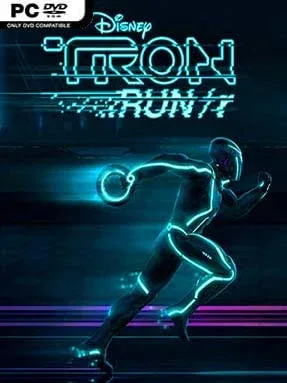
Game Overview
Neon speed and ruthless precision define this arcade runner set inside Disney’s iconic digital frontier. TRON RUN/r turns the familiar Grid into a side-scrolling obstacle course where every glowing wall, collapsing platform, and hostile program demands instant reactions. Its atmosphere is sleek, aggressive, and deliberately overwhelming, backed by a pounding electronic soundtrack that makes each close escape feel like a miniature victory. Rather than retelling the films, it uses the TRON setting as a striking frame for score-chasing action.
Players race through compact stages on foot or aboard a Light Cycle, swapping between modes built around different kinds of danger. Runner sequences focus on jumping gaps, sliding under hazards, wall-running, and hurling identity discs at enemies, while cycle sections demand careful lane changes and sharp turns to avoid trails, barriers, and incoming threats. Levels are designed for repetition: finishing a course is only the first goal, since cleaner routes, better timing, and fewer crashes improve performance. Unlockable suits, cycles, and power-ups let players tailor their look and loadout, while 32 structured levels provide escalating challenges before the endless STREAM mode starts remixing obstacles and modes into a survival test.
What separates TRON RUN/r from more relaxed endless runners is its willingness to be punishing. The pace resembles a mix of Bit.Trip Runner’s timing-heavy platforming and the visual intensity of a futuristic arcade racer, with failures arriving quickly but restarts happening fast enough to encourage another try. STREAM mode gives competitive players a strong reason to return, as leaderboard runs become contests of concentration and memorization rather than simple luck. Giorgio Moroder, Raney Shockne, and a roster of electronic remix artists give the presentation real identity, making every stage feel wired directly into a neon nightclub. It suits arcade veterans, score attackers, and TRON fans best; newcomers can enjoy the spectacle, but should expect a steep learning curve.
Installation
- Click the green button below to be redirected to UploadHaven.
- Wait 15 seconds, then hit “Free Download.” (Free downloads may be slower — upgrade to UploadHaven Pro for faster speeds.)
- Once downloaded, right-click the .zip file and choose “Extract to TRON RUN/r.” (You’ll need 7-Zip for this.)
- Open the extracted folder and run the game as administrator.
- Enjoy! 🎮 If you see missing DLL errors, check the <strong>_Redist</strong> folder inside and install what’s needed.
System Requirements
- OS: Windows 7/8 64-bit
- Processor: Quad-core Intel or AMD, 2.5 GHz or faster
- Memory: 8 GB RAM
- Graphics: DirectX 11 compatible graphics card
- DirectX: Version 11
- Storage: 5 GB available space
Setup Guide & Troubleshooting
How do I fix missing DLL errors for TRON RUN/r?
After extracting TRON RUN/r, navigate to the _Redist or _CommonRedist folder inside the game directory and install DirectX, Vcredist, and any other dependencies included.
What should I do if the downloaded file is corrupted?
The full archive is 3.71 GB — make sure your download completed fully before extracting. Use 7-Zip to extract the files. If you still see a "file corrupted" error, re-download and try again.
Why should I run the game as administrator?
Right-click the game executable and select "Run as Administrator" to avoid save file issues and permission errors. This is especially important on the first launch.
How do I update my GPU drivers for this game?
TRON RUN/r requires a DirectX 11 compatible graphics card or equivalent. Update your NVIDIA or AMD drivers to the latest version for the best performance.
The game won't launch — what should I try?
This game requires Version 11. Try running in compatibility mode, install the latest DirectX runtime, or install the All-in-One VC Redist Package.
My antivirus is blocking the game — is it safe?
Antivirus false positives are common with pre-installed games. Temporarily pause your antivirus during extraction to prevent it from quarantining game files. You can re-enable it after the extraction completes.