
Toy Tanks Cover Art

Toy Tanks

INDIE 254.59 MB v1.20

Game Overview

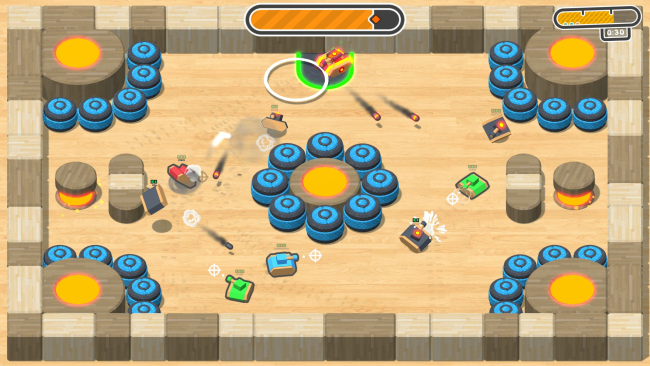
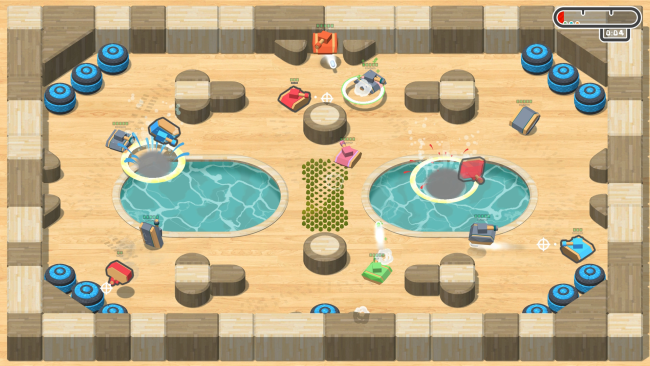
Tiny armored vehicles turn every arena into a chaotic physics playground, where jumping, dashing, and firing are as important as lining up a shot. Toy Tanks is an indie 3D action game with an intentionally playful, toy-box feel, but its momentum-driven battles demand quick reactions and smart positioning. Campaign stages pack hazards, platforms, obstacles, and enemy encounters into compact handcrafted challenges rather than aiming for military simulation. The tone stays light and accessible, making every spectacular crash, launch, or badly timed dash part of the fun.

The main campaign sends players through more than 50 levels while gradually opening access to a roster of over six tanks hidden along the way. Each encounter revolves around maneuvering a physics-based vehicle through environmental threats, finding advantageous firing angles, and using mobility to avoid becoming an easy target. Tanks can leap and burst forward with a dash, giving combat a more vertical, arcade-like rhythm than traditional tank games. Local multiplayer supports up to four people, turning the same fundamentals into couch battles where players can compete against friends or AI-controlled opposition. PvP modes also allow modifiers such as adjusted firing speed, letting groups tune matches toward frantic projectile spam or more deliberate duels.

Its strongest feature is the combination of a structured solo campaign, accessible local competition, and a level editor that extends the package beyond its built-in content. Players can assemble custom maps with different arena sizes, blocks, vehicles, interactive devices, and dangerous traps, then create challenges tailored to their group’s preferred brand of chaos. That makes Toy Tanks feel closer to a miniature party-game take on arena shooters than a serious armored combat simulator, with echoes of couch multiplayer classics and physics-heavy indie brawlers. It suits newcomers because the controls are easy to grasp, while players who enjoy mastering movement, map layouts, and custom creations have plenty of room to keep experimenting.

Installation

  1. Click the green button below to be redirected to UploadHaven.
  2. Wait 15 seconds, then hit “Free Download.” (Free downloads may be slower — upgrade to UploadHaven Pro for faster speeds.)
  3. Once downloaded, right-click the .zip file and choose “Extract to Toy Tanks.” (You’ll need 7-Zip for this.)
  4. Open the extracted folder and run the game as administrator.
  5. Enjoy! 🎮 If you see missing DLL errors, check the <strong>_Redist</strong> folder inside and install what’s needed.

System Requirements

  • Requires a 64-bit processor and operating system
  • OS: Windows 7
  • Processor: Intel i3 with 1.0GHz (or equivalent)
  • Memory: 1024 MB RAM
  • Graphics: Intel Integrated Graphics
  • Storage: 1 GB available space

Setup Guide & Troubleshooting

How do I fix missing DLL errors for Toy Tanks (v1.20)?

After extracting Toy Tanks (v1.20), navigate to the _Redist or _CommonRedist folder inside the game directory and install DirectX, Vcredist, and any other dependencies included.

What should I do if the downloaded file is corrupted?

The full archive is 254.59 MB — make sure your download completed fully before extracting. Use 7-Zip to extract the files. If you still see a "file corrupted" error, re-download and try again.

Why should I run the game as administrator?

Right-click the game executable and select "Run as Administrator" to avoid save file issues and permission errors. This is especially important on the first launch.

How do I update my GPU drivers for this game?

Toy Tanks (v1.20) requires a Intel Integrated Graphics or equivalent. Update your NVIDIA or AMD drivers to the latest version for the best performance.

The game won't launch — what should I try?

Try running in compatibility mode, install the latest DirectX runtime, or install the All-in-One VC Redist Package.

My antivirus is blocking the game — is it safe?

Antivirus false positives are common with pre-installed games. Temporarily pause your antivirus during extraction to prevent it from quarantining game files. You can re-enable it after the extraction completes.

Need more help? Browse our FAQ & Troubleshooting Guide for solutions to common issues.
Looking for something else? Explore all games on Steam Unlocked