
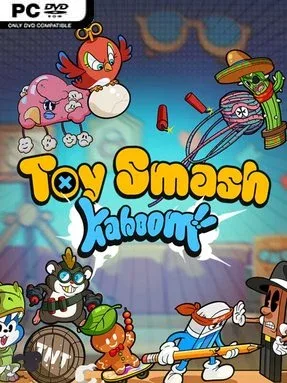
Game Overview
A childhood tabletop becomes a surprisingly cutthroat battlefield where plastic heroes, creepy dolls, tiny monsters, and improvised weapons fight for control. Toy Smash Kaboom! is an indie tactical battler built around the satisfying idea of turning forgotten toys into an evolving army, then using their odd abilities to wreck an opponent’s formation. Its storybook presentation gives the action a nostalgic, slightly eerie personality, with memories of Fred and his friends gradually filling in the emotional backdrop. Beneath the colorful toy-box look, though, the tone is competitive and strategic rather than purely cute.
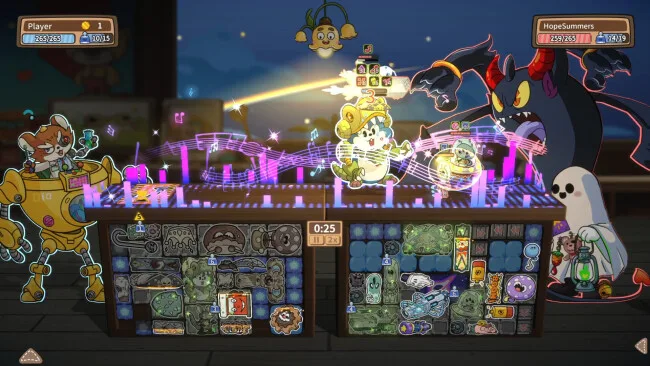
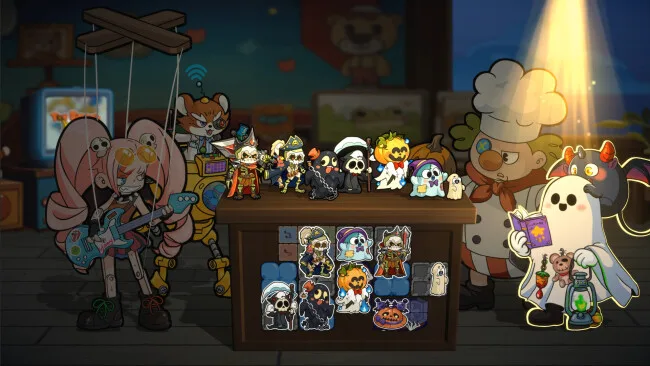
Matches revolve around placing units in limited slots, combining matching toys into stronger forms, and making every position count before the fighting begins. Battles play out through collisions, knockback effects, summons, traps, spells, and equipment, so a well-timed shove can be as valuable as a high-damage attacker. More than 400 toys, including summonable units, class powers, traps, magic items, and weapons, create plenty of room to build around a preferred plan. Captains further define each army: Doll Chef favors defensive board control, Dr. Hamster floods the table with small bodies, Puppet Musician influences the pace of combat, and Naughty Andy leans into curses and sinister minions.
The strongest appeal lies in how much tactical variety it draws from a deliberately small tabletop arena. Rather than relying only on stat upgrades, it rewards players who recognize placement patterns, anticipate enemy movement, and use traps to reverse a losing exchange. Asynchronous PvP lets you test builds against other players’ recorded lineups without needing to schedule live matches, making it well suited to short but thoughtful sessions. The ability to turn friends into customizable armed “Game Buddies” adds a playful personal flourish, while unlockable skins, achievements, and story memories give long-term goals beyond rank climbing. Players who enjoy the merging and positioning tension of auto-battlers, but want more direct control over board manipulation, should find plenty to experiment with here.
Screenshots
Installation
- Select the <strong>Download</strong> button at the top of this page to open UploadHaven.
- On UploadHaven, wait for any countdown, then select <strong>Free Download</strong>. Optional: UploadHaven Pro for faster downloads.
- When complete, extract the archive to a <strong>Toy Smash Kaboom!</strong> folder using 7-Zip.
- Open the extracted folder and start the game normally.
- For errors, check <strong>Setup Guide & Troubleshooting</strong> below. Keep your security software enabled.
System Requirements
- Requires a 64-bit processor and operating system
- OS: Windows 10 64bit / Windows 11 64bit
- Processor: Intel Core i5-750, 2.67 GHz / AMD A12-9800, 3.80 GHz
- Memory: 8 GB RAM
- Graphics: NVIDIA GeForce GTX 750 Ti, 2 GB / AMD Radeon HD 7770, 2 GB / Intel Iris Plus
- Storage: 1 GB available space
Setup Guide & Troubleshooting
How do I fix missing DLL errors for Toy Smash Kaboom! (v1.0.10)?
After extracting Toy Smash Kaboom! (v1.0.10), navigate to the _Redist or _CommonRedist folder inside the game directory and install DirectX, Vcredist, and any other dependencies included.
What should I do if the downloaded file is corrupted?
The full archive is 470.18 MB — make sure your download completed fully before extracting. Use 7-Zip to extract the files. If you still see a "file corrupted" error, re-download and try again.
Why should I run the game as administrator?
Right-click the game executable and select "Run as Administrator" to avoid save file issues and permission errors. This is especially important on the first launch.
How do I update my GPU drivers for this game?
Toy Smash Kaboom! (v1.0.10) requires a NVIDIA GeForce GTX 750 Ti, 2 GB / AMD Radeon HD 7770, 2 GB / Intel Iris Plus or equivalent. Update your NVIDIA or AMD drivers to the latest version for the best performance.
The game won't launch — what should I try?
Try running in compatibility mode, install the latest DirectX runtime, or install the All-in-One VC Redist Package.
My antivirus is blocking the game — is it safe?
Antivirus false positives are common with pre-installed games. Temporarily pause your antivirus during extraction to prevent it from quarantining game files. You can re-enable it after the extraction completes.