
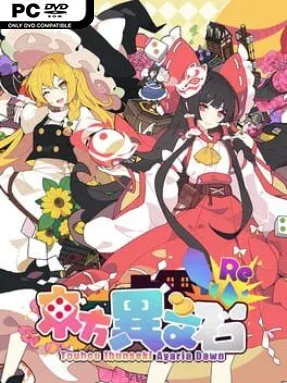
Game Overview
A bizarre crystal crash-lands in Gensokyo, and Reimu Hakurei answers the resulting chaos with an unexpectedly practical plan: make a fortune through real estate. Touhou Ibunseki – Ayaria Dawn: ReCreation turns the familiar bullet-hell universe into a competitive board-game contest built around property purchases, route planning, and financial sabotage. The tone is knowingly absurd, leaning into the idea that shrine maidens, magicians, and youkai can settle supernatural incidents with cash rather than danmaku. It is a colorful Touhou spin-off that trades reflex shooting for tactical turns and the satisfaction of bankrupting rivals.
Matches play like a more complicated Monopoly board, as players roll and spend resources to travel across map spaces, acquire land, develop holdings, and extract money from anyone unfortunate enough to visit. Money is only part of the economy: crystals are another key resource, while dice rolls consume SP, forcing players to consider whether a big movement play is worth its cost. Weather conditions substantially alter mobility, so reading the board and exploiting changing routes matters as much as owning expensive districts. Opponents blocking the way can be challenged in fights, with victories bringing rewards and losses potentially sending a character to hospital, adding a direct confrontation system to the usual property-game pressure.
More than 20 playable characters drawn from the Touhou 6 through 11 era bring individual skills and voiced personalities, while original boss characters keep the roster from feeling like a simple fan-service checklist. Over ten official boards offer different layouts and tactical problems, and the included level editor gives players room to build their own property battles instead of exhausting the preset maps. Its double-currency economy, weather manipulation, and combat make it more involved than a standard digital Monopoly adaptation, even when luck still influences each match. Fans of Touhou, Fortune Street, or board games where alliances collapse over a single bad roll will find the strongest fit, while newcomers should expect a quirky but systems-heavy strategy game rather than a traditional Touhou shooter.
Installation
- Click the green button below to be redirected to UploadHaven.
- Wait 15 seconds, then hit “Free Download.” (Free downloads may be slower — upgrade to UploadHaven Pro for faster speeds.)
- Once downloaded, right-click the .zip file and choose “Extract to Touhou Ibunseki - Ayaria Dawn: ReCreation.” (You’ll need 7-Zip for this.)
- Open the extracted folder and run the game as administrator.
- Enjoy! 🎮 If you see missing DLL errors, check the <strong>_Redist</strong> folder inside and install what’s needed.
System Requirements
- OS: Windows 7
- Processor: Intel Core i5 3210M
- Memory: 4 GB RAM
- Graphics: AMD Radeon HD 7600M
- DirectX: Version 9.0c
- Storage: 1 GB available space
Setup Guide & Troubleshooting
How do I fix missing DLL errors for Touhou Ibunseki – Ayaria Dawn: ReCreation (v1.1.0)?
After extracting Touhou Ibunseki – Ayaria Dawn: ReCreation (v1.1.0), navigate to the _Redist or _CommonRedist folder inside the game directory and install DirectX, Vcredist, and any other dependencies included.
What should I do if the downloaded file is corrupted?
The full archive is 800.30 MB — make sure your download completed fully before extracting. Use 7-Zip to extract the files. If you still see a "file corrupted" error, re-download and try again.
Why should I run the game as administrator?
Right-click the game executable and select "Run as Administrator" to avoid save file issues and permission errors. This is especially important on the first launch.
How do I update my GPU drivers for this game?
Touhou Ibunseki – Ayaria Dawn: ReCreation (v1.1.0) requires a AMD Radeon HD 7600M or equivalent. Update your NVIDIA or AMD drivers to the latest version for the best performance.
The game won't launch — what should I try?
This game requires Version 9.0c. Try running in compatibility mode, install the latest DirectX runtime, or install the All-in-One VC Redist Package.
My antivirus is blocking the game — is it safe?
Antivirus false positives are common with pre-installed games. Temporarily pause your antivirus during extraction to prevent it from quarantining game files. You can re-enable it after the extraction completes.