
Game Overview
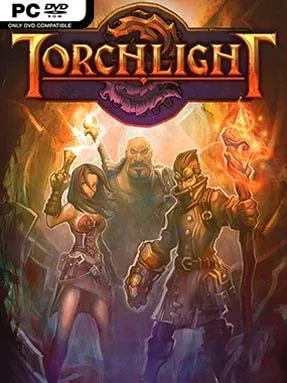
Torchlight is a fast, colorful action RPG built around the simple pleasure of clearing monster-filled floors, grabbing ever-better loot, and pushing deeper into a sprawling dungeon. Its tone is lighter and more approachable than Diablo's gothic misery, but corruption, strange machinery, and increasingly dangerous underground ruins give the adventure real momentum. A single trip below town can become a long, satisfying hunt for the next rare weapon, spell, or piece of armor.
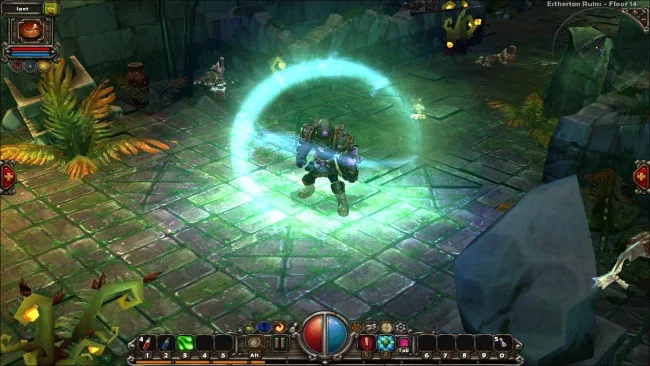
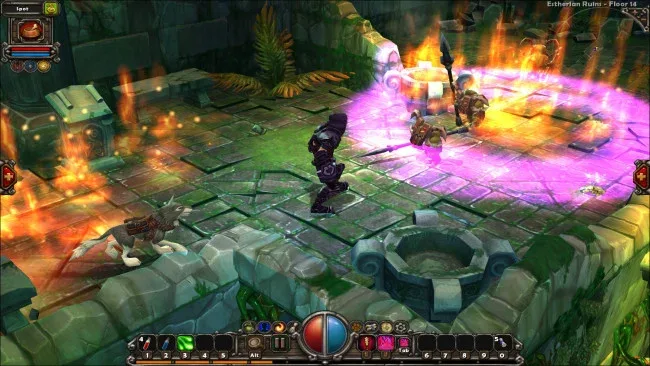
Players choose between the hard-hitting Destroyer, spell-focused Alchemist, and ranged Vanquisher, then shape their hero through skill trees, equipment bonuses, and class-specific abilities. Combat is click-driven and immediate: mow through crowds, manage mana or resource costs, use cooldown powers, and constantly compare piles of randomized gear. The town acts as a reliable reset point for selling loot, buying supplies, enchanting items, and accepting quests, while a loyal pet fights beside you and can return to town with an overloaded inventory. Fishing adds a quirky diversion, and certain catches let pets temporarily transform into far more dangerous creatures; on later runs, retired heroes can also pass a special heirloom item to a new character.
Torchlight stands out through its brisk pacing, charming exaggerated art style, and dungeon randomization that keeps repeat expeditions from feeling identical. Seven distinct environments, shifting enemy groups, secret-filled side areas, and a steady flood of item drops make it ideal for players who enjoy loot-driven progression without the commitment of a huge open world. TorchED gives dedicated PC players the tools to alter content and build their own adventures, adding substantial value beyond the campaign. Fans of Diablo, Fate, and early dungeon-crawling ARPGs find a polished, welcoming alternative here, while genre veterans can raise the difficulty and chase stronger builds.
Screenshots
Installation
- Select the <strong>Download</strong> button at the top of this page to open UploadHaven.
- On UploadHaven, wait for any countdown, then select <strong>Free Download</strong>. Optional: UploadHaven Pro for faster downloads.
- When complete, extract the archive to a <strong>Torchlight</strong> folder using 7-Zip.
- Open the extracted folder and start the game normally.
- For errors, check <strong>Setup Guide & Troubleshooting</strong> below. Keep your security software enabled.
System Requirements
- OS: Windows XP or later
- Processor: x86-compatible 800MHz processor
- Memory: 512MB
- Graphics: DirectX-compatible 3D graphics with at least 64MB of addressable memory (such as an ATI Radeon 7200, NVIDIA GeForce 2, or Intel GMA 950)
- DirectX®: 9.0c
- Hard Drive: 400MB
Setup Guide & Troubleshooting
Is Torchlight completely free?
Yes. The listing shows a Free license, and the download is 412.58 MB from the provided UploadHaven link.
How do I install Torchlight?
Select the Download button to open UploadHaven, wait for any countdown, then select Free Download. Extract the archive to a Torchlight folder using 7-Zip, open the extracted folder, and start the game normally.
What are the system requirements for Torchlight?
Windows XP or later, an x86-compatible 800MHz processor, 512MB of memory, DirectX-compatible 3D graphics with at least 64MB of addressable memory, DirectX 9.0c, and 400MB of hard drive space.
What version of Torchlight is this?
The source data does not specify a version number, so treat the build as an estimated current release and confirm the version inside the game after you install.
Can I mod Torchlight?
Yes. TorchED gives PC players the tools to alter content and build their own adventures beyond the campaign.