
Game Overview
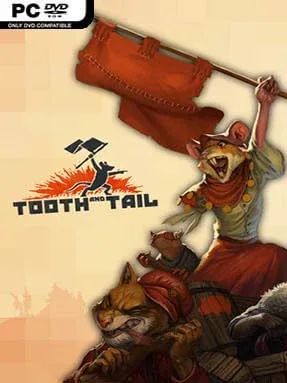
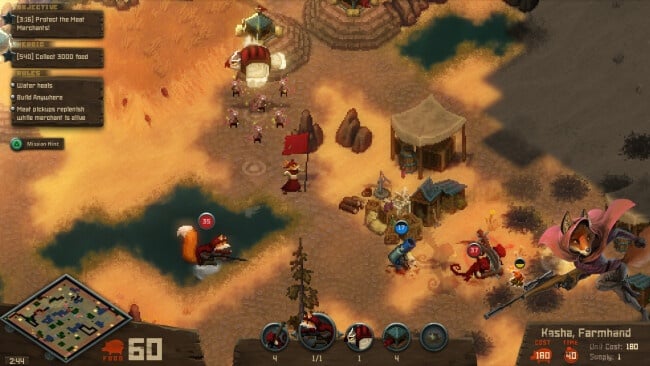
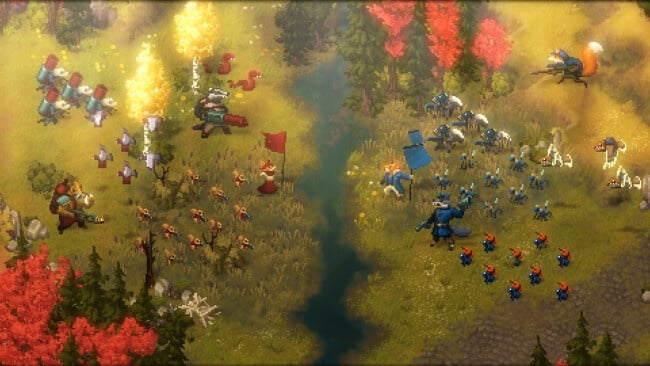
A brutal civil war over food turns this compact real-time strategy game into a surprisingly sharp tale of class conflict, hunger, and animal revolution. Tooth and Tail trades futuristic armies for flamethrowing boars, poison-launching skunks, machine-gun foxes, and owls that drop troops from above, all rendered in chunky, expressive pixel art. Its world is grim but never humorless, presenting each faction’s struggle with a storybook style that makes the violence feel both absurd and unsettling.
Matches revolve around a commander unit carrying a flag, which you use to place structures, rally troops, capture resource-producing gristmills, and direct the fight without the usual maze of RTS menus. Food-like grist funds buildings and units, while a limited population cap forces meaningful choices between cheap infantry, defensive emplacements, elite beasts, and air support. The streamlined controls make it playable with a controller and keep battles fast, but winning still demands map awareness, smart unit counters, and good timing around reinforcements. A substantial single-player campaign introduces the Longcoats, Commonfolk, KSR, and Civilized through missions with changing objectives, while online competitive modes, replays, and local split-screen support extend its lifespan.
What separates Tooth and Tail from traditional strategy games is its willingness to cut away micromanagement without stripping out tactical depth. Randomized map layouts and army compositions push players to adapt rather than memorize build orders, and the flag-based command system makes every advance feel personal and risky. Its matches are far shorter and more immediately readable than those in StarCraft or Age of Empires, yet they retain the tension of defending resource points and committing to a decisive push. It suits RTS newcomers who find keyboard-heavy strategy games intimidating, but experienced players can still dig into faction matchups, economy pressure, and competitive play.
Installation
- Click the green button below to be redirected to UploadHaven.
- Wait 15 seconds, then hit “Free Download.” (Free downloads may be slower — upgrade to UploadHaven Pro for faster speeds.)
- Once downloaded, right-click the .zip file and choose “Extract to Tooth And Tail.” (You’ll need 7-Zip for this.)
- Open the extracted folder and run the game as administrator.
- Enjoy! 🎮 If you see missing DLL errors, check the <strong>_Redist</strong> folder inside and install what’s needed.
System Requirements
- OS: Windows 7 or later
- Processor: 2 GHz Processor
- Memory: 2 GB RAM
- Graphics: 1.5gb video card required to play. nVidia 320M, Radeon HD 2400, Intel HD 3000 or better
- DirectX: Version 11
- Storage: 2 GB available space
Setup Guide & Troubleshooting
How do I fix missing DLL errors for Tooth And Tail (v1.7.0.1)?
After extracting Tooth And Tail (v1.7.0.1), navigate to the _Redist or _CommonRedist folder inside the game directory and install DirectX, Vcredist, and any other dependencies included.
What should I do if the downloaded file is corrupted?
The full archive is 505.30 MB — make sure your download completed fully before extracting. Use 7-Zip to extract the files. If you still see a "file corrupted" error, re-download and try again.
Why should I run the game as administrator?
Right-click the game executable and select "Run as Administrator" to avoid save file issues and permission errors. This is especially important on the first launch.
How do I update my GPU drivers for this game?
Tooth And Tail (v1.7.0.1) requires a 1.5gb video card required to play. nVidia 320M, Radeon HD 2400, Intel HD 3000 or better or equivalent. Update your NVIDIA or AMD drivers to the latest version for the best performance.
The game won't launch — what should I try?
This game requires Version 11. Try running in compatibility mode, install the latest DirectX runtime, or install the All-in-One VC Redist Package.
My antivirus is blocking the game — is it safe?
Antivirus false positives are common with pre-installed games. Temporarily pause your antivirus during extraction to prevent it from quarantining game files. You can re-enable it after the extraction completes.