
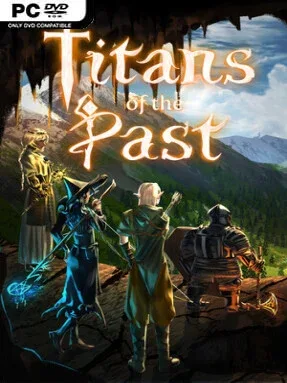
Game Overview
Handcrafted corridors, hidden switches, and lethal encounters give this first-person dungeon crawler the stubborn, methodical feel of a 1990s computer RPG. Titans of the Past builds its adventure around a fully customizable party of Adventurers, letting players choose their portraits, voices, races, classes, and personalities before sending them into dangerous ruins. Its mood is deliberately unforgiving rather than cinematic: every unopened door may conceal treasure, a puzzle, or a fight that punishes careless positioning. The result feels like a modern-made love letter to Wizardry, Eye of the Beholder, and Legend of Grimrock, with enough systems to keep character-build enthusiasts busy.
Exploration unfolds in real time, but the world waits whenever players pause, allowing battles to reward both quick reactions and deliberate command decisions. Parties develop through a dense RPG framework of attributes, class abilities, resistances, critical-hit effects, cooldown changes, and skills that rise through several mastery tiers. Spells, equipment, and party composition matter, while randomized loot uses Diablo-style modifiers, crafting, and rerolling to turn every weapon or piece of armor into a potential build-defining find. Outside fixed dungeons, procedural expeditions present branching choices between combat zones, merchants, rest stops, and unpredictable events, with modifiers changing both the danger and the payout.
Town building provides a larger progression layer beyond individual runs, as recovered resources unlock further classes, races, gear, skills, and crafting possibilities. Randomized enemy placements, secrets, and mutators keep familiar dungeon layouts from becoming completely predictable, while the large pool of classes, races, spells, perks, and items encourages repeated experiments. Its presentation comes from a small independent team and favors functional old-school atmosphere over lavish modern spectacle, including a mix of custom and externally sourced visual assets. Veterans who miss grid-based party RPGs and enjoy optimizing numbers will find the strongest appeal here, while newcomers should arrive ready to learn complex systems and accept a demanding pace.
Installation
- Click the green button below to be redirected to UploadHaven.
- Wait 15 seconds, then hit “Free Download.” (Free downloads may be slower — upgrade to UploadHaven Pro for faster speeds.)
- Once downloaded, right-click the .zip file and choose “Extract to Titans of the Past.” (You’ll need 7-Zip for this.)
- Open the extracted folder and run the game as administrator.
- Enjoy! 🎮 If you see missing DLL errors, check the <strong>_Redist</strong> folder inside and install what’s needed.
System Requirements
- OS: Windows 10
- Processor: Just your average processor, even office notebooks can run it. i5 is enough
- Memory: 8 GB RAM
- Graphics: Our Nvidia 1060 can run it well
- Storage: 4 GB available space
Setup Guide & Troubleshooting
How do I fix missing DLL errors for Titans of the Past?
After extracting Titans of the Past, navigate to the _Redist or _CommonRedist folder inside the game directory and install DirectX, Vcredist, and any other dependencies included.
What should I do if the downloaded file is corrupted?
The full archive is 3.14 GB — make sure your download completed fully before extracting. Use 7-Zip to extract the files. If you still see a "file corrupted" error, re-download and try again.
Why should I run the game as administrator?
Right-click the game executable and select "Run as Administrator" to avoid save file issues and permission errors. This is especially important on the first launch.
How do I update my GPU drivers for this game?
Titans of the Past requires a Our Nvidia 1060 can run it well or equivalent. Update your NVIDIA or AMD drivers to the latest version for the best performance.
The game won't launch — what should I try?
Try running in compatibility mode, install the latest DirectX runtime, or install the All-in-One VC Redist Package.
My antivirus is blocking the game — is it safe?
Antivirus false positives are common with pre-installed games. Temporarily pause your antivirus during extraction to prevent it from quarantining game files. You can re-enable it after the extraction completes.