
Game Overview
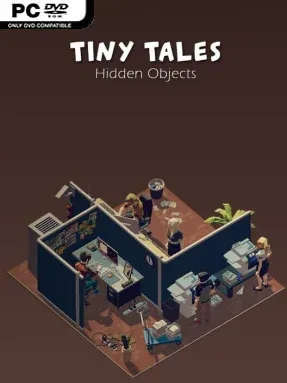
Small, carefully arranged dioramas turn a familiar spot-the-difference formula into a calm 3D observation challenge. Tiny Tales: Hidden Objects trades frantic timers and busy interfaces for low-poly scenes that invite players to slow down, inspect every corner, and notice what has changed. Each of its 60 miniature environments suggests a self-contained story, whether the clues lie in a missing prop, an altered decoration, or a detail that no longer fits the scene. The mood is deliberately gentle and cozy, making it an easy choice for a quiet break rather than an intense brain-teaser.
Players compare objects and details within each three-dimensional tableau, searching for a selected number of differences before moving on. Three challenge settings ask for three, five, or seven changes, so newcomers can keep the sessions breezy while sharper-eyed puzzle fans can demand more careful scrutiny. There are no countdowns or failure states pushing the pace, and the hint system offers a nudge when a particular alteration proves too well hidden. Progress comes from clearing scenes and uncovering their tiny visual narratives, while selectable music tracks let players tailor the background atmosphere to something more soothing, playful, or focused.
Its strongest idea is the use of depth: rather than presenting another flat picture comparison, Tiny Tales frames each puzzle as a compact 3D set with a little personality. The simple geometric art style keeps objects readable without losing the charm of a handcrafted miniature world, and the changing scene themes help prevent the format from feeling overly repetitive across 60 stages. It is not designed for players seeking elaborate adventure mechanics, competitive scoring, or demanding logic puzzles; its appeal sits closer to casual hidden-object collections and relaxing mobile-style observation games, but without the usual time pressure. Fans of low-stakes puzzlers, cozy visuals, and find-the-difference challenges will find a pleasant, accessible game that works equally well for short sessions or an unhurried evening.
Installation
- Click the green button below to be redirected to UploadHaven.
- Wait 15 seconds, then hit “Free Download.” (Free downloads may be slower — upgrade to UploadHaven Pro for faster speeds.)
- Once downloaded, right-click the .zip file and choose “Extract to Tiny Tales: Hidden Objects.” (You’ll need 7-Zip for this.)
- Open the extracted folder and run the game as administrator.
- Enjoy! 🎮 If you see missing DLL errors, check the <strong>_Redist</strong> folder inside and install what’s needed.
System Requirements
- OS: Windows 10+
- Processor: i3
- Memory: 4 GB RAM
- Graphics: 2 GRAM
- Storage: 4 GB available space
Setup Guide & Troubleshooting
How do I fix missing DLL errors for Tiny Tales: Hidden Objects?
After extracting Tiny Tales: Hidden Objects, navigate to the _Redist or _CommonRedist folder inside the game directory and install DirectX, Vcredist, and any other dependencies included.
What should I do if the downloaded file is corrupted?
The full archive is 755.13 MB — make sure your download completed fully before extracting. Use 7-Zip to extract the files. If you still see a "file corrupted" error, re-download and try again.
Why should I run the game as administrator?
Right-click the game executable and select "Run as Administrator" to avoid save file issues and permission errors. This is especially important on the first launch.
How do I update my GPU drivers for this game?
Tiny Tales: Hidden Objects requires a 2 GRAM or equivalent. Update your NVIDIA or AMD drivers to the latest version for the best performance.
The game won't launch — what should I try?
Try running in compatibility mode, install the latest DirectX runtime, or install the All-in-One VC Redist Package.
My antivirus is blocking the game — is it safe?
Antivirus false positives are common with pre-installed games. Temporarily pause your antivirus during extraction to prevent it from quarantining game files. You can re-enable it after the extraction completes.