

Game Overview
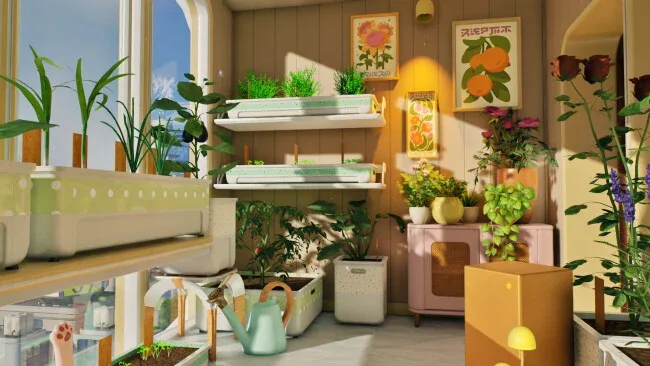
An overlooked apartment becomes the setting for a gentle gardening sim where every spare corner can become productive. Tiny Eden begins with only a few containers, limited light, and a small selection of seeds, but gradually turns into a lush personal refuge filled with edible plants, flowers, and handmade décor. Its tone is calm and domestic rather than demanding, focusing on the quiet satisfaction of watching a seedling mature into something useful. The surrounding city provides a distant backdrop while the real journey takes place room by room, from cramped windowsills to a rooftop greenhouse.
Tiny Eden revolves around understanding what each crop needs before it can thrive. Players choose suitable pots, create soil blends from materials such as compost and sand, place plants according to temperature and sunlight, then manage watering and weeds as the garden develops. Harvested ingredients move into the kitchen, where they become meals and baked goods that residents buy, creating the money loop needed to purchase upgrades, unlock additional rooms, and broaden the available plant collection. Expansion is gradual and tangible: balconies, indoor spaces, and eventually higher growing areas all become part of an increasingly elaborate cultivation setup.
What makes the concept appealing is how gardening, interior decorating, and light economic progression feed into one another instead of feeling like disconnected systems. Plant placement is both practical and aesthetic, letting a thriving berry patch sit beside furniture or turning an ordinary room into a carefully arranged conservatory. A resident cat adds a small layer of home-life charm, reinforcing the idea that the apartment is a lived-in space rather than a sterile management board. Fans of the relaxed routine in games like Stardew Valley, Garden Life, or House Flipper should find plenty to enjoy here, especially if they prefer low-pressure planning and cozy visual customization over fast reflexes or punishing survival mechanics.
Screenshots

Installation
- Click the green button below to be redirected to UploadHaven.
- Wait 15 seconds, then hit “Free Download.” (Free downloads may be slower — upgrade to UploadHaven Pro for faster speeds.)
- Once downloaded, right-click the .zip file and choose “Extract to Tiny Eden.” (You’ll need 7-Zip for this.)
- Open the extracted folder and run the game as administrator.
- Enjoy! 🎮 If you see missing DLL errors, check the <strong>_Redist</strong> folder inside and install what’s needed.
System Requirements
- Requires a 64-bit processor and operating system
- OS: Windows 10 64-bit
- Processor: Intel Core i5-8400 / AMD Ryzen 3 3100
- Memory: 16 GB RAM
- Graphics: NVIDIA GeForce GTX 1050 Ti 4 GB / AMD Radeon RX 570 4 GB
- DirectX: Version 12
- Storage: 10 GB available space
- Additional Notes: For comfortable experience it is highly recommended to use SSD
Setup Guide & Troubleshooting
How do I fix missing DLL errors for Tiny Eden?
After extracting Tiny Eden, navigate to the _Redist or _CommonRedist folder inside the game directory and install DirectX, Vcredist, and any other dependencies included.
What should I do if the downloaded file is corrupted?
The full archive is 3.38 GB — make sure your download completed fully before extracting. Use 7-Zip to extract the files. If you still see a "file corrupted" error, re-download and try again.
Why should I run the game as administrator?
Right-click the game executable and select "Run as Administrator" to avoid save file issues and permission errors. This is especially important on the first launch.
How do I update my GPU drivers for this game?
Tiny Eden requires a NVIDIA GeForce GTX 1050 Ti 4 GB / AMD Radeon RX 570 4 GB or equivalent. Update your NVIDIA or AMD drivers to the latest version for the best performance.
The game won't launch — what should I try?
This game requires Version 12. Try running in compatibility mode, install the latest DirectX runtime, or install the All-in-One VC Redist Package.
My antivirus is blocking the game — is it safe?
Antivirus false positives are common with pre-installed games. Temporarily pause your antivirus during extraction to prevent it from quarantining game files. You can re-enable it after the extraction completes.