
Game Overview
A failing escape pod becomes a hostile little universe where every wire, fuse, filter, and circuit board can decide whether you live another minute. Tin Can is a first-person survival simulation that trades monsters and gunfights for the far more convincing terror of an oxygen system refusing to start while your suit power drains away. Stranded in deep space after a catastrophic event, you work through malfunctioning machinery with limited tools, scarce replacement parts, and no guarantee that the next repair will hold. The mood is tense, technical, and deliberately claustrophobic, making even a blinking warning light feel like a crisis.
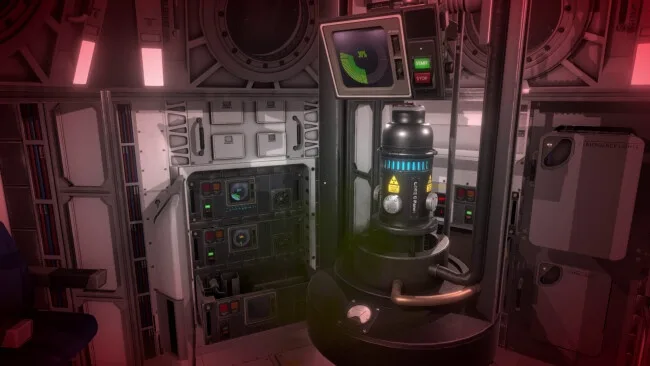
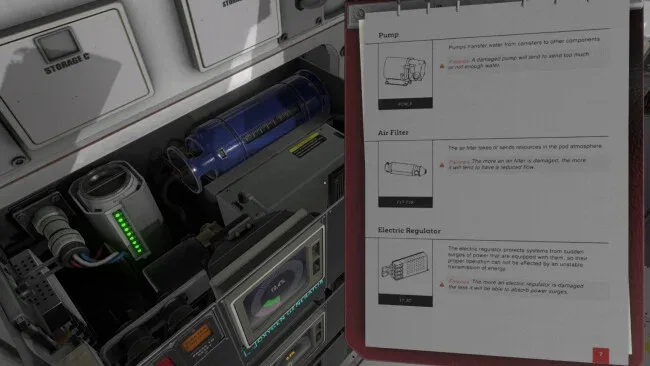
Survival revolves around physically inspecting and maintaining the pod’s interconnected systems. You open panels, remove damaged components, test fuses, replace batteries, reconnect cables, monitor atmospheric conditions, and learn how machinery such as oxygen production, carbon-dioxide scrubbing, power management, heating, and communications affects everything else. Problems rarely arrive alone: a dead battery can disable life support, a faulty sensor can hide a worsening emergency, and an incorrect repair can waste the precious time needed to diagnose the real issue. Runs demand close attention to onboard manuals and system feedback rather than quick reflexes, while the demanding design encourages experimentation, careful planning, and learning from fatal mistakes.
What makes Tin Can memorable is its commitment to component-level problem solving. Instead of pressing a button marked “repair,” you handle the individual parts that make a spacefaring life-support system function, giving the game a hands-on authenticity closer to a spacecraft maintenance sim than a conventional survival title. The compact setting also works in its favor, turning a small pod into a dense mechanical puzzle box where familiarity slowly replaces panic. Fans of the pressure and procedural troubleshooting found in Hardspace: Shipbreaker, alongside the isolation of space survival games such as Breathedge, should find plenty to enjoy, though its unforgiving systems and technical focus suit patient players more than newcomers seeking a relaxed adventure.
Screenshots
Installation
- Select the <strong>Download</strong> button at the top of this page to open UploadHaven.
- On UploadHaven, wait for any countdown, then select <strong>Free Download</strong>. Optional: UploadHaven Pro for faster downloads.
- When complete, extract the archive to a <strong>Tin Can</strong> folder using 7-Zip.
- Open the extracted folder and start the game normally.
- For errors, check <strong>Setup Guide & Troubleshooting</strong> below. Keep your security software enabled.
System Requirements
- OS: Windows 7
- Processor: Core I5
- Memory: 8 GB RAM
- Graphics: GTX 960 or equivalent
- Storage: 2 GB available space
- Additional Notes: Temporary minimum configuration
Setup Guide & Troubleshooting
How do I fix missing DLL errors for Tin Can (v1.0.0.7c)?
After extracting Tin Can (v1.0.0.7c), navigate to the _Redist or _CommonRedist folder inside the game directory and install DirectX, Vcredist, and any other dependencies included.
What should I do if the downloaded file is corrupted?
The full archive is 3.66 GB — make sure your download completed fully before extracting. Use 7-Zip to extract the files. If you still see a "file corrupted" error, re-download and try again.
Why should I run the game as administrator?
Right-click the game executable and select "Run as Administrator" to avoid save file issues and permission errors. This is especially important on the first launch.
How do I update my GPU drivers for this game?
Tin Can (v1.0.0.7c) requires a GTX 960 or equivalent or equivalent. Update your NVIDIA or AMD drivers to the latest version for the best performance.
The game won't launch — what should I try?
Try running in compatibility mode, install the latest DirectX runtime, or install the All-in-One VC Redist Package.
My antivirus is blocking the game — is it safe?
Antivirus false positives are common with pre-installed games. Temporarily pause your antivirus during extraction to prevent it from quarantining game files. You can re-enable it after the extraction completes.