

Game Overview
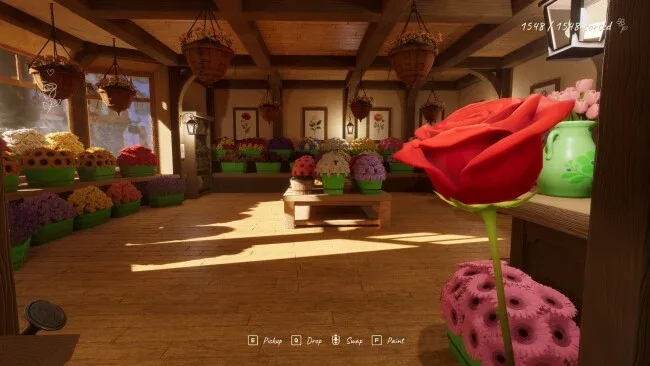
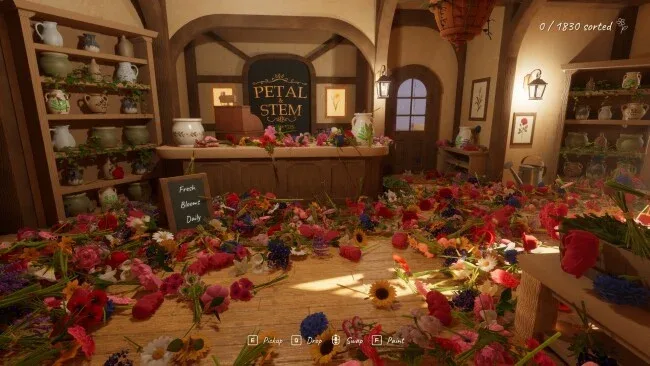
A flower shop lies in cheerful disarray after a well-meaning niece unloads an entire delivery onto the floor. Tidy Up the Flower Shop turns that small domestic catastrophe into a calm, tactile organizing game about restoring order one bouquet at a time. Its premise is deliberately simple: tomorrow’s opening depends on sorting every bloom into the correct display basket. The mood stays gentle and unhurried, making it a welcome change from puzzle games built around pressure, failure states, or endless optimization.
Players scoop up flowers until their arms are full, then cycle through the bundle to place each stem in the matching basket. Every container accepts a single flower type, while visual feedback makes it clear when a display has been completed, so the challenge comes from managing your carrying capacity and reading the room rather than deciphering obscure rules. Progress unfolds at your own pace, with no timers, scores, upgrades, or customers demanding faster service. You can leave midway through the cleanup and return later without losing the arrangement, and full controller support makes it easy to settle in from the sofa.
Customization gives the otherwise straightforward task a personal touch. Baskets can be painted in individual colors and patterns, whether you prefer neat stripes, alternating shades around the edges, or a more scattered handmade look. That means the final shop feels less like a solved puzzle board and more like a space you have decorated while putting it back together. Fans of relaxing sorting games such as A Little to the Left, Unpacking, or cozy cleaning simulators will find the appeal immediately, though Tidy Up the Flower Shop is even more focused and low-stakes. It suits newcomers, younger players, and anyone who wants a short, soothing organizational ritual rather than a demanding management game.
Screenshots
Installation
- Select the <strong>Download</strong> button at the top of this page to open UploadHaven.
- On UploadHaven, wait for any countdown, then select <strong>Free Download</strong>. Optional: UploadHaven Pro for faster downloads.
- When complete, extract the archive to a <strong>Tidy Up the Flower Shop</strong> folder using 7-Zip.
- Open the extracted folder and start the game normally.
- For errors, check <strong>Setup Guide & Troubleshooting</strong> below. Keep your security software enabled.
System Requirements
- OS: Windows 10 64-bit
- Processor: Intel Core i5-6600 / AMD Ryzen 5 1600
- Memory: 8 GB RAM
- Graphics: NVIDIA GeForce GTX 1060 6 GB / AMD Radeon RX 580 8 GB
- DirectX: Version 12
- Storage: 800 MB available space
Setup Guide & Troubleshooting
Is Tidy Up the Flower Shop (v1.09) safe to download?
Yes, files are tested and verified before publication.
What are the system requirements?
Compatible with Windows with required storage space.
Can I run this on Windows 11?
Yes, tested on 64-bit Windows 10 and Windows 11.