
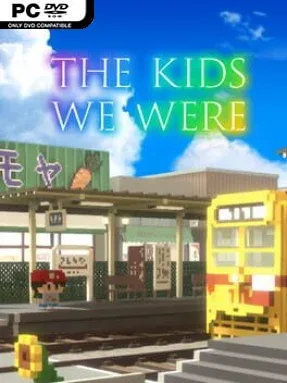
Game Overview
A summer in 1980s Japan becomes far more than a holiday for young Minato, whose ordinary hometown hides a mystery tied to his family’s future. The Kids We Were is a gentle, story-led adventure built around Showa-era nostalgia: narrow shopping streets, neighborhood hangouts, childhood rumors, and the small treasures that define a particular time and place. Its warm, colorful presentation initially feels like a relaxed coming-of-age tale, but the central plot gradually adds emotional stakes as Minato investigates a strange notebook and the town’s so-called Seven Mysteries. Rather than leaning on action, it uses curiosity, memory, and family bonds to create a heartfelt sense of momentum.
Players guide Minato around a compact Japanese town, talking to residents, examining points of interest, completing simple errands, and following clues that unlock the next piece of the story. The main loop revolves around exploration and collection, with more than 90 retro objects tucked into shops, alleys, and other easily missed corners; finding them helps sell the game’s period setting as much as it rewards thorough players. Puzzles are generally light and accessible, designed to keep the narrative moving rather than stall it with demanding logic tests. The Complete Edition also adds an epilogue chapter set after the main ending, plus extra collectibles and Steam achievements for players who want to see every part of Minato’s adventure.
What stands out is the specificity of its nostalgia. The game is not merely “an old Japan” backdrop; everyday objects, local routines, and the closely connected town give the setting a lived-in character similar to the slice-of-life charm found in Boku no Natsuyasumi, though with a more supernatural, plot-driven mystery. Its mobile origins show in the straightforward structure and modest challenge, but the PC release feels like the definitive version thanks to the added story content. Fans of emotional visual adventures, cozy exploration, and Japanese period settings should find plenty to enjoy, while action-focused players or anyone seeking difficult puzzles may want a more demanding adventure.
Installation
- Click the green button below to be redirected to UploadHaven.
- Wait 15 seconds, then hit “Free Download.” (Free downloads may be slower — upgrade to UploadHaven Pro for faster speeds.)
- Once downloaded, right-click the .zip file and choose “Extract to The Kids We Were.” (You’ll need 7-Zip for this.)
- Open the extracted folder and run the game as administrator.
- Enjoy! 🎮 If you see missing DLL errors, check the <strong>_Redist</strong> folder inside and install what’s needed.
System Requirements
- OS: Windows 10
- Processor: Intel Core i3
- Memory: 4 GB RAM
- Graphics: Intel(R)HD Graphics 520
- Storage: 2 GB available space
Setup Guide & Troubleshooting
How do I fix missing DLL errors for The Kids We Were (v1.0.4)?
After extracting The Kids We Were (v1.0.4), navigate to the _Redist or _CommonRedist folder inside the game directory and install DirectX, Vcredist, and any other dependencies included.
What should I do if the downloaded file is corrupted?
The full archive is 577.39 MB — make sure your download completed fully before extracting. Use 7-Zip to extract the files. If you still see a "file corrupted" error, re-download and try again.
Why should I run the game as administrator?
Right-click the game executable and select "Run as Administrator" to avoid save file issues and permission errors. This is especially important on the first launch.
How do I update my GPU drivers for this game?
The Kids We Were (v1.0.4) requires a Intel(R)HD Graphics 520 or equivalent. Update your NVIDIA or AMD drivers to the latest version for the best performance.
The game won't launch — what should I try?
Try running in compatibility mode, install the latest DirectX runtime, or install the All-in-One VC Redist Package.
My antivirus is blocking the game — is it safe?
Antivirus false positives are common with pre-installed games. Temporarily pause your antivirus during extraction to prevent it from quarantining game files. You can re-enable it after the extraction completes.