

Game Overview
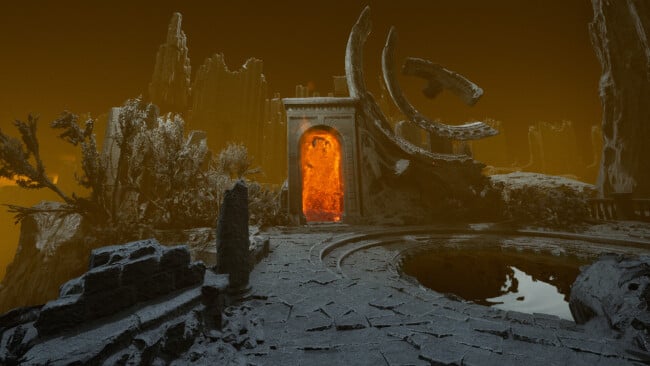
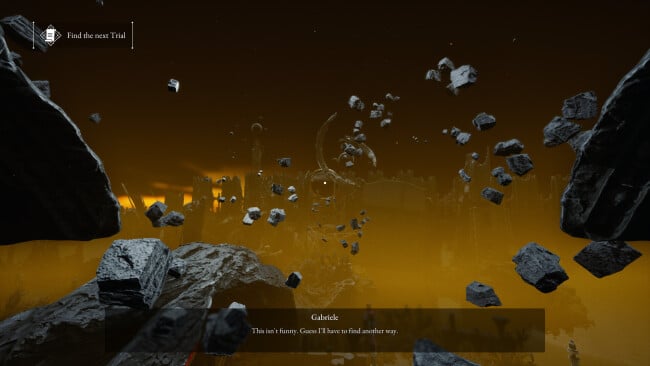
A decaying Italian manor becomes the threshold between inherited guilt and something far more literal in this first-person psychological thriller. You play Gabriele Alighieri, an ordinary man forced back to his family estate when a ritual performed once every 33 years must keep Hell from bleeding into reality. Rather than treating Dante’s legacy as a backdrop for monster hunting, the story frames Inferno as a personal, shifting reflection of trauma, memory, and family obligation. The result is slow-burning, somber horror built around dread instead of action.
Gabriele searches the villa’s abandoned rooms, studies documents and diary fragments, and follows clues connected to his family’s troubled history. Progress depends on locating scattered pages tied to the Divine Comedy, interpreting occult puzzles, and restoring the means to complete the protective ritual. There is no combat system to soften encounters; vulnerability is central to the experience, so threats and unexplained changes in the environment carry more weight. Exploration moves between the grounded melancholy of the estate and “the Dive,” a warped infernal counterpart where familiar spaces take on a more hostile, surreal character.
Its strongest idea is the dual-reality structure, which lets the game turn a single location into both a haunted home and an unstable psychological labyrinth. The Divine Comedy influence gives the puzzles and imagery a more literary flavor than standard haunted-house horror, while collectible notes gradually assemble a family tragedy rather than merely delivering lore dumps. Expect a narrative-led pace closer to Layers of Fear, Amnesia, or other walking-simulator horror than Resident Evil; patience and attention matter more than reflexes. Fans of atmospheric, combat-free scares and stories about inherited sins should find plenty to appreciate, while players seeking frequent chases, weapons, or open-ended systems may find its deliberate approach too restrained.
Screenshots
Installation
- Click the green button below to be redirected to UploadHaven.
- Wait 15 seconds, then hit “Free Download.” (Free downloads may be slower — upgrade to UploadHaven Pro for faster speeds.)
- Once downloaded, right-click the .zip file and choose “Extract to The Alighieri Circle: Dante's Bloodline.” (You’ll need 7-Zip for this.)
- Open the extracted folder and run the game as administrator.
- Enjoy! 🎮 If you see missing DLL errors, check the <strong>_Redist</strong> folder inside and install what’s needed.
System Requirements
- Requires a 64-bit processor and operating system
- OS: Windows 10/11 64 bits
- Processor: Intel Core i5 4690 | AMD Ryzen 3 1200
- Memory: 8 GB RAM
- Graphics: NVIDIA GeForce GTX 1060 6GB | AMD Radeon RX 580
- DirectX: Version 12
- Storage: 25 GB available space
Setup Guide & Troubleshooting
How do I fix missing DLL errors for The Alighieri Circle: Dante’s Bloodline?
After extracting The Alighieri Circle: Dante’s Bloodline, navigate to the _Redist or _CommonRedist folder inside the game directory and install DirectX, Vcredist, and any other dependencies included.
What should I do if the downloaded file is corrupted?
The full archive is 11.33 GB — make sure your download completed fully before extracting. Use 7-Zip to extract the files. If you still see a "file corrupted" error, re-download and try again.
Why should I run the game as administrator?
Right-click the game executable and select "Run as Administrator" to avoid save file issues and permission errors. This is especially important on the first launch.
How do I update my GPU drivers for this game?
The Alighieri Circle: Dante’s Bloodline requires a NVIDIA GeForce GTX 1060 6GB | AMD Radeon RX 580 or equivalent. Update your NVIDIA or AMD drivers to the latest version for the best performance.
The game won't launch — what should I try?
This game requires Version 12. Try running in compatibility mode, install the latest DirectX runtime, or install the All-in-One VC Redist Package.
My antivirus is blocking the game — is it safe?
Antivirus false positives are common with pre-installed games. Temporarily pause your antivirus during extraction to prevent it from quarantining game files. You can re-enable it after the extraction completes.