
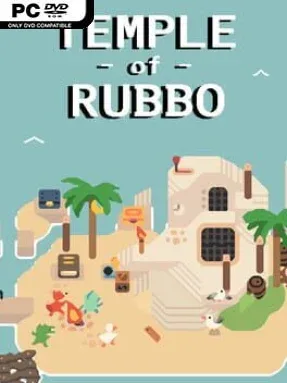
Game Overview
Shipwrecked pirates, transformed into animals by a cruel curse, descend beneath an ominous temple in search of the wizard who can restore them. Temple Of Rubbo is a brisk, arcade-flavoured dungeon crawler that favors constant movement, crowded rooms, and the unpredictable chaos of a party run. Its fantasy world feels playful rather than grim, even when rats, goblins, armored foes, and demons are pouring in from every direction. The central appeal is simple: push deeper through a dangerous ruin, survive its escalating threats, and bring the whole crew back to human form.
Runs send one to four players through a changing sequence of dungeon floors spread across five distinct regions. You pick from ten characters and scavenge weapons, magic, equipment, and useful oddities, swapping between close-range swords and spears, safer bow attacks, and spell-based options to suit the situation. More than 120 possible items give each expedition a different texture, while shops offer opportunities to spend resources and shape a build instead of relying only on lucky drops. Four major bosses and several smaller elite encounters break up the floor-clearing loop, demanding better positioning and teamwork than ordinary enemy packs.
Procedural layouts make repeat attempts feel less scripted, which matters in a compact adventure designed to be finished in a few hours rather than endlessly grinded. Temple Of Rubbo stands out most as a social dungeon romp: the small character roster, broad item pool, and fast co-op pacing create the sort of memorable mistakes and last-second rescues that work best with friends. Solo players can still tackle the temple, but a full group gives its combat and shop decisions more energy. Anyone who enjoys the pick-up-and-play unpredictability of roguelite crawlers, without committing to the complexity of a massive action RPG, should find an approachable and lively challenge here.
Installation
- Click the green button below to be redirected to UploadHaven.
- Wait 15 seconds, then hit “Free Download.” (Free downloads may be slower — upgrade to UploadHaven Pro for faster speeds.)
- Once downloaded, right-click the .zip file and choose “Extract to Temple Of Rubbo.” (You’ll need 7-Zip for this.)
- Open the extracted folder and run the game as administrator.
- Enjoy! 🎮 If you see missing DLL errors, check the <strong>_Redist</strong> folder inside and install what’s needed.
System Requirements
- OS: Windows 7
- Processor: Dual Core 2 GHz
- Memory: 4 GB RAM
- Graphics: DirectX 9 compatible with at least 500MB of memory
- DirectX: Version 9.0
- Storage: 100 MB available space
- Sound Card: DirectX 9 compatible sound card or integrated sound chip
Setup Guide & Troubleshooting
How do I fix missing DLL errors for Temple Of Rubbo?
After extracting Temple Of Rubbo, navigate to the _Redist or _CommonRedist folder inside the game directory and install DirectX, Vcredist, and any other dependencies included.
What should I do if the downloaded file is corrupted?
The full archive is 103.04 MB — make sure your download completed fully before extracting. Use 7-Zip to extract the files. If you still see a "file corrupted" error, re-download and try again.
Why should I run the game as administrator?
Right-click the game executable and select "Run as Administrator" to avoid save file issues and permission errors. This is especially important on the first launch.
How do I update my GPU drivers for this game?
Temple Of Rubbo requires a DirectX 9 compatible with at least 500MB of memory or equivalent. Update your NVIDIA or AMD drivers to the latest version for the best performance.
The game won't launch — what should I try?
This game requires Version 9.0. Try running in compatibility mode, install the latest DirectX runtime, or install the All-in-One VC Redist Package.
My antivirus is blocking the game — is it safe?
Antivirus false positives are common with pre-installed games. Temporarily pause your antivirus during extraction to prevent it from quarantining game files. You can re-enable it after the extraction completes.