
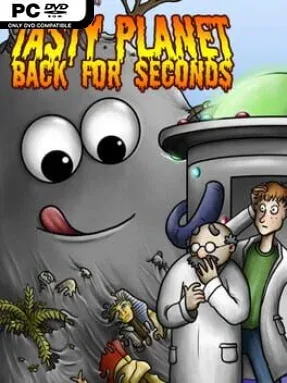
Game Overview
A runaway blob of grey goo turns a simple appetite into a time-traveling arcade rampage. After swallowing a time machine, it bounces between the present day, dinosaur country, Ancient Egypt, Rome, feudal Japan, and a far-off sci-fi future, consuming everything in sight. The tone is cheerfully absurd rather than threatening: one minute you are nibbling dust and insects, and before long you are devouring tanks, pyramids, planets, and eventually entire galaxies. Tasty Planet: Back for Seconds thrives on that satisfying escalation, making every level feel like a compact power fantasy.
Players guide the goo around top-down stages, eating any object smaller than its current size while avoiding anything large enough to kill it. Every meal increases the blob’s mass, opening up new targets and creating a constant route-planning loop: clear the tiny clutter first, grow safely, then return for animals, people, vehicles, or prehistoric predators that once blocked your path. Stages often set time goals, so success depends on keeping momentum rather than cautiously wandering around the map. The full campaign supports local two-player co-op, with a second goo blob helping clear levels faster, while extra unlockable challenges offer tougher scenarios after the main set is complete.
Its appeal comes from how clearly it communicates growth. Scale changes dramatically within a single session, shifting the perspective from microscopic debris to a world where dinosaurs are snacks and celestial bodies are bite-sized. Each historical setting supplies its own visual jokes and edible objects, giving the straightforward formula enough variety to stay playful across the campaign. Fans of Katamari Damacy’s escalating scale or the original Tasty Planet’s relaxed consumption loop should feel immediately at home, though the tighter time demands give experienced players something to optimize. It suits newcomers, younger players, and anyone looking for an uncomplicated, lighthearted co-op game built around the primal joy of getting bigger.
Installation
- Click the green button below to be redirected to UploadHaven.
- Wait 15 seconds, then hit “Free Download.” (Free downloads may be slower — upgrade to UploadHaven Pro for faster speeds.)
- Once downloaded, right-click the .zip file and choose “Extract to Tasty Planet: Back for Seconds.” (You’ll need 7-Zip for this.)
- Open the extracted folder and run the game as administrator.
- Enjoy! 🎮 If you see missing DLL errors, check the <strong>_Redist</strong> folder inside and install what’s needed.
System Requirements
- OS: Windows XP
- Processor: 1.4 GHz
- Memory: 512 MB RAM
- DirectX: Version 7.0
- Storage: 30 MB available space
Setup Guide & Troubleshooting
How do I fix missing DLL errors for Tasty Planet: Back for Seconds (v1.6.2.0)?
After extracting Tasty Planet: Back for Seconds (v1.6.2.0), navigate to the _Redist or _CommonRedist folder inside the game directory and install DirectX, Vcredist, and any other dependencies included.
What should I do if the downloaded file is corrupted?
The full archive is 65.34 MB — make sure your download completed fully before extracting. Use 7-Zip to extract the files. If you still see a "file corrupted" error, re-download and try again.
Why should I run the game as administrator?
Right-click the game executable and select "Run as Administrator" to avoid save file issues and permission errors. This is especially important on the first launch.
How do I update my GPU drivers for this game?
Update your NVIDIA or AMD drivers to the latest version for the best performance and compatibility.
The game won't launch — what should I try?
This game requires Version 7.0. Try running in compatibility mode, install the latest DirectX runtime, or install the All-in-One VC Redist Package.
My antivirus is blocking the game — is it safe?
Antivirus false positives are common with pre-installed games. Temporarily pause your antivirus during extraction to prevent it from quarantining game files. You can re-enable it after the extraction completes.