
Game Overview
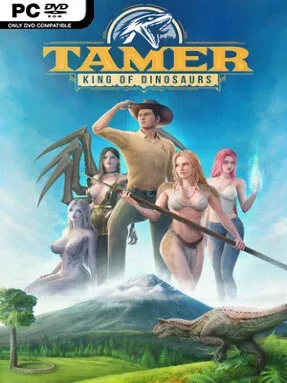
A hostile alien planet turns prehistoric survival into an unusually personal adventure, mixing dinosaur hunting, base-building, and adult relationship drama. Tamer: King of Dinosaurs follows Victor Shelby, a Los Angeles animal control officer snatched from Earth and abandoned among predators far beyond anything in his old job description. The tone is pulpy and deliberately over-the-top, with dangerous wilderness expeditions sharing space with a four-character harem storyline. Its 28-day structure gives the campaign a sense of forward momentum as Victor tries to turn a temporary camp into a functioning tribe.
Daily survival revolves around accepting quests, collecting materials, crafting equipment, and pushing into increasingly threatening areas. Combat favors close-range weapons such as spears, clubs, and axes, while an adrenaline meter supports stronger strikes and especially violent finishing moves when fights turn desperate. Dinosaurs are not only enemies: taming mounts makes crossing the open landscape safer and faster, while fort construction provides another long-term goal beyond simply staying alive. Relationships also feed into progression, since each companion offers practical help: Sheela contributes to combat and weapon work, Galmine supports gardening and recipes, Trel-Idil-Iria assists with construction, and Kacerie improves the group’s morale and presentation.
What separates it from a standard survival sandbox is how closely its dating-sim framework is tied to the camp’s development. Respect-based character quests unlock story scenes and mature encounters, presented with performance-captured cinematics and adjustable camera, pacing, and lighting options. The premise has the rough-edged appeal of Ark: Survival Evolved crossed with a choice-driven adult visual novel, although its focus remains on a directed character campaign rather than competitive multiplayer survival. Players looking for deep simulation systems or ranged combat may find its scope narrower than genre giants, but anyone who enjoys dinosaurs, crafting loops, and unapologetically adult sci-fi romance gets a distinctive blend that few games attempt.
Installation
- Click the green button below to be redirected to UploadHaven.
- Wait 15 seconds, then hit “Free Download.” (Free downloads may be slower — upgrade to UploadHaven Pro for faster speeds.)
- Once downloaded, right-click the .zip file and choose “Extract to Tamer: King of Dinosaurs (Uncensored).” (You’ll need 7-Zip for this.)
- Open the extracted folder and run the game as administrator.
- Enjoy! 🎮 If you see missing DLL errors, check the <strong>_Redist</strong> folder inside and install what’s needed.
System Requirements
- OS: Windows10, Windows11 (64bit)
- Processor: AMD FX-6300, Intel Core i3-2100
- Memory: 8 GB RAM
- Graphics: Nvidia GTX 1050ti, Radeon RX 560X
- DirectX: Version 11
- Storage: 40 GB available space
Setup Guide & Troubleshooting
How do I fix missing DLL errors for Tamer: King of Dinosaurs (Uncensored)?
After extracting Tamer: King of Dinosaurs (Uncensored), navigate to the _Redist or _CommonRedist folder inside the game directory and install DirectX, Vcredist, and any other dependencies included.
What should I do if the downloaded file is corrupted?
The full archive is 17.69 GB — make sure your download completed fully before extracting. Use 7-Zip to extract the files. If you still see a "file corrupted" error, re-download and try again.
Why should I run the game as administrator?
Right-click the game executable and select "Run as Administrator" to avoid save file issues and permission errors. This is especially important on the first launch.
How do I update my GPU drivers for this game?
Tamer: King of Dinosaurs (Uncensored) requires a Nvidia GTX 1050ti, Radeon RX 560X or equivalent. Update your NVIDIA or AMD drivers to the latest version for the best performance.
The game won't launch — what should I try?
This game requires Version 11. Try running in compatibility mode, install the latest DirectX runtime, or install the All-in-One VC Redist Package.
My antivirus is blocking the game — is it safe?
Antivirus false positives are common with pre-installed games. Temporarily pause your antivirus during extraction to prevent it from quarantining game files. You can re-enable it after the extraction completes.