
Game Overview
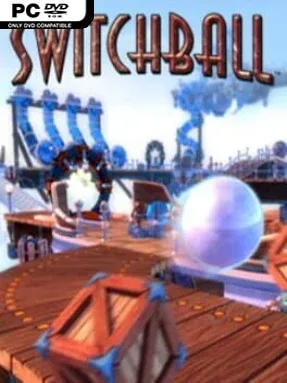
A rolling marble becomes the star of a surprisingly tense physics platformer, where every narrow bridge, swinging obstacle, and sudden drop can ruin an otherwise perfect run. Switchball HD sends players across suspended courses in sky, ice, cave, cloud, and lava environments, each built as a colorful obstacle course rather than a traditional platforming world. The mood stays bright and approachable, but the constant risk of sliding off the edge gives even simple maneuvers real pressure. Its clean 3D presentation and wide views make the courses easy to read while emphasizing just how far the fall is.
Players steer a ball through 30 compact, puzzle-heavy stages, balancing careful movement with the clock always running. Different ball forms change how problems are solved: the standard marble handles ordinary terrain, the heavy steel form shoves weighty objects and breaks through certain surfaces, while the Power Ball can use abilities such as a burst of speed, jumping, or magnetism. Fans, cannons, movable crates, fabric paths, magnets, switches, and rotating hazards interact through physical rules, so success often comes from understanding momentum and material behavior rather than merely reacting quickly. Finishing stages quickly earns bronze, silver, or gold medals, giving completed levels a strong reason to revisit and master.
What makes Switchball HD memorable is its mix of Monkey Ball-style balance challenges and tactile environmental puzzles. A route that looks straightforward can demand a different ball type, a carefully placed crate, or the confidence to build speed before a jump, and mistakes are usually immediate rather than punishingly drawn out. The HD version’s sharper visuals help its toy-like worlds retain their charm, though the experience is deliberately focused and old-school rather than packed with story or open-ended progression. It suits newcomers who want readable, bite-sized puzzles, while speedrun-minded veterans can chase better medals and cleaner lines through every course.
Installation
- Click the green button below to be redirected to UploadHaven.
- Wait 15 seconds, then hit “Free Download.” (Free downloads may be slower — upgrade to UploadHaven Pro for faster speeds.)
- Once downloaded, right-click the .zip file and choose “Extract to Switchball HD - Puzzle Platformer.” (You’ll need 7-Zip for this.)
- Open the extracted folder and run the game as administrator.
- Enjoy! 🎮 If you see missing DLL errors, check the <strong>_Redist</strong> folder inside and install what’s needed.
System Requirements
- Requires a 64-bit processor and operating system
- OS: Windows® 10 64-bit
- Processor: Intel® Core™ i3 3250 3.5 GHz or Intel Pentium G4560 3.5 GHz / AMD FX-4350 4.2 GHz
- Memory: 4 GB RAM
- Graphics: NVIDIA® GeForce® GTX 660 2GB or GTX 1050 2GB / AMD Radeon HD 7850 2GB
- DirectX: Version 9.0c
- Storage: 3 GB available space
Setup Guide & Troubleshooting
How do I fix missing DLL errors for Switchball HD – Puzzle Platformer?
After extracting Switchball HD – Puzzle Platformer, navigate to the _Redist or _CommonRedist folder inside the game directory and install DirectX, Vcredist, and any other dependencies included.
What should I do if the downloaded file is corrupted?
The full archive is 1.21 GB — make sure your download completed fully before extracting. Use 7-Zip to extract the files. If you still see a "file corrupted" error, re-download and try again.
Why should I run the game as administrator?
Right-click the game executable and select "Run as Administrator" to avoid save file issues and permission errors. This is especially important on the first launch.
How do I update my GPU drivers for this game?
Switchball HD – Puzzle Platformer requires a NVIDIA® GeForce® GTX 660 2GB or GTX 1050 2GB / AMD Radeon HD 7850 2GB or equivalent. Update your NVIDIA or AMD drivers to the latest version for the best performance.
The game won't launch — what should I try?
This game requires Version 9.0c. Try running in compatibility mode, install the latest DirectX runtime, or install the All-in-One VC Redist Package.
My antivirus is blocking the game — is it safe?
Antivirus false positives are common with pre-installed games. Temporarily pause your antivirus during extraction to prevent it from quarantining game files. You can re-enable it after the extraction completes.