
Game Overview
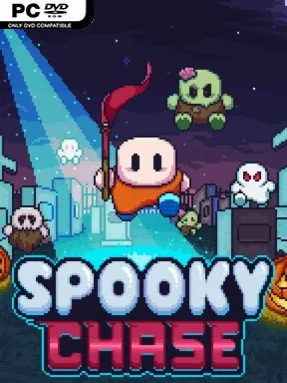
A Halloween capture-the-flag contest turns unnerving when every route you take becomes a future threat. Spooky Chase is a demanding 2D indie platformer built around a wonderfully cruel idea: the monsters pursuing you replay your own previous movements. You begin as a treat-motivated child collecting flags, but the cheerful costume-and-candy premise quickly gives way to tense, precision-focused escapes. Its spooky tone stays playful rather than horrific, with each level feeling like a race against the mistakes you have already made.
Reaching a flag records your path, then adds an enemy that follows that exact recorded route, forcing you to rethink familiar platforms, jumps, and corridors. More flags mean more spectral copies on the map, so success depends on planning efficient lines, reacting under pressure, and knowing when to abandon a safe-looking route before it becomes blocked by your past self. Campaign stages introduce the central gimmick through increasingly tricky layouts and demand patience when a single bad movement can ruin a run. Candy collectibles unlock costumes, while Endless Mode lets you revisit favorite stages and chase higher flag totals against an ever-growing crowd of copied enemies. Local multiplayer supports up to four players, turning the careful solo puzzle-platforming into a chaotic contest of survival and flag grabbing.
Its strongest feature is how directly it turns platforming muscle memory against the player. Rather than merely adding faster monsters or tighter timers, Spooky Chase makes your own decisions the level’s evolving hazard, giving each attempt a puzzle-like quality similar to Super Meat Boy’s precision challenges mixed with an arcade score attack. The colorful Halloween presentation and unlockable outfits keep failure from feeling overly grim, even when the chase becomes overwhelming. Players who enjoy difficult platformers, repeatable score runs, and couch multiplayer should find plenty to like, while newcomers should expect a steep but understandable learning curve.
Installation
- Click the green button below to be redirected to UploadHaven.
- Wait 15 seconds, then hit “Free Download.” (Free downloads may be slower — upgrade to UploadHaven Pro for faster speeds.)
- Once downloaded, right-click the .zip file and choose “Extract to Spooky Chase.” (You’ll need 7-Zip for this.)
- Open the extracted folder and run the game as administrator.
- Enjoy! 🎮 If you see missing DLL errors, check the <strong>_Redist</strong> folder inside and install what’s needed.
System Requirements
- OS: Windows 7 or newer
- Processor: Intel Core i3 8100
- Memory: 4 GB RAM
- Graphics: Intel HD 4000
- DirectX: Version 10
- Storage: 100 MB available space
Setup Guide & Troubleshooting
How do I fix missing DLL errors for Spooky Chase?
After extracting Spooky Chase, navigate to the _Redist or _CommonRedist folder inside the game directory and install DirectX, Vcredist, and any other dependencies included.
What should I do if the downloaded file is corrupted?
The full archive is 171.31 MB — make sure your download completed fully before extracting. Use 7-Zip to extract the files. If you still see a "file corrupted" error, re-download and try again.
Why should I run the game as administrator?
Right-click the game executable and select "Run as Administrator" to avoid save file issues and permission errors. This is especially important on the first launch.
How do I update my GPU drivers for this game?
Spooky Chase requires a Intel HD 4000 or equivalent. Update your NVIDIA or AMD drivers to the latest version for the best performance.
The game won't launch — what should I try?
This game requires Version 10. Try running in compatibility mode, install the latest DirectX runtime, or install the All-in-One VC Redist Package.
My antivirus is blocking the game — is it safe?
Antivirus false positives are common with pre-installed games. Temporarily pause your antivirus during extraction to prevent it from quarantining game files. You can re-enable it after the extraction completes.