
Game Overview
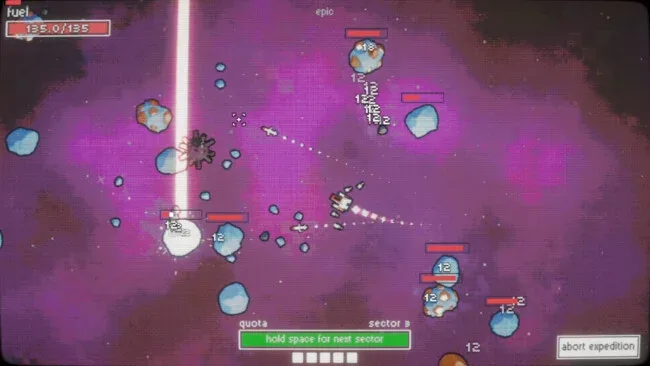
Asteroid mining becomes a fast, satisfying loop of destruction and profit in this compact indie incremental game. Piloting a ship through a colorful stretch of space, you blast apart drifting rocks to uncover ore, then turn that haul into the cash needed to keep pushing outward. The tone is breezy rather than simulation-heavy: it is about watching numbers rise, weapons improve, and previously stubborn asteroids become easy targets. Space Rock Breaker works best as a focused progression game with enough arcade action to keep its idle-style economy from feeling passive.
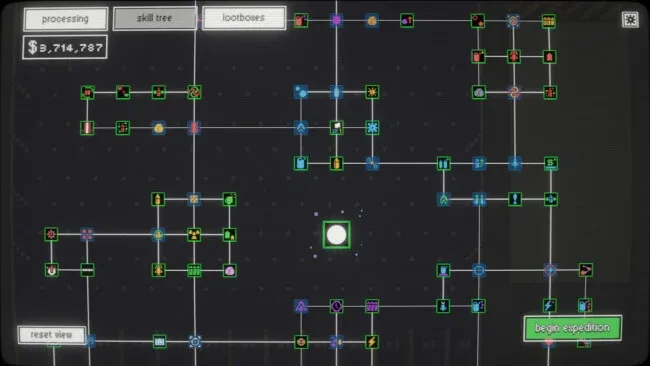
Most of your time goes into choosing the right way to break down asteroids, whether that means steady gunfire, heavier missiles, or precise lasers. Mined material feeds into a Plinko-style processing machine, where the path of each drop helps determine the payout and upgrades improve the results over time. Earnings strengthen both the ship and its offensive tools, increasing mining speed and opening the way to more distant sectors packed with higher-value resources. Lootboxes add another layer of chance, supplying bonuses and enhancements that can alter the pace of a run or provide a useful boost when progress begins to slow.
Its strongest idea is the combination of asteroid shooting and a physical-looking Plinko conversion system, which gives the usual extract-and-upgrade formula a more playful payoff than a standard menu-driven clicker. Advancement remains easy to understand—destroy rocks, process ore, buy improvements, reach better rocks—but changing weapon types and rare finds keep that structure from becoming entirely automatic. The concise format suits players who want a low-pressure numbers-go-up game between larger releases, especially fans of incremental titles with a little active input. Anyone looking for deep space combat, complex trading, or a demanding simulation may find it lightweight, but players who enjoy the upgrade loops of casual mining and idle games should find plenty to chase.
Screenshots
Installation
- Select the <strong>Download</strong> button at the top of this page to open UploadHaven.
- On UploadHaven, wait for any countdown, then select <strong>Free Download</strong>. Optional: UploadHaven Pro for faster downloads.
- When complete, extract the archive to a <strong>Space Rock Breaker</strong> folder using 7-Zip.
- Open the extracted folder and start the game normally.
- For errors, check <strong>Setup Guide & Troubleshooting</strong> below. Keep your security software enabled.
System Requirements
- OS: Windows 10+
- Processor: 2.5 GHz Quad-core Intel or AMD processor
- Memory: 4 GB RAM
- Graphics: NVIDIA GeForce GTX 1050 | AMD Radeon RX-580
Setup Guide & Troubleshooting
How do I fix missing DLL errors for Space Rock Breaker (v2026.01.03)?
After extracting Space Rock Breaker (v2026.01.03), navigate to the _Redist or _CommonRedist folder inside the game directory and install DirectX, Vcredist, and any other dependencies included.
What should I do if the downloaded file is corrupted?
The full archive is 174.71 MB — make sure your download completed fully before extracting. Use 7-Zip to extract the files. If you still see a "file corrupted" error, re-download and try again.
Why should I run the game as administrator?
Right-click the game executable and select "Run as Administrator" to avoid save file issues and permission errors. This is especially important on the first launch.
How do I update my GPU drivers for this game?
Space Rock Breaker (v2026.01.03) requires a NVIDIA GeForce GTX 1050 | AMD Radeon RX-580 or equivalent. Update your NVIDIA or AMD drivers to the latest version for the best performance.
The game won't launch — what should I try?
Try running in compatibility mode, install the latest DirectX runtime, or install the All-in-One VC Redist Package.
My antivirus is blocking the game — is it safe?
Antivirus false positives are common with pre-installed games. Temporarily pause your antivirus during extraction to prevent it from quarantining game files. You can re-enable it after the extraction completes.